
When you want to change the default look of your slide background, you can explore the various slide background styles available in PowerPoint. Other than these styles, you can certainly explore specific options that we have already covered: solid, gradient, or picture fills for slide backgrounds. In addition, you can also choose a texture fill for your slide background. Texture and picture fills for slide backgrounds have so much in common; the same picture can be used for both a texture or a picture fill — the main difference is that while a picture background results in your slide using a single picture as a backdrop, using a texture background can result in the same picture being tiled across the slide background — imagine a wallpaper on your room’s wall with repeating motifs. Also some pictures lend themselves better to being used as textures, especially if they are seamless.
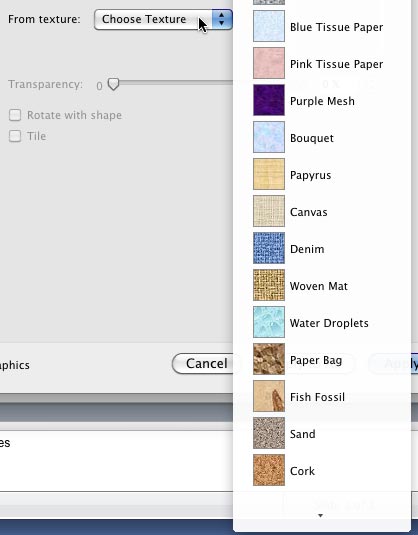
Learn how to apply texture fills as a slide background in PowerPoint 2011 for Mac.
Related Posts
 The Remove Background option is among PowerPoint's newest and most wonderful abilities. It lets you remove the background from an inserted picture -- ...
 We already showed you how to remove the background from an inserted picture in PowerPoint 2011 for Mac -- this process works great for simple pictures...
 It's true that picture backgrounds add value to your presentations. Yet, one of the worst things that you can do to your PowerPoint presentation is to...
 Pattern fills are the last of the various fill options for slide backgrounds we have explored to use in PowerPoint 2011 for Mac. Patterns in PowerPoin...