
This is the print version of this page. All content is copyright Indezine.com 2000-2026.
Thoughts and impressions of happenings in the world of PowerPoint and presentations, continuously updated since 2003.
See Also:
PowerPoint and Presenting Notes
PowerPoint and Presenting Glossary
Many PowerPoint users create and send their cards as PowerPoint presentations, mainly as email attachments. These work great, but do have some disadvantages:
Now, authorSTREAM has added a new feature that lets you resolve both problems. Their new option to create and send custom eGreetings is easy to use.

Filed Under:
Companion Programs
Tagged as: authorSTREAM, Online Presentations, PowerPoint
Color blindness is some sort of color vision deficiency which results in differences in the way that an affected person sees and distinguishes various colors. It is mostly inherited, but can also be caused due to damage to the eye, nerve, or brain. There is no proven way to change these vision deficiencies. When a color-blind user looks at a PowerPoint slide, he or she might view it differently from other people. Even different color-blind users may not see the same slide with the same vision. There are three known varieties of color-blind visions.
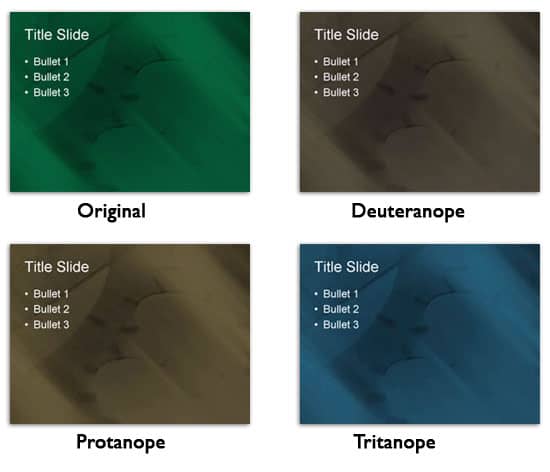
Test your PowerPoint slides for color-blind users, to see how they appear to them.
You May Also Like: The Incredible, Accessible Presentation | Craft Your Content with a KISS | Bitmaps and Vector Graphics
Filed Under:
PowerPoint All Versions
Tagged as: Accessibility, Color, Design, PowerPoint
Comments Off on PowerPoint Slides for Color-Blind Audiences
We have already explained the basics of outlines in PowerPoint 2007 and changing weight and dash types. In this tutorial, we’ll learn about adding arrowheads to lines. First things first: arrowheads can only be added to lines within open shapes. Shapes, such as rectangles, circles, etc. are closed shapes. Regular line Shapes, such as straight lines, curves, scribbles, etc., are open shapes.

Learn how to format arrowheads for line shapes in PowerPoint 2007 for Windows.
Filed Under:
PowerPoint 2007
Tagged as: Color, Lines, PowerPoint 2007, Shapes, Tutorials
Comments Off on Formatting Arrowheads for Line Shapes in PowerPoint 2007 for Windows
We have already showed you the different outline attributes in PowerPoint 2007. In this tutorial, the outline options series will conclude with this article on gradient lines. Gradient lines are a new feature in PowerPoint 2007.

Apply gradients to lines in PowerPoint 2007 for Windows.
Filed Under:
PowerPoint 2007
Tagged as: Color, Lines, PowerPoint 2007, Shapes, Tutorials
Comments Off on Gradient Lines for Shapes in PowerPoint 2007 for Windows

Lisa Lindgren has brought solid presentation advice to hundreds of thousands of people during her professional career. For nearly a decade, she published the critically acclaimed Presenters University website and its monthly Presentation Pointers newsletter. Now, a member of the Steering Committee for InfoComm’s Presentations Council, she continues to work to enrich the industry and advocates for improved presentation techniques and standards.
Geetesh: Tell us about Second Life, and how it can be a platform to deliver and share PowerPoint presentations.
Lisa: Second Life is a 3-D virtual world where you navigate “inworld” using your own, personalized avatar. It claims to have millions of participants, and many companies and universities have built presences there with the hopes of capitalizing on it. The reviews are mixed, although I did hear a presentation given by Sarah Robbins from Ball State University about her experience in running her class lab in Second Life. She said that one of the challenges was that her students got so engrossed that they forgot to go to their next class! This is precisely why I think that there may be some potential for giving presentations there when you can’t physically be in front of your audience. Unlike a webinar or a podcast, it’s a very rich and consuming experience, one that your audience is not likely to listen to half-heartedly while they check their e-mail.
I should make it clear that I am not an expert on Second Life, but I have had the opportunity to visit the Virtualis Convention and Learning Center located in Second Life. There may be other presentation-oriented locations (called islands) there, but this was the one that I got to visit, or more precisely, that my avatar visited.
Geetesh: Tell us about your experiences. And what sort of potential do you foresee for something of this sort?
Lisa: I watched a basic presentation, without any animation or fancy bells and whistles. But that didn’t really matter, at least to me. I was so engrossed in the total experience that perhaps it was best that the visual slides were simple.
Because it is a virtual world, the possibilities are literally endless. There were a variety of pre-set rooms and seating arrangements, such as a large theater-style room and small classrooms. The classrooms were equipped with individual workstations, where streaming video could be displayed. There were even break areas where your avatar could enjoy a coffee break, and a ballroom complete with a dance floor and disco lights.
Just like a Webinar or Webcast, your audience logs on from wherever they happen to be. Then they direct their avatars to the pre-determined location and have them gather to watch the event. They can sit in chairs, or since the avatars don’t get tired, that really isn’t necessary. They could position themselves wherever it was easiest to see. You could even have them fly and hover around the presentation screen. Although in his Tips for Second Life Presentations, Gary Barber suggests you seat the avatars “very close together in almost a tiered traditional speaking pit of amphitheater arrangement…” He offers some other common-sense suggestions for the would-be Second Life presenter.
One of the strengths of using Second Life is that the audience members are likely to pay more attention since they are actively participating in controlling their avatars. Of course, if it is a boring and truly awful presentation, they are still likely to tune out, just like they do during Webinars or in person. So, the responsibility is still on the presenter to provide engaging content.
Second Life has some advantages over traditional in-person presentations too. Instead of simply showing photos of a new product in a sales presentation, one that you couldn’t easily bring to a physical venue, you can literally create a working model of it in-world. And the physical limitations disappear. Need to teach your technicians how to repair your latest copier, for example? Build one 50 times to scale and take their avatars “inside” to see the mechanisms. It’s really pretty amazing when you think of it in these terms.
Geetesh: What does one need to get started with using PowerPoint as a content source within Second Life?
Lisa: The obvious requirement is that you need a presentation forum in Second Life. Similar to presenting on the Web, you can either build/buy your own or use a service. Virtualis is one option for using a service, and there may be others. Building your own may not be as daunting as it sounds. Many large companies of course, already have islands in Second Life, but Andrew Burton in Giving a PowerPoint Presentation in Second Life, and the ensuing commentary below his article make it sound like it would be a pretty doable endeavor, assuming that you were already competent in building simple structures in Second Life and didn’t need a lot of fancy extras for your audience.
After you have a place to present your slides, you then need to import them. They must be imported one slide at a time as GIF, JPEG, or PNG files. So, no animation or transitions, but because it is such a visually rich environment, you want to keep them simple so that they don’t compete with the experience. Finally, you have to pay in Linden dollars to import your images. You purchase Linden dollars with real money, so there is a real expense in this virtual world.
The final “cost” of presenting in Second Life is that you and your audience need to create avatars and learn how to operate in-world. It’s really not very difficult, but I’ll admit I was a bit intimidated at first. My friend and presentation consultant, Ellen Finkelstein, offered to accompany me at first, and it was reassuring to have her there with a helpful tip or two as I learned the basics. But Second Life really does make it pretty easy. There are standard avatars from which you select, which can be customized later. And you start your in-world experience on a beginner’s island, where everyone is learning. There are tutorials to walk you through what you really need to know and host, and hostess avatars are available to answer your questions. Only newbies are around you at first, so you are less likely to be embarrassed.
Is Second Life for everyone? Certainly not. You need an open mind and a business culture that will support it. If management or your client base perceives it as just a game, they are not going to be receptive. But for the right companies and markets, I think it’s a powerful option.
The views and opinions expressed in this blog post or content are those of the authors or the interviewees and do not necessarily reflect the official policy or position of any other agency, organization, employer, or company.
Filed Under:
Interviews
Tagged as: Case Studies, Interviews, PowerPoint, Second Life
Microsoft and the Office logo are trademarks or registered trademarks of Microsoft Corporation in the United States and/or other countries.