
This is the print version of this page. All content is copyright Indezine.com 2000-2026.
Thoughts and impressions of happenings in the world of PowerPoint and presentations, continuously updated since 2003.
See Also:
PowerPoint and Presenting Notes
PowerPoint and Presenting Glossary

Mark Schwartz is the executive vice president for sales and marketing at Articulate. In this role, he has worldwide sales responsibility for Articulate, leading the direct sales and channel management teams as well as all product marketing activities. Prior to joining Articulate, Mark spent 20 years in sales and sales management roles with IBM and Dell.
In this discussion, Mark discusses the new Articulate Engage ’09 product.
Geetesh: Tell us more about the improvements to Engage ’09–and what is your favorite new feature?
Mark: Engage ’09 has introduced some wonderful improvements over the previous version, which was driven by customer feature request submissions and the ingenuity of our amazing engineering teams.
I’m really excited about the new Community Interactions option. Often, we receive requests to create more Engage interaction options. When we would ask 10 people which interactions they would like to see, we’d get 10 different suggestions. So we introduced a free Software Developers Kit (SDK) to empower Flash programmers to create their own Engage interactions. We expect to see many new interactions created by and shared within our community. Now there will be a virtually unlimited number of Engage interaction types.
I also think several other new features will be very well received including interaction branching, increased color palette, template customization, and the ability to publish directly to a Learning Management System (LMS) from Engage.
Geetesh: Beyond Engage’s synergies with Articulate Presenter and Articulate Online, I found it to be a great product to create quick electronic brochures, especially for users who are Flash-challenged. Can you share your thoughts on this concept?
Mark: Yes, we see many customers using Engage as a Flash authoring tool. While it was really initially designed to be primarily used as a way to enhance Articulate Presenter courses, we realized that many customers were actually creating entire courses using Engage. That is why we introduced the ability to publish Engage interactions directly to Articulate Online and to LMSs to enable tracking of these Engage-only courses.
You May Also Like: Articulate Engage ’09: The Indezine Review
The views and opinions expressed in this blog post or content are those of the authors or the interviewees and do not necessarily reflect the official policy or position of any other agency, organization, employer, or company.
Filed Under:
Interviews
Tagged as: Articulate, Mark Schwartz, PowerPoint
Comments Off on Articulate Engage ’09: Conversation with Mark Schwartz
If you are still working with PowerPoint 2003, and work in a mixed environment where some users have upgraded to PowerPoint 2007, you know that it’s no easy task working with presentations that have been opened, edited, and saved on both versions. The opposite is also true. If you are using PowerPoint 2007 and need to share files with users who are still working on PowerPoint 2003 (or even older versions), you know that there have been some unhappy times!

When you gain something, you almost always also gain something unwanted as well.
Filed Under:
Microsoft Office
Tagged as: PowerPoint, Version Hell
Comments Off on PowerPoint Version Hell
Explaining a concept, a process, or even showing a series of pictures can sometimes become so complicated, just because you may be using the wrong sort of computer program to do the explaining! When you run across a scenario like that, you will find that Engage, a quick and easy-to-use program that lets you create interactions is just what you want!
What we like about Engage is that it does not try to do everything. It takes a simple approach of being a one-trick pony and does that exceedingly well. The folks at Articulate, the company that creates Engage like to call anything you create within Engage an interaction. Think of these interactions as small brochure-like Flash movies with rich-media interactivity that can be embedded within presentations, e-learning content, and web sites.
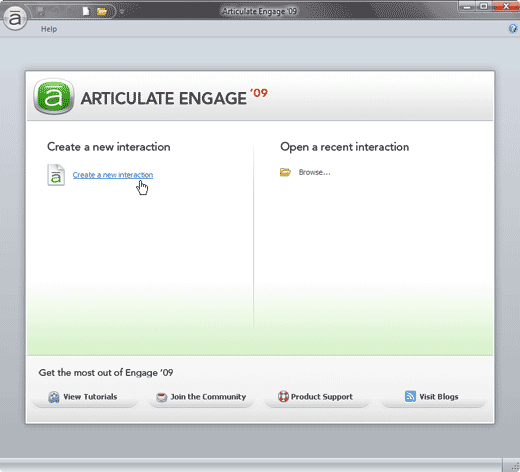
Read the Indezine review of Articulate Engage ’09.
Filed Under:
Reviews
Tagged as: Add-in, Articulate, PowerPoint, Review
Comments Off on Articulate Engage ’09: The Indezine Review
Articulate Quizmaker is a simple application that lets you create quizzes and surveys without any programming knowledge. All you need to do is walk through some simple wizards, and let Quizmaker output your quizzes as rich media Flash files. These Flash outputs can be hosted online, used in presentations, or combined with Articulate’s other products.
Quizmaker comprises 20 question types, including drag-and-drop and hotspot styles. You can add a number of rich media objects, add design themes, include a wide range of effects for your images and text without tedious manual formatting, and also implement a customizable player.
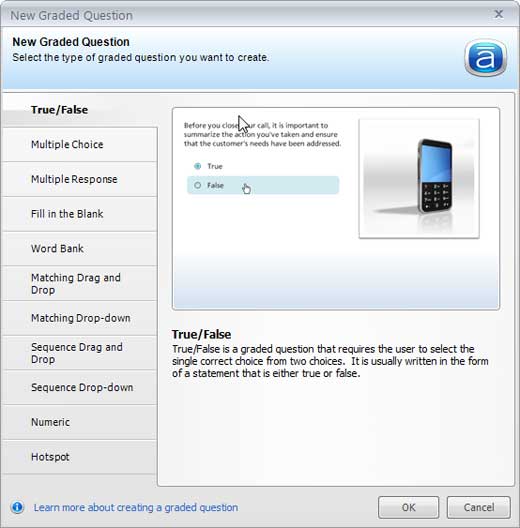
Read the Indezine review of Articulate Quizmaker ’09.
Filed Under:
Add-ins
Tagged as: Add-in, Articulate, PowerPoint, Review
Comments Off on Articulate Quizmaker ’09: The Indezine Review
Day 1 of PowerPoint Live started in the afternoon of Sunday, the 21st of September, with the registration. This picture shows the registration desk just before it opened.

And if you noticed the blue T-shirts, you’ll want to see them close to see the Indezine logo — see this picture:

The first day had two sessions — one each by Rick Altman and Rikk Flohr.
Filed Under:
Companion Programs
Tagged as: PowerPoint Live
Comments Off on PowerPoint Live: Day 1
Microsoft and the Office logo are trademarks or registered trademarks of Microsoft Corporation in the United States and/or other countries.