
This is the print version of this page. All content is copyright Indezine.com 2000-2026.
Thoughts and impressions of happenings in the world of PowerPoint and presentations, continuously updated since 2003.
See Also:
PowerPoint and Presenting Notes
PowerPoint and Presenting Glossary
Articulate Video Encoder ’09 converts almost any popular video format into the FLV Flash video format. In addition, it also allows you to record video directly from your webcam to an FLV file. All videos can be tweaked with some essential edits. Finally, the converted FLV Flash video format files can be used as media elements in Articulate Presenter, Articulate Engage, and Articulate Quizmaker, or anywhere else.

Read the Indezine review of Articulate Video Encoder ’09.
Filed Under:
Reviews
Tagged as: Articulate, PowerPoint, Review
Comments Off on Articulate Video Encoder ’09: The Indezine Review
One of the simplest motion path tricks is using the reverse motion path option. This is very helpful if you want an object to animate using a motion path, and then animate again from the end of the motion path to the beginning!

Reverse the direction for Motion Path animations in PowerPoint 2007, 2003, and 2002 for Windows.
Filed Under:
PowerPoint 2002, PowerPoint 2003, PowerPoint 2007
Tagged as: Animation, PowerPoint, PowerPoint 2002, PowerPoint 2003, PowerPoint 2007
Comments Off on Reversing Paths of Motion Path Animations in PowerPoint 2007, 2003, and 2002 for Windows
We showed how you can add a basic Motion Path animation to any object on a PowerPoint slide. Now, we’ll show how you can use PowerPoint’s drawing tools to create your own motion path.
PowerPoint provides 4 types of drawing options for custom Motion Path animations.
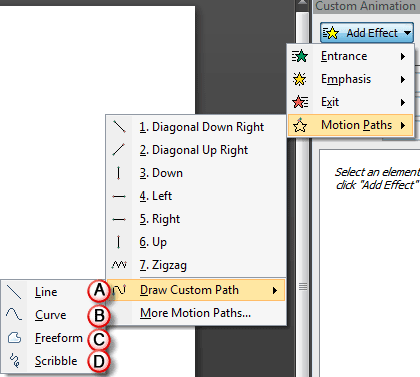
Learn to draw custom paths for Motion Path animations in PowerPoint 2007, 2003, and 2002 for Windows.
Filed Under:
PowerPoint 2002, PowerPoint 2003, PowerPoint 2007
Tagged as: Animation, PowerPoint, PowerPoint 2002, PowerPoint 2003, PowerPoint 2007
Comments Off on Drawing Custom Paths for Motion Path Animations in PowerPoint 2007, 2003, and 2002 for Windows

Mark Normand was born in Chelmsford, England, and he has lived and worked for almost two decades in Singapore. In his present position as the founder and managing director of Impress Training, he has traversed much of Asia to deliver training in management and business communication. With a keen interest in graphic design and amateur photography, he is a regular contributor to such sites as SlideShare and Stock.XCHNG.
In this interview, Mark discusses his PowerPoint (2003) Mechanics ebook.
Geetesh: Tell us more about yourself, and how this book evolved.
Mark: Together with my business partner, we run Impress Training, a training firm based in Singapore, providing soft skills training to organizations in various areas such as management, sales, service, communication, and more.
 During my years of work, like many others, you’ve either sat through or provided many PowerPoint presentations. And like so many others, they just look bad and take a lot of value away from the delivery of the presenter.
The blog site and the book evolved out of a course we run at Impress Training to train normal business professionals to achieve a higher quality of PowerPoint visuals. Looking around, I thought there is still something missing, there’s a lot of books out there that can be too technical, too wordy, or that talk about ‘what’ should be done but never the how, and many of them feature graphics that you’ll come to realize are designed by professionals, use Photoshop or Illustrator and many other applications to produce these visuals. What I really wanted to do was provide the means to ordinary businesspeople to whip up a presentation quickly, look good, and not use any external tools to produce the visuals – just plain PowerPoint, because at the end of the day, this is all that most people have. The ebook is basically a straight-to-the-point step-by-step guide to producing some of the visual effects that many people see around them – and why 2003? Because for many businesses (here in Asia at least) we’re still some way from everyone upgrading to 2007. However, I’m working on a new ebook just for them in the future.
Geetesh: What do you believe is the most important thing that any reader will gain from the book?
Mark: As mentioned, this book doesn’t have any text on the dos and don’ts because there are many other books out there that do a good job of that, i.e., explaining what. What I wanted to give them is “the how.” The main aim is to provide the mechanics and let them use those techniques and apply them to their own presentations. As with the blog, I try not to touch on effects that are too readily available, but something a little more unique.
The views and opinions expressed in this blog post or content are those of the authors or the interviewees and do not necessarily reflect the official policy or position of any other agency, organization, employer, or company.
Filed Under:
Interviews
Tagged as: Books, Interviews, Mark Normand, PowerPoint
Comments Off on PowerPoint (2003) Mechanics: Conversation with Mark Normand
Many PowerPoint users still haven’t mastered working with motion path animations, and we don’t blame them, for unless you just want to add a preset path, the whole process is not too intuitive. So, in the next few days, we’ll cover motion paths extensively on the Indezine site through a set of tutorials.

Filed Under:
PowerPoint 2002, PowerPoint 2003, PowerPoint 2007
Tagged as: Animation, Motion Path, PowerPoint, PowerPoint 2002, PowerPoint 2003, PowerPoint 2007, Transitions
Comments Off on Getting Started with Motion Path Animations in PowerPoint 2007, 2003, and 2002 for Windows
Microsoft and the Office logo are trademarks or registered trademarks of Microsoft Corporation in the United States and/or other countries.