
This is the print version of this page. All content is copyright Indezine.com 2000-2026.
Thoughts and impressions of happenings in the world of PowerPoint and presentations, continuously updated since 2003.
See Also:
PowerPoint and Presenting Notes
PowerPoint and Presenting Glossary
Among the most popular pages on Indezine are those that show you how you can create an EXE from a PowerPoint presentation without having to buy any extra software. However, we still had to update our tutorial for PowerPoint 2007, especially as PowerPoint 2003 users could no longer create an EXE successfully if they had PowerPoint 2007 installed as well.
PowerPoint 2007 includes the Package for CD feature, which we’ll use with a cool and undocumented Windows utility to create a standalone EXE file from PPT or PPTX presentations that can play on any system with Windows XP, Vista, or higher installed.

Explore our series on creating an EXE from a slide deck in PowerPoint 2007 for Windows.
Filed Under:
PowerPoint 2007
Tagged as: PowerPoint, PowerPoint 2003, PowerPoint 2007, Prepare, Share, Tutorials
Comments Off on PowerPoint 2007 to EXE
 Lou Douros co-founded Freepath. His passion for story and compassion for digital storytellers fueled the desire to bridge the gap between content and audience. Lou contributed to the earliest Freepath user experience. Most recently, he co-designed a site where world class, multi-format, native content could move fluidly between communicators, Freepath’s social network MyFreepath. Lou sees the world as places made up of people described by their stories; increasingly made up of digital content. His 20+ years of remote video production experience informs his continuing quest to move and be moved by inspired ideas.
In this interview, Lou discusses the new Freepath 2.
Filed Under:
Interviews
Tagged as: Freepath, Interviews, Lou Douros, Playlists, PowerPoint
Comments Off on Freepath 2: The Lou Douros Interview
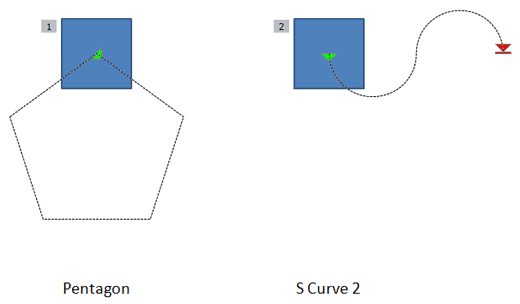
Much of what you can do with motion path animations in PowerPoint relates to what you can do with the motion paths themselves. And the motion paths are essentially just ordinary paths (or lines) that have curves, points, etc. If you are familiar with drawing in PowerPoint, or if you use a graphic illustration program like Adobe Illustrator or CorelDRAW, you know that paths can be either open or closed.
A circle is a good example of a closed path, whereas a curve is an open path. So, how is the concept of open and closed paths relevant to motion path animations in PowerPoint?
Filed Under:
PowerPoint 2002, PowerPoint 2003, PowerPoint 2007
Tagged as: Animation, PowerPoint, PowerPoint 2002, PowerPoint 2003, PowerPoint 2007
Comments Off on Motion Path Animations — Open and Close Motion Paths
Articulate Presenter ’09 is the new version of Articulate Presenter, a product that plugs into Microsoft PowerPoint, and allows you to create interactive rich-media content. In addition, Presenter allows you to insert quizzes created in Articulate Quizmaker ’09, interactions created in Articulate Engage ’09, FLV Flash videos converted in Articulate Video Encoder ’09, Flash animations, narrations, and web objects to the presentation.

Read the Indezine review of Articulate Presenter ’09.
Filed Under:
Reviews
Tagged as: Articulate, PowerPoint, Review
Comments Off on Articulate Presenter ’09: The Indezine Review

Mark Schwartz is the executive vice president for sales and marketing at Articulate. In this role, he has worldwide sales responsibility for Articulate, leading the direct sales and channel management teams as well as all product marketing activities. Prior to joining Articulate, Mark spent 20 years in sales and sales management roles with IBM and Dell.
In this discussion, Mark discusses the new Articulate Quizmaker ’09 product.
Geetesh: How easy is it to create a quiz or survey in Quizmaker ’09 — does it involve any coding at all? And what’s your favorite new feature in Quizmaker ’09?
Mark: That’s the power of Quizmaker ’09. It allows for very simple quiz and survey authoring and requires no coding at all. If you do like to code in Flash, Quizmaker ’09 easily supports inserting those Flash objects within the quiz. Quizmaker ’09 provides for 2 authoring options – a form view and a slide view. The form view is set up as a template that allows for simple fill-in-the-blank question creation. With it, you get an effective, albeit generically designed quiz. The slide view empowers the author to design a beautiful, engaging quiz. And it’s simple to use. The slide view interface is similar to the PowerPoint 2007 animation, design, and pictures interface, plus we add an audio and timeline editor for precise controls over audio and timings. It really allows for some amazing design options.
My favorite new feature is the slide view authoring capability. It provides a total free-form design but remains extremely simple to use. I can’t wait to see some of the quizzes and surveys that our customers create. I also love the new conditional branching option used in conjunction with our new blank slide feature. The branching option allows Quizmaker ’09 to direct the student to a specific slide or question based on a right or wrong answer. The new blank slide feature allows the author to create non-question slides, which provide for directed remediation when used with branching.
Geetesh: How does Quizmaker ’09 integrate with Articulate Presenter and Articulate Online — and are there any unconventional case studies on Quizmaker that you can share?
Mark: Customers who have Quizmaker ’09 and Presenter ’09 can integrate their quizzes within Presenter ’09 courses. When integrated within a Presenter ’09 course, you can set the number of quiz attempts, and you can direct the student to a specific slide within the Presenter course based on a pass/fail result. All of these settings are easily controlled via a simple drop-down selection.
Articulate Online is an Articulate-hosted offering that allows customers to easily track and manage Articulate-authored content. Quizmaker ’09 authors can publish the quiz or survey directly to their Articulate Online portal via one click within Quizmaker ’09. Once published, Articulate Online administrators can see full answer-level detail for all students and quizzes.
I’m not aware of any unconventional case studies related to Quizmaker. It’s really designed to allow for quick quiz and survey authoring, and that’s how our customers are using it. With the blank slide feature and powerful design capabilities now provided with Quizmaker ’09, perhaps we’ll learn of some new unconventional uses for Quizmaker.
You May Also Like: Articulate Quizmaker ’09 — The Indezine Review
Filed Under:
Interviews
Tagged as: Articulate, Interviews, Mark Schwartz, PowerPoint
Comments Off on Articulate Quizmaker ’09: Conversation with Mark Schwartz
Microsoft and the Office logo are trademarks or registered trademarks of Microsoft Corporation in the United States and/or other countries.