
This is the print version of this page. All content is copyright Indezine.com 2000-2026.
Thoughts and impressions of happenings in the world of PowerPoint and presentations, continuously updated since 2003.
See Also:
PowerPoint and Presenting Notes
PowerPoint and Presenting Glossary
This is among the most interesting and original uses for PowerPoint that I have read about.
Jill White, who has finished 10 years of teaching with Memphis City Schools, uses PowerPoint with first graders so that they can add their poetry to PowerPoint slides with a picture. This works great because it’s the first time the children use PowerPoint. So, it’s nice to start with simple stuff. These poetry slides then make great presentations to show at Open Houses, parent meetings, school meetings, and even district-wide meetings.

Read more on the Scholastic site.
Filed Under:
Case Studies
Tagged as: Case Studies, PowerPoint
Comments Off on Poetry Slideshows in PowerPoint!
For organizations and individuals who have been creating PowerPoint presentations for years, these presentations represent a very significant pool of content that needs to be synergised for reuse and reference — aiding in the creation of new slide content.
Cataloging your presentations to the slide level is therefore a very important aspect of slide management, and our review product does just that and more.
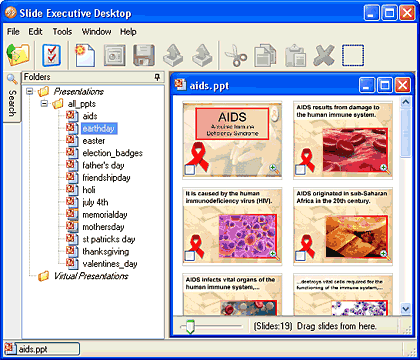
Read the Indezine review of Slide Executive 2.4.
Filed Under:
Reviews
Tagged as: Add-in, PowerPoint, Review, Slide Management
Comments Off on Slide Executive 2.4: The Indezine Review
Scrapblog is an awesome site that lets you create online digital scrapbooks—and it works so much like PowerPoint! They have added a slew of new improvements:
The new photo cropping options now allow you to crop to cookie cutter shapes like circles, rectangles, and stars. There’s also a freehand scissors tool that lets you cut edges any way you want. And an eraser option lets you erase areas of photos as required!

Scrapblog now provides one-click effects—these effects include 12 new built-in effects like black and white, sepia, antique, matte, vignette, a comic book effect, and even the ability to flip your photo. There are also advanced options that allow you to adjust the contrast, saturation, tint, or other fine grained settings.

Scrapblog now also provides new themes, stickers, backgrounds, and frames.

Filed Under:
Companion Programs
Tagged as: Companion Programs, Online Presentations, PowerPoint
I ran into this excellent, post by Cory Bohon on automating PowerPoint 2008 on the Mac using the Automator program built within the Mac OS X. This may prove a great starting point for automating PowerPoint on the Mac since this new version (PowerPoint 2008) no longer provides VBA programming support.

Read on The Unofficial Apple Weblog site.
Filed Under:
Templates
Tagged as: Office for Mac, PowerPoint, Templates
Comments Off on Automating Microsoft PowerPoint 2008
Scott Schwertly of Ethos3 recently interviewed Geetesh Bajaj in the first of his series on 7 Questions.

This interview can be found on his new Storybored blog.
Filed Under:
Interviews
Tagged as: Geetesh, Interviews, PowerPoint, Scott Schwertly
Comments Off on Interview on Storybored
Microsoft and the Office logo are trademarks or registered trademarks of Microsoft Corporation in the United States and/or other countries.