
This is the print version of this page. All content is copyright Indezine.com 2000-2026.
Thoughts and impressions of happenings in the world of PowerPoint and presentations, continuously updated since 2003.
See Also:
PowerPoint and Presenting Notes
PowerPoint and Presenting Glossary

StandOut from Electric Rain does seem one of the most promising presentation programs in the recent past. In the decade that’s gone by, one presentation program after the other has gone to no man’s land: Astound, Lotus Freelance, Adobe Persuasion, Macromedia Action, and these are only a few of them. Microsoft’s PowerPoint has towered over all of them.
So that brings us back to StandOut. Can it make it where others haven’t been able to? Ironically, StandOut is a great example of showcasing Microsoft’s new technologies: Windows Vista, .NET 3, and Expression graphic programs. And Mike Soucie, CEO of Electric Rain does mention that there’s some sort of content exchange possible between PowerPoint and StandOut.
Filed Under:
Interviews
Tagged as: Interviews, Mike Soucie, PowerPoint, Standout
Comments Off on An Interview with Mike Soucie
This time, in a continuing series for PowerPoint beginners, we have put up a tutorial on inserting clip art in PowerPoint using the Clip Art task pane, found in PowerPoint 2002 and 2003.

Filed Under:
PowerPoint 2003
Tagged as: Clip Media, PowerPoint, Tutorials
Comments Off on Inserting Clip Art in PowerPoint
StandOut is the name of a soon-to-be-released presentation product from Electric Rain that uses Windows Vista’s graphic and multimedia abilities to good use.
Essentially, StandOut will be available in two versions: Designer and Presenter.
The Designer version takes advantage of Microsoft’s new Expression design tools so that designers can create a set of Design Kits (templates) that can be used to create presentations using the Presenter version.

The Presenter version is for non-designers such as typical office staff and presenters themselves who can create and edit presentations based on the Design Kits (templates) created with the Designer version.
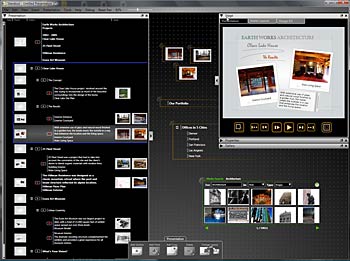
One of StandOut’s stellar features is the FlyPaper, a large digital bulletin board that can be used to store several types of content including graphics, documents, media, and PowerPoint presentations. These resources can then be organized, and also directly dragged into a StandOut presentation. Naturally, something of this sort will benefit from a large monitor (or probably a dual monitor).

StandOut allows import of Microsoft PowerPoint content, although this exchange of content will not work the other way around. Watch out for a detailed interview with Mike Soucie, President and CEO of Electric Rain soon, which we will announce on this blog.
Meanwhile, do check out the Electric Rain site for more info.
The views and opinions expressed in this blog post or content are those of the authors or the interviewees and do not necessarily reflect the official policy or position of any other agency, organization, employer, or company.
Filed Under:
Companion Programs
Tagged as: Companion, PowerPoint, Standout
Comments Off on Focus on StandOut
If you use MathType with Word or PowerPoint and then upgrade to Office 2007, you will find that you no longer have the icons or buttons to insert a MathType equation in Word 2007 or PowerPoint 2007.
You’ll find instructions on bringing them back in Word 2007. The techniques work the same way for Excel 2007 and PowerPoint 2007.

Learn more on the Core Economics site.
Filed Under:
Microsoft Office
Tagged as: Add-in, MathType, Microsoft Office, PowerPoint 2007
Comments Off on Using MathType with Office 2007
Many of us find it easy to share photos online, but as far as PowerPoint files go, the more common option is to email PowerPoint as an attachment. However, PowerPoint files can be huge and can quickly fill up inbox and mail accounts. The product that we are reviewing today offers a solution — PPTshare Desktop Slide Library does more than allowing you to share your presentations, it also allows you to manage your presentations at the slide level and create new presentations from those slides without opening PowerPoint.

Read the Indezine review of PPTshare Desktop Slide Library.
Filed Under:
Add-ins
Tagged as: Add-in, James Ontra, PowerPoint
Comments Off on PPTshare Desktop Slide Library
Microsoft and the Office logo are trademarks or registered trademarks of Microsoft Corporation in the United States and/or other countries.