
This is the print version of this page. All content is copyright Indezine.com 2000-2026.
Thoughts and impressions of happenings in the world of PowerPoint and presentations, continuously updated since 2003.
See Also:
PowerPoint and Presenting Notes
PowerPoint and Presenting Glossary
 Earlier this month, Microsoft announced its support for an open-source project to create a translator plug-in for its Office applications that, eventually, will enable Word, Excel and PowerPoint users to read and write word processor, spreadsheet and presentation files saved in the rival OpenDocument for Office Applications format. The key word here is eventually.
Jason Brooks discusses more on the eWeek site.
Filed Under:
Microsoft Office
Tagged as: Microsoft Office, ODF, PowerPoint
Colin McBride is from in-shop, a UK-based company that creates Flash Toolbar, a Flash-related add-in for PowerPoint. Colin says he has a passion for doing things right, and he always thinks of the words spoken by JFK we chose to go because it is difficult.
When asked for a photo for this conversation, Colin sent an image of his trip to Tibet rather than a conventional headshot. As he said, this sums him more.

Colin in Tibet
Geetesh: Tell us more about in-shop and your custom PowerPoint solutions.
Colin: The in-shop has been set up to create user-friendly software which is both professionally developed and reasonably priced. We have begun with a range of software add-ins for Microsoft PowerPoint. Later, we plan to extend this range to include other software utilities. We have used our experience working with some of the world’s leading companies, our typical corporate client has anywhere between 25,000 to 150,000 employees spread across the globe, and from this work we have developed rigorously tested, secure and user-friendly software solutions. This makes our software the ideal choice for both individuals and corporations.
The Flash Toolbar is a good example of this, it has always been time consuming and difficult to do simple things with a Flash movie in PowerPoint, e.g. insert a Flash movie, change the play setting, change the background color of Flash movies etc. But why? We felt that it does not need to be this difficult, so we decided to create an easy-to-use solution directly within the PowerPoint program.
Geetesh: Tell us more about Flash Toolbar — particularly the export static slides feature. How did that come about and how can it help?
Colin: The Flash Toolbar is a professionally produced tool that allows you to work more easily with Flash movies within PowerPoint presentations. It has been designed both for individual use and/or corporate use, once installed it displays a toolbar with a range of easy-to-use tools, and with a single-click you can insert a Flash movie or change its settings. In addition, it automatically fixes the problems commonly know as flashback, which is when Flash movies do not automatically rewind.

Flash Toolbar
A key tool for many users, especially business users is the Create Static Image Slide tool. Many sales and business presentations use Flash movies to show their products and services within a PowerPoint presentation, this gives a real wow factor. However, without our solution when using Flash movies in PowerPoint they are left with the problem of not being able to print the scenes or stills from the Flash movie, or, they cannot e-mail the presentation (this can be for a range of reasons, e.g. size, email server security, they don’t know if their client uses Flash etc.)
The Create Static Image Slide tool on the Flash Toolbar resolves these problems/issues by making it simple for the user to change Flash movies used in PowerPoint into a series of static images. Our tool creates a range of new slides, where each slide is a duplicate of the original slide, and the Flash movie is replaced with a still or frame from the Flash movie which are JPEG images.
So, for example, if you have a PowerPoint presentation which uses a Flash movie to show The six steps of a new wonder product, our tool allows you to select the Flash movie and with a single click create six new slides, each showing a scene or still from the Flash movie.
You can learn more about Flash Toolbar in Indezine’s full review of the product.
The views and opinions expressed in this blog post or content are those of the authors or the interviewees and do not necessarily reflect the official policy or position of any other agency, organization, employer, or company.
Filed Under:
Interviews
Tagged as: Add-in, Colin McBride, Interviews, PowerPoint, PowerPoint Flash
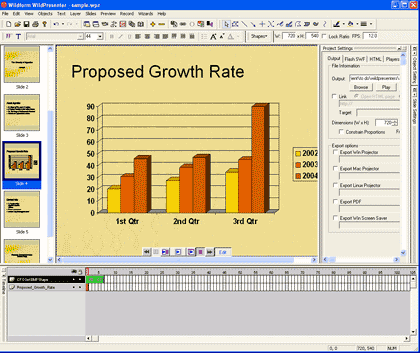
There are many advantages in converting a PowerPoint presentation into a Flash SWF movie since they tend to be smaller in size, cannot be edited, and can easily be viewed in almost any operating system or computer these days. And with dozens of PowerPoint-to-Flash converting applications available, it’s easy to be spoilt for choices.
And with so many choices, every such application has to either do things better than others or add more capabilities. WildPresenter, the product we are reviewing tries to do both. In this review, we will explore if it succeeds or not.
Filed Under:
Companion Programs
Tagged as: Flash, PowerPoint, PowerPoint Flash, Wildform, WildPresenter
 Kirk Cunnigham is Executive Director, Marketing at Business Objects, creators of Crystal Xcelsius software. Prior to Business Objects, Kirk was VP Marketing and Planning at Estee Lauder, responsible for launching and growing their successful ecommerce subsidiary.
Filed Under:
Interviews
Tagged as: Add-in, Crystal Xcelsius, Interviews, Kirk Cunningham, PowerPoint
WildPresenter is a new product from Wildform that has more abilities than you can count. It is one of those things that you want to keep always installed on your system.

In this Indezine exclusive interview, Wildform CEO Jonathan Blank discusses WildPresenter and its PowerPoint-specific abilities.
Geetesh: Tell us more about Wildform and WildPresenter.
Jonathan: Wildform develops and sells presentation, animation, and video software. Our products are designed to empower our customers to easily create multimedia presentations, product demos, online tutorials, websites, and e-learning courses that are ready for the widest possible deployment on the Web, intranets, CD-ROMs, and mobile devices. We started in 1999 and are based in Los Angeles, California, USA.
Our latest product is WildPresenter, a powerful yet easy-to-use software that is the ideal solution for creating Flash and video presentations, product demos, training videos, and sales & marketing materials. As Tom Arah of PC Pro Magazine (which gave WildPresenter 5 stars) wrote: WildPresenter offers everything you need to produce impressive results. In particular, it brings together the core features from a whole host of applications – Adobe Flash Professional, Microsoft PowerPoint, Articulate Presenter, Sorenson Squeeze, and Adobe Captivate – and at a fraction of their cost, especially at a heavily discounted introductory price. That’s extraordinary power and value.
In creating WildPresenter we built on our long experience developing easy-to-use Flash software such as our text animators and Flash video encoders, as well as our experience as Internet marketers who often found ourselves looking for software that could do what WildPresenter can do. We found a number of products which could be purchased separately for a few thousand dollars, and which still did not provide all the capabilities that we were looking for. So, we created WildPresenter and are offering it at a very affordable price. Our goal is for WildPresenter to be the best Flash and video presentation software on the market and we believe that we are well on our way.
Geetesh: Can you explain more about the PowerPoint conversion features in WildPresenter?
Jonathan: One of the great capabilities of WildPresenter is its PowerPoint-to-Flash converter which features a unique editable import option. Using this option, when you import a PowerPoint .ppt or .pot file, WildPresenter will convert it into WildPresenter’s native format, so that all the text, images, animations, and transitions can be edited after import. This method of conversion has many benefits including the following:
Admittedly, PowerPoint is a huge program with a lot of features, and we do not support all of them, but we support virtually all transitions and the majority of animations and we are continuously adding support for the rest of the features. In fact, since we released WildPresenter in February, we have already provided two significant updates that have greatly enhanced our PowerPoint support. Our goal is to support all the features which can be implemented in the Flash format.
The views and opinions expressed in this blog post or content are those of the authors or the interviewees and do not necessarily reflect the official policy or position of any other agency, organization, employer, or company.
Filed Under:
Interviews
Tagged as: Add-in, Interviews, Jonathan Blank, PowerPoint, Wildform, WildPresenter
Microsoft and the Office logo are trademarks or registered trademarks of Microsoft Corporation in the United States and/or other countries.