
This is the print version of this page. All content is copyright Indezine.com 2000-2026.
Thoughts and impressions of happenings in the world of PowerPoint and presentations, continuously updated since 2003.
See Also:
PowerPoint and Presenting Notes
PowerPoint and Presenting Glossary
Stamps in SnagIt are a current fascination. We love the way TechSmith has implemented them in the program, and how intuitive they are to use. In this tutorial, we show you how you can use them effectively.

Filed Under:
Companion Programs
Tagged as: Snagit, Techsmith

Barbara Brundage has been teaching people ways to use Photoshop Elements since the product came out in 2001. She’s the author of the best-selling Photoshop Elements 4: The Missing Manual, published by O’Reilly and several other books. In this interview, Barbara discusses her book, Photoshop Elements, and how you can use it with PowerPoint effectively.
Filed Under:
Interviews
Tagged as: Books, Interviews, Photoshop
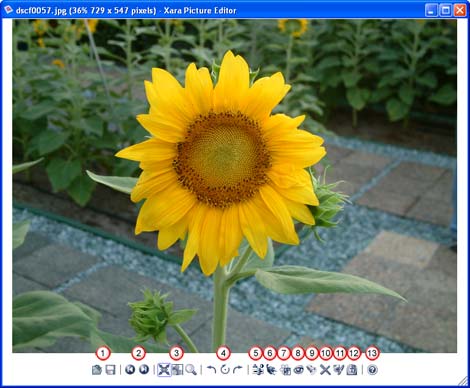
Xara Picture Editor is a small program that’s bundled with the Xara Xtreme software. Double-click any bitmap inside Xara Xtreme to summon the Xara Picture Editor–alternatively, Xara Picture Editor also works independently as a picture viewer and editor on its own.
Xara Picture Editor provides the basic, most commonly required photo features like quick preview, resize, straighten, crop, and enhance pictures. It also works with photo plug-ins, removes red eye and applies 3D bump maps.
Filed Under:
Companion Programs
Tagged as: Companion, Graphics, Xara
 Cliff Atkinson, president of Los Angeles-based Sociable Media, thinks government agencies and companies should go “Beyond Bullet Points” — the title of his book — and improve how they communicate through PowerPoint presentations.
These days, PowerPoint is used for everything from grocery shopping lists to presentations at large conferences. Cliff Atkinson, who has led a workshop at the Social Security Administration, said PowerPoint is ingrained in the culture of business and government, especially the military.
PowerPoint fans will tell you it’s an easy and convenient way to convey your main points. Adding animation and music to PowerPoint presentations can heighten interest. But detractors argue that PowerPoint presentations are often mind-numbing, especially when people deliver them in a monotone voice and close off discussion.
Filed Under:
Thoughts
Tagged as: Cliff Atkinson, Death by PowerPoint
Although it is the norm to place conventional pictures on PowerPoint slides, a little experimentation with transparent effects will provide great looking results. However, it’s not too easy to create such effects in Adobe Photoshop or other image editors unless you are well versed with the way those programs work.
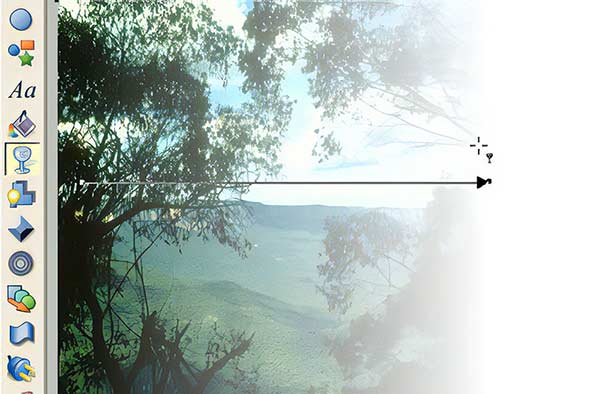
Surprising, Xara Xtreme, a program that costs less than $90 makes the whole process so easy that almost anyone can create such effects. Learn more here.
Filed Under:
Companion Programs
Tagged as: Companion, Xara
Microsoft and the Office logo are trademarks or registered trademarks of Microsoft Corporation in the United States and/or other countries.