
This is the print version of this page. All content is copyright Indezine.com 2000-2026.
Thoughts and impressions of happenings in the world of PowerPoint and presentations, continuously updated since 2003.
See Also:
PowerPoint and Presenting Notes
PowerPoint and Presenting Glossary
Have you wondered why some pictures show jaggies on the edges when they are resized larger. Or why some pictures don’t show jaggies when enlarged? Those jaggies have more to do with the type of graphics you’re resizing, and broadly speaking, there are two types of computer graphics: bitmaps and vector graphics. If you use graphics often, understanding these two formats, their differences, and how they are created is essential. To put in a nutshell, bitmap graphics get the jaggies when they are resized. And vector graphics can be resized to any extent without the pixelated jaggies.
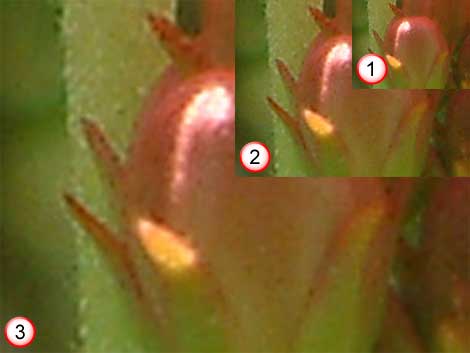
Learn about the differences between Bitmaps and Vector Graphics.
Filed Under:
Pictures and Visuals
Tagged as: Bitmap Graphics, Digital Cameras, Drawing, Graphics, Illustration, Photography, Photoshop, Pictures, Pixels, PowerPoint, Vector Graphics
Comments Off on Bitmaps and Vector Graphics
Whatever be the numbers or skills, no one disagrees with the fact that many PowerPoint presentations do fail to leave an impact on the audience. And that’s exactly what Jeff Van West tackles in his Effective Presentations tutorial that I’m reviewing. Effective Presentations is a movie-based tutorial from Lynda.com that’s available both on CD-ROM and an online movie library.

Filed Under:
PowerPoint All Versions
Tagged as: Books, PowerPoint, Training, Tutors
Comments Off on Effective Presentations from Lynda.com
 O’Reilly Media announced the 2006 O’Reilly Photoshop Cook-Off, a contest featuring eighteen top Photoshop experts as judges including Mikkel Aaland, Katrin Eismann, Harris Fogel, Tim Grey, Deke McClelland, Bert Monroy, Eddie Tapp, Vincent Versace, and John Beardsworth, among others.
O’Reilly is aiming to inspire creativity and discover new and promising talent from the ranks of the 4,000,000 plus Photoshop users. The winners will be recognized with awards and fabulous prizes which will be presented at an event at PhotoPlus Expo in New York on November 2, 2006.
Comments Off on 2006 O’Reilly Photoshop Cook-Off
Stamps in SnagIt are a current fascination. We love the way TechSmith has implemented them in the program, and how intuitive they are to use. In this tutorial, we show you how you can use them effectively.

Filed Under:
Companion Programs
Tagged as: Snagit, Techsmith
Comments Off on Using Stamps in TechSmith SnagIt

Barbara Brundage has been teaching people ways to use Photoshop Elements since the product came out in 2001. She’s the author of the best-selling Photoshop Elements 4: The Missing Manual, published by O’Reilly and several other books. In this interview, Barbara discusses her book, Photoshop Elements, and how you can use it with PowerPoint effectively.
Filed Under:
Interviews
Tagged as: Books, Interviews, Photoshop
Comments Off on The Barbara Brundage Interview
Microsoft and the Office logo are trademarks or registered trademarks of Microsoft Corporation in the United States and/or other countries.