
This is the print version of this page. All content is copyright Indezine.com 2000-2026.
Thoughts and impressions of happenings in the world of PowerPoint and presentations, continuously updated since 2003.
See Also:
PowerPoint and Presenting Notes
PowerPoint and Presenting Glossary
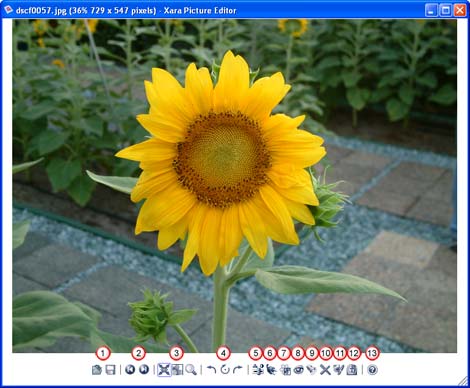
Xara Picture Editor is a small program that’s bundled with the Xara Xtreme software. Double-click any bitmap inside Xara Xtreme to summon the Xara Picture Editor–alternatively, Xara Picture Editor also works independently as a picture viewer and editor on its own.
Xara Picture Editor provides the basic, most commonly required photo features like quick preview, resize, straighten, crop, and enhance pictures. It also works with photo plug-ins, removes red eye and applies 3D bump maps.
Filed Under:
Companion Programs
Tagged as: Companion, Graphics, Xara
Comments Off on Xara Picture Editor
 Cliff Atkinson, president of Los Angeles-based Sociable Media, thinks government agencies and companies should go “Beyond Bullet Points” — the title of his book — and improve how they communicate through PowerPoint presentations.
These days, PowerPoint is used for everything from grocery shopping lists to presentations at large conferences. Cliff Atkinson, who has led a workshop at the Social Security Administration, said PowerPoint is ingrained in the culture of business and government, especially the military.
PowerPoint fans will tell you it’s an easy and convenient way to convey your main points. Adding animation and music to PowerPoint presentations can heighten interest. But detractors argue that PowerPoint presentations are often mind-numbing, especially when people deliver them in a monotone voice and close off discussion.
Filed Under:
Thoughts
Tagged as: Cliff Atkinson, Death by PowerPoint
Comments Off on Powering up your Points
Although it is the norm to place conventional pictures on PowerPoint slides, a little experimentation with transparent effects will provide great looking results. However, it’s not too easy to create such effects in Adobe Photoshop or other image editors unless you are well versed with the way those programs work.
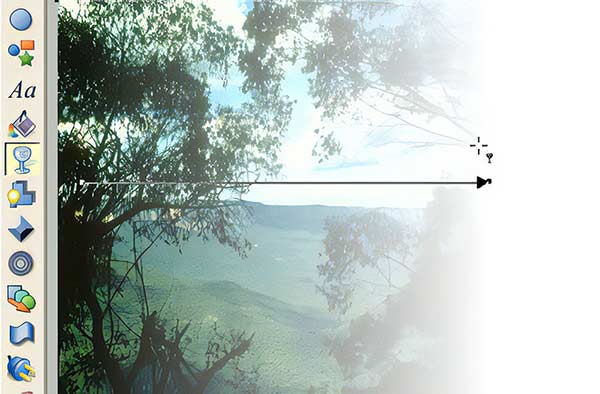
Surprising, Xara Xtreme, a program that costs less than $90 makes the whole process so easy that almost anyone can create such effects. Learn more here.
Filed Under:
Companion Programs
Tagged as: Companion, Xara
Comments Off on Xara Xtreme Transparency Effects for PowerPoint

So, you’ve been doing PowerPoint for years now. So you’ve even done your own custom templates. Now it’s time to take your PowerPoint game to the next level. Cutting Edge PowerPoint for Dummies was written by Geetesh Bajaj, a Microsoft PowerPont MVP.
One of the things I notice most often in PowerPoint presentations is that the people designing them have no concept of what color combinations look good. Bajaj discusses contrasting colors, and how to use color combinations to make text stand out and be easier to read. Color plates located in the center of the book help to emphasize his point. If more people would pay attention to this simple tip, PowerPoint presentations would be far less painful to view.
Read Warren Kelly’s full review on Blogcritics.org.
Filed Under:
Books
Tagged as: Book Review, Books, Geetesh
Comments Off on Book Review: Cutting Edge PowerPoint for Dummies
Digital imaging guru Deke McClelland introduced the pilot for his new show “dekePod,” a video podcast with a hip, visually compelling style. “dekePod” is personal and entertaining with rapid-fire imagery that keeps the viewer engaged. The pilot episode “It’s Your Money, Scan It!” shows viewers a workaround in Photoshop to scan and open money (legal in the U.S. under the specific guidelines detailed at Rules for use. Deke is the host of this educational, zippy, sometimes laugh-out-loud show.

To download or view the show, go here.
Filed Under:
Photoshop
Tagged as: Deke McClelland, Photoshop
Comments Off on dekePod–Scan and Open Money in Photoshop
Microsoft and the Office logo are trademarks or registered trademarks of Microsoft Corporation in the United States and/or other countries.