
This is the print version of this page. All content is copyright Indezine.com 2000-2026.
Thoughts and impressions of happenings in the world of PowerPoint and presentations, continuously updated since 2003.
See Also:
PowerPoint and Presenting Notes
PowerPoint and Presenting Glossary
Apple has released an update for Keynote 3, their presentation program that ships as part of their iWork 06 productivity suite. The new 3.0.1 update adds better texture fidelity and some more features.

Comments Off on Apple Releases Keynote 3.0.1 Update
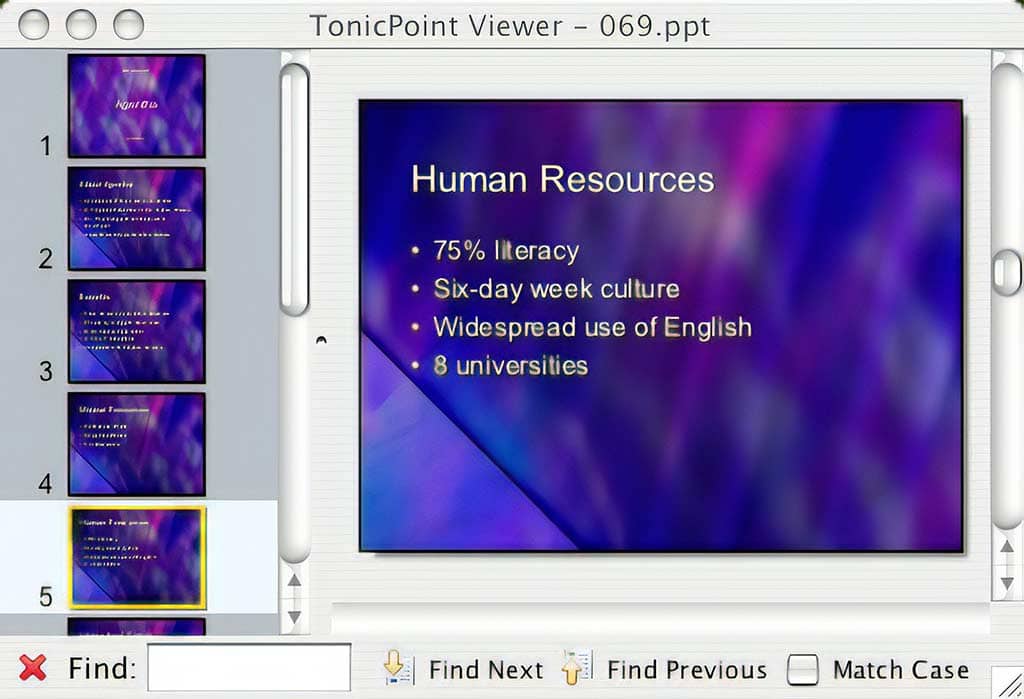
Tonic Systems has released a new Java-based PowerPoint Viewer that works on Windows, Mac OS X, and Linux platforms. That’s great news for Mac OS X users who have been asking for a new PowerPoint Viewer for a long time. And Linux users no longer need to have a copy of OpenOffice installed to just see PowerPoint presentations.
The TonicPoint Viewer is free for non-commercial use and only allows you to see static slides without any animations or transitions. In addition, Tonic Systems plans to eventually release a pro version of the TonicPoint Viewer with additional features like save-to-PDF.
This screenshot shows you how TonicPoint Viewer looks on Mac OS X (Tiger).
Filed Under:
Interviews
Tagged as: Companion, Google Slides, Interviews

The May issue of Inc. magazine features 6 products to liven up your presentations, including Indezine’s own Thermometer add-in for PowerPoint, which is a free download.
Among the products featured are TurningPoint’s polling system, Ovation from Serious Magic, Keynote from Apple, Thermometer from Indezine, Panasonic’s Toughbook CF-18, and Ontra Presentations.
Ellen Neuborne explains how these products can help make your next presentation less of a snooze and more of a blockbuster.

Read the article on the Inc. magazine site.
Filed Under:
Reviews
Tagged as: PowerPoint, Press, Review
Comments Off on Making Your (Power)Point

The Microsoft Office Specialist certification is an acclaimed, worldwide standard for Microsoft Office usage skills. A certification can help career prospects and provide promotions, not to speak about several other benefits that certified professionals receive. No wonder, there are many books dedicated to such certification curriculum.

Linda Johnson, who runs a premier Microsoft Office and computing site has authored a comprehensive guide on what you need to prepare for certification in Microsoft Excel 2003, both the Specialist and Expert levels.
Linda’s book, Microsoft Office Specialist: Excel 2003 Study Guide uses real-world scenarios to teach the full range of Excel 2003 skills you need. Check out the book here.
Comments Off on Linda Johnson’s New Excel Book
Recosoft’s PDF2Office 3 (Standard and Personal editions) claims to create editable PowerPoint presentations, Word documents, and several other formats from PDFs. Let’s admit that we were quite skeptical about this one. After all, we’ve lost count of how many people have asked about how they can create editable PowerPoint presentations from their PDFs. And maybe you are now wondering why anyone would want to create PowerPoints from their PDFs?
There are two reasons:
Filed Under:
Reviews
Tagged as: Companion, PDF, PDF to PowerPoint
Comments Off on Convert PDFs to PowerPoint with PDF2Office
Microsoft and the Office logo are trademarks or registered trademarks of Microsoft Corporation in the United States and/or other countries.