
This is the print version of this page. All content is copyright Indezine.com 2000-2026.
Thoughts and impressions of happenings in the world of PowerPoint and presentations, continuously updated since 2003.
See Also:
PowerPoint and Presenting Notes
PowerPoint and Presenting Glossary
“Have you ever dreaded the day of the inevitable science fair and the cumbersome boards?” begins a description of the session, which promises to demonstrate how PowerPoint can come to the rescue.
“We’re obviously in a time of change,” said Gerry Wheeler, the association’s executive director. “Things like PowerPoint can support the teacher and student in a 21st-century kind of way.”

Read more on The New York Times site (requires registration).
Filed Under:
Thoughts
Tagged as: Case Studies, Opinion, PowerPoint
Sony Media Software announced the launch of Sound Forge 8 Professional, the latest version of its award-winning professional digital audio editing product. New features include the addition of CD Architect 5.2 software for professional CD mastering, with direct track export functionality from Sound Forge software for fast and efficient Red Book audio CD creation.

More info on the Sony Media site.
PowerPoint designers often use Sound Forge to edit presentation background scores and narration. Here’s a sound fade tutorial using Sound Forge.
Filed Under:
Companion Programs
Tagged as: Companion, Sony, Sound Forge
 It’s been a while since Apple released Keynote 2 and the reviews are pouring in. I’ve used Keynote 1 and although I loved the look and interface, the product itself was seriously underpowered. Steve Jobs might have used it for his presentations but that’s hardly surprising, because if he started using PowerPoint, who would use Keynote? Meanwhile, PowerPoint:mac 2004 was probably the best PowerPoint release ever across versions and Microsoft is already working on the next PowerPoint version on both Mac and Windows. One very crucial advantage that Microsoft has over Apple in the presentation arena is its presence on both platforms. If Apple is serious about Keynote, it has to become a cross-platform product like QuickTime and FileMaker.
Meanwhile, these reviews make interesting comparisons.
Mike Wendland thinks Keynote is not as full-featured as one would like.
He further adds: The other iWork program is actually a long-overdue upgrade to the Keynote application Apple released a couple of years ago to compete with Microsoft PowerPoint. The new version really looks sharp, and it’s easier to insert photos and animations. Though greatly improved, it still seems a bit klutzy compared with PowerPoint. For instance, it lacks PowerPoint’s ease of embedding and playing movies in slides.
Read more on the Detroit Free Press site.
Mike’s review sparked off an intense debate on the Mac Observer site.
The editor, Bryan Chaffin says, Though the iWork suite is a fraction of the price of just Word, for instance, many consumers and professionals alike will be making the comparison, whether or not either of Apple’s offerings are intended to replace Word or PowerPoint.
Read more on the Mac Observer site.
Dan Pourhadi sings a different tune, Now that I’ve had a taste of Keynote 2, I realize that this new version of Keynote is much more a PowerPoint Killer than Pages is a Word Killer. In fact, I don’t see much of a need to use PowerPoint at all anymore.
Read more on the Macteens site.
The coming months are definitely going to be even more interesting. If nothing else, the emergence of Keynote has certainly woken up Microsoft like nothing else. Microsoft typically has focused more on Word and Excel than PowerPoint. Will this change? Let’s wait and watch.
Filed Under:
Keynote
Tagged as: Keynote, PowerPoint
Quick, can you answer this question? You selected the AutoShape and want to add or edit a gradient. How many clicks away are you from the Gradient dialog box?
Did you answer 3, 2, or 1?
You select the AutoShape and choose the Format | AutoShape option. Or you might right-click the AutoShape and choose Format AutoShape…. Then, click the downward pointing arrow next to Color and choose Fill Effects in the resultant dropdown box. This gets you to the Gradient tab of the Fill Effects dialog box.
You double-click the AutoShape to get to the Format AutoShape dialog box. Then click the downward pointing arrow next to Color and choose Fill Effects in the resultant drop-down list. Doing so gets you to the Gradient tab of the Fill Effects dialog box.
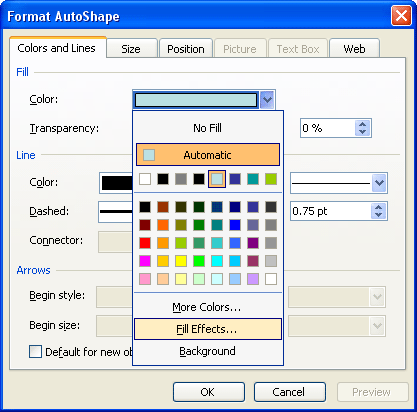
You select the AutoShape and click on the downward pointing arrow next to the Fill icon on the Drawing toolbar (the icon that looks like a paint can). In the resultant flyout menu, choose the Fill Effects option. Doing so gets you straight to the Gradient tab of the Fill Effects dialog box.
Filed Under:
PowerPoint 2003
Tagged as: Fills, Gradient Fills, PowerPoint 2002, PowerPoint 2003, Tutorials

Bill Abbott has been drawing cartoons almost literally since he could hold a pen. Charles Schulz was his first, and still dominant source of inspiration although his current characters look more like a bespectacled Walter Matthau and Ethel Merman. In the early 90’s, he enjoyed a career as a stockbroker, from which much of his business-related material is derived. For non-business-related material, his two wonderful sons keep him chock-full of ideas. Between then and now, he has had the honor of serving in the U.S. military and continues to enjoy working as a writer. For him, Working as a cartoonist is the fulfillment of a life-long dream.
In this conversation, Bill talks about his cartoons site. Bill Abott is providing two of his cartoons for you to use in your next PowerPoint presentation.
Geetesh: How can presenters benefit from incorporating cartoons within PowerPoint?
Bill: That’s a great question, Geetesh. Presenters will benefit from using cartoons in their visual communications in several ways. First, when someone is giving a PowerPoint presentation on a topic that, by its nature tends to be dry, quick but on-topic pieces of visual humor placed at advantageous points throughout the brief can be enough to draw an audience back in and maintain their attention. Second, if a brief is necessarily long, a few well placed, topical cartoons seem to break the material up into more manageable chunks. And third, but certainly not the last benefit, in a challenging marketplace where competition is fierce, a well-thought-out presentation that offers key moments of levity can make all the difference between you and your competition.

Geetesh: How expensive is it to license a cartoon for presentation use? Do you have separate options for use of cartoons in presentations?
Bill: Using cartoons for a PowerPoint presentation is not expensive at all. For the cost of a lunch, you can add a cartoon to enhance the quality of your information. There are options available for using my cartoons, all of which are presented on my website. Basically, usage fees are based on how, to how many, and to how often the cartoon will be used, but I think you’ll find them all surprisingly affordable.
Learn more about Bill and explore his work at the Bill’s Cartoons site.
The views and opinions expressed in this blog post or content are those of the authors or the interviewees and do not necessarily reflect the official policy or position of any other agency, organization, employer, or company.
Filed Under:
Interviews
Tagged as: Cartoons, Clip Media, Interviews
Microsoft and the Office logo are trademarks or registered trademarks of Microsoft Corporation in the United States and/or other countries.