
This is the print version of this page. All content is copyright Indezine.com 2000-2026.
Thoughts and impressions of happenings in the world of PowerPoint and presentations, continuously updated since 2003.
See Also:
PowerPoint and Presenting Notes
PowerPoint and Presenting Glossary
We first feature Haley Rich, who talks about her sessions at the upcoming CreativePro Week online event. We also bring you a special offer for the upcoming CreativePro Week and Click conference. We then explore Neuxpower’s Slidewise add-in for PowerPoint that lets you look under the hood to understand what’s ballooning your file sizes. We also look at PresentationPoint’s new SignageTube Free for Life option that lets anyone play with digital signage.
PowerPoint 2019 and 2016 for Windows and Mac users can learn how to play a sound across specific slides. We also bring you quotes, press releases, and templates from the last few days.

Stay informed about updated tutorials and happenings related to PowerPoint and presenting.
Filed Under:
Ezine
Tagged as: Ezine, Indezine, News, PowerPoint
Comments Off on PowerPoint and Presenting News: May 11, 2021
Once you add an audio track such as a music clip to your PowerPoint slides, you can let the inserted audio span across all your slides from the first one to the last by selecting the convenient Play Across Slides option. Yes, that’s a great solution if you need the same music clip to be playing while looping on all your slides. However, in the real world, there will always be a need for something different. What if you want the music to play only across some successive slides? What if you want the music to play from slide numbers 2 to 8, and let all subsequent slides play without any music? Or you may want to add another audio clip for the next set of slides?

Loop audio clips to play across specific slides in PowerPoint 365 for Windows.
Filed Under:
PowerPoint 365
Tagged as: Audio, Microsoft Windows, Multimedia, Office 365, PowerPoint 365, Sound, Tutorials
Comments Off on Sound Across Specific Slides in PowerPoint 365 for Windows
Once you add an audio track such as a music clip to your PowerPoint slides, you can let the inserted audio span across all your slides from the first one to the last by selecting the convenient Play Across Slides option. Yes, that’s a great solution if you need the same music clip to be playing while you move across slides. However, in the real world, there will always be a need for something different. What if you want the music to play only across some successive slides? What if you want the music to play from slide numbers 2 to 8, and let all subsequent slides play without any music? Or you may want to add another audio clip for the next set of slides?
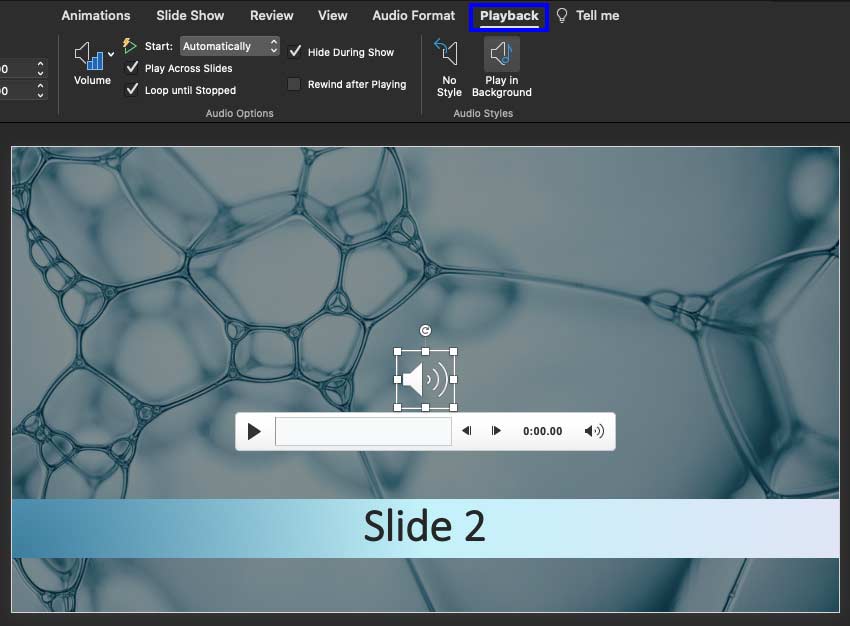
Loop audio clips to play across specific slides in PowerPoint 365 for Mac.
Filed Under:
PowerPoint 365
Tagged as: Audio, Mac, Multimedia, Office 365, PowerPoint 365, Sound, Tutorials
Comments Off on Sound Across Specific Slides in PowerPoint 365 for Mac
Once you add an audio track such as a music clip to your PowerPoint slides, you can let the inserted audio span across all your slides from the first one to the last by selecting the convenient Play Across Slides option. Yes, that’s a great solution if you need the same music clip to be playing while looping on all your slides. However, in the real world, there will always be a need for something different. What if you want the music to play only across some successive slides? What if you want the music to play from slide numbers 2 to 8, and let all subsequent slides play without any music? Or you may want to add another audio clip for the next set of slides?

Loop audio clips to play across specific slides in PowerPoint 2019 for Windows.
Filed Under:
PowerPoint 2019
Tagged as: Audio, Microsoft Windows, Multimedia, Office 2019, PowerPoint 2019, Sound, Tutorials
Comments Off on Sound Across Specific Slides in PowerPoint 2019 for Windows

Haley Rich is a Senior Art Director and Creative Doer from California. She has a love for all things plants, an infatuation for the color yellow. She spends any extra time she can get traveling the world, and until that is possible again she enjoys planning her next trip in her plant filled studio.
Haley has been in the design industry for about 14 years in various roles ranging from editorial, print, web, and packaging, most recently finding herself in the world of presentations and becoming an expert in the programs that go with it. She traveled worldwide to provide event support for some of the largest Silicon Valley companies. She has developed extensive training programs on the intricacies of PowerPoint, Keynote, Google Slides, and Adobe.
In this conversation, Haley talks about her session(s) at CreativePro Week 2021 being held online on May 17–21 this year.
Indezine is a media partner for this event.
Filed Under:
Events
Tagged as: Click Conference, CreativePro Week, Events, Haley Rich, Interviews
Comments Off on CreativePro Week and Click 2021: Conversation with Haley Rich
Microsoft and the Office logo are trademarks or registered trademarks of Microsoft Corporation in the United States and/or other countries.