
This is the print version of this page. All content is copyright Indezine.com 2000-2026.
Thoughts and impressions of happenings in the world of PowerPoint and presentations, continuously updated since 2003.
See Also:
PowerPoint and Presenting Notes
PowerPoint and Presenting Glossary
If your presentation has many slides, it will be easy to identify the current slide in Slide Show view, as long as you have enabled slide numbers on your slides. In PowerPoint, you have to make these slide numbers visible since they don’t show by default.
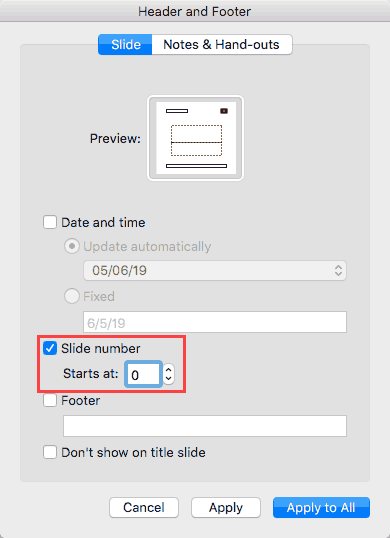
Learn how to add Slide Numbers on slides and Masters in PowerPoint 365 for Mac.
Filed Under:
PowerPoint 365
Tagged as: Mac, Office 2016, Office 365, Office for Mac, PowerPoint 2016, PowerPoint 2019, PowerPoint 365, PowerPoint for Mac, Tutorials
Comments Off on Working With Slide Numbers in PowerPoint 365 for Mac

Richard Goring is a Director at BrightCarbon, the specialist presentation and eLearning agency. He has helped to write and create thousands of presentations, and coached hundreds of teams to present more effectively using visuals, diagrams, and animated sequences that explain and reinforce the key points.
In this conversation, Richard talks about the Presentation Summit, being held in San Antonio, TX this year from October 6 to 9, 2019.
Filed Under:
Events
Tagged as: BrightCarbon, Events, Interviews, Presentation Summit, Richard Goring, Rick Altman, San Antonio
Comments Off on Presentation Summit 2019: Conversation with Richard Goring
Creating outlines for PowerPoint in various external applications lets you stay away from distractions in PowerPoint-land and concentrate on the structure of your slides rather than their appearance. Once you have the outline created, it’s very easy to import it in the form of slides into PowerPoint. While this import process works the same way in all versions of PowerPoint, there are small interface changes from version to version. In this tutorial, we’ll show you how to import outlines in PowerPoint 365 for Mac.

Learn how to import outlines in PowerPoint 365 for Mac.
Filed Under:
PowerPoint 365
Tagged as: Mac, Office 2016, Office 365, Office for Mac, PowerPoint 2016, PowerPoint 2019, PowerPoint 365, PowerPoint for Mac, Tutorials
Comments Off on Import Outlines in PowerPoint 365 for Mac

Ric Bretschneider is a technologist, troublemaker, and problem solver. Professionally, he helps people raise the quality of their business communications, mainly presenting. At Microsoft, Ric spent 17 years working on PowerPoint, designing and molding the program that became a juggernaut in business communication.
Shortly after leaving Microsoft, Ric was awarded PowerPoint MVP status, a recognition held by only a dozen or so people in the US. In his spare time, Ric runs the San Jose California branch of the Pecha Kucha presentation event, writes, blogs and podcasts. He’s also a huge geek; his obsessions are hidden away on his site.
In this conversation, Ric talks about the Presentation Summit, being held in San Antonio, TX this year from October 6 to 9, 2019.
Geetesh: Your sessions at this year’s Presentation Summit are the ones associated with you and identified with your personal brand, and several are regular repeat events at the Presentation Summit. Can you tell us more about your Late-Night Guru Session, PowerPoint Karaoke, and Catching up with Pecha Kucha sessions? What should attendees expect to take away from these sessions?
Ric: Wow, I guess you’re right. Two of them are some of the longest-running Presentation Summit regular sessions, I guess. Hadn’t ever given that any thought before, I just enjoy doing them and always get a lot of good feedback from participants and audience members.
Certainly, there’s an intentional amount of fun in the Late-Night Guru Session. We break most of the stodgy rules of convention panels and sessions. That started from the first time we did it. It was the second year of the conference; the late-night get-together was a spontaneous thing – nothing planned about it at all. I was still working for Microsoft, attending the convention as an official representative of the PowerPoint team. About a dozen of us were walking back from a late dinner and looking for a place to hang out. We found a conference room that was open, with a projector, and luckily one of us was dragging around a laptop. So, we spent the rest of the evening and into the morning just hanging out and talking about the weird and wonderful things we could do with PowerPoint. I told stories about the early days of PowerPoint development, things like how PowerPoint got its name, stuff like that. It was a part tutorial, part love fest, and no small part group therapy session.
The next morning it was kind of legendary. Everyone who was there was telling those who missed it how much they’d missed! Word got around and there was this impression that “that Microsoft guy has spilled a bunch of secrets” but that wasn’t really the case. The next year I told Rick Altman we should make it official, he agreed, and we’ve done it every year since.
Rick advertised it as “The Guru Session” first attaching that label to me. It stuck, but I try to make everyone understand that we’re all the gurus, everyone has something to share, and that you can’t predict where the next revelation will come from. At its weakest, it was about Microsoft touting new stuff. That’s not necessary anymore because the PowerPoint team has their own session for that this year to do just that. The strength of the Guru session comes from everyone who comes to the party, everyone with a problem, a solution, or just something that makes us all laugh and become a stronger community.
Pecha Kucha is another thing entirely. I met Nancy Duarte at one of the first Presentation Summits, called PowerPoint Live in the early days. I watched her session and was so impressed that afterwards I had to go up to gush a bit. So funny too when we discovered that her team’s office was literally minutes from mine. We’ve been friends ever since. One evening in 2007 Nancy and I and a couple of Duarte folks went to San Francisco to see what this Pecha Kucha presentation style was all about. I’d heard about these short presentations that were given in bars to packed houses but wasn’t actually prepared for how mind-blowing it was to be part of the audience. The subjects were all over the board, from the art of cartography to transit solutions to a dozen other amazing little presentations.
You see the gist of the Pecha Kucha style is that presenters prepare 20 slides or images that will be projected for them as they speak. Each slide automatically advances after 20 seconds. So, the presentation moves along at a good clip and is over in 6 minutes and 40 seconds. It’s kind of a blend of standard presentations, iron man competitions, and performance art. You really have to know your stuff to make it work in front of a live audience (of course, they’ve usually been drinking so they’re a happy bunch.)
There was so much enthusiasm in the car on the drive back. Everyone knew they’d seen something new and special. When I got home I decided that San Francisco was too far to go to attend these things on a regular basis, so I contacted the Pecha Kucha organization in Japan and founded the branch in the Silicon Valley, San Jose being the hub. After a couple of years running local shows, it seemed a natural to do a Pecha Kucha event for Presentation Summit.
Now, a couple of months before the conference, I work with a number of Presentation Summit attendees who will be part of the session. I explain the format and history, help them craft their presentations and practice, and in the end, we put on a mini PK show. Both the presenters and audience get a solid introduction to how accepting the constraints of the format put you into a mode where clarity and focus benefit your message. Again, fun, accessible, and informative; the best way to learn.
Geetesh: Ric, is The Late-Night Guru session completely open? What rules are there about the questions asked?
Ric: Hah! Yes, entirely open. Any question can be asked, no rules whatsoever. Of course, that doesn’t mean all questions will be answered!
Seriously though, as I think we’ve done about a dozen of these over the more than a decade of Presentation Summits, I really can’t think of a question that was totally out of bounds. The concerns are much more about the value of what we talk about, and where conversations go. I moderate the session with a mind that everyone should be heard, but no one should monopolize the conversation. And some questions just can’t be answered because they’re formed wrong, based on misconceptions.
A favorite example of that is “What are the most slides you should have in a presentation?” Typically, this comes from a management edict – some executive trying to manage an event without understanding how communication works. It’s a favorite topic of lazy presentation pundits, especially if they can rhyme it. “No more than ten.” “Twenty is the max.” Ridiculous. You need exactly as many slides as you need to support your message. No more, no less. And you should keep working on that message to keep your slides to a minimum, your argument focused, and your audience attentive. But that’s a purely situational thing. Your slides should move along briskly, nimbly, each exactingly supporting your arguments as you lay them out. One definite answer is that if you’re going to read every word on your slide to the audience, maybe you should keep your presentation to one slide. And you should send it out in an e-mail and stop wasting people’s time.
But “the correct number of slides” is an example of something we’d still take on, and in just that manner. Without breaking any confidences, I can say that there’s no Microsoft secret number of slides to use. Heck, I wish there had been because frankly, I sat through some pretty horrendous presentations at Microsoft. And so, the secrets we expose in the Late-Night Guru Session are just that; wisdom we all have but need the courage to apply. Because you need the courage to fight back against the mistakes and misconceptions about presentations in your organization. And that courage can find its foundation in a community, a community like you find at The Presentation Summit, and at The Late-Night Guru Session.
Geetesh: Last year you started doing a session on PowerPoint Karaoke, and it’s back again this year! What’s that like and what value does it have for the audience?
Ric: I love getting the audience involved. My uniform goal any time I’m up in front of an audience is to provide interesting and useful information that keeps the audience off their phones, off their computers, and watching every step of the presentation. PowerPoint Karaoke does that naturally to a delightful extreme. At its core it’s an exercise in improv; in dealing with the unexpected things that can pop up while you’re trying to deliver your message, truly learning how to “expect the unexpected.”
After a quick lesson in improv and how it can help your presentations, volunteers from the audience come up and present short presentations that they have never seen before! Like regular karaoke, nobody expects polish, it’s more about moving through the narrative you’re building on the fly. Bragging rights go to the participants who aren’t thrown by the unexpected images and move right along in the presentation as if everything was planned. Although it can be hard to get up to do this the first time, everyone has a great time. We do PowerPoint Karaoke as a warm-up to my Pecha Kucha events, and I have folks who come specifically for the Karaoke!
As much as it is a presentation exercise, it’s also part party game and part variety show. And once you see it done, you’ll be ready to run an event of your own – for your company, your family, or a gathering of friends. Come see how it’s done and create your own events.
Geetesh: About everyday PowerPoint users, if you had to give them just one advice to make their presentation slides more memorable, what would that be?
Ric: Practice. Aloud. Standing up. In front of a mirror or video recorder. You can read your presentation all day long, but until it escapes your head, until you actually hear your voice bouncing off the walls back at you, you really aren’t experiencing your presentation like the audience will. And that’s when all the weird nuances are brought to light. Where the disconnects make your story fall apart. When you read it, you know what it’s supposed to be saying and you mentally fill in the cracks from your own intent, your background, your experience. It’s hearing your presentation aloud that shows you where you still have work to do. So yeah, practice early and leave yourself time after the practice to revise your presentation. And then practice again.
Wow, I’m really looking forward to this year! Thanks for asking Geetesh.

For nearly two decades, Rick Altman has been hosting the Presentation Summit, a highly popular event that is geared towards users of PowerPoint and other presentation platforms.
Indezine.com is the official Media Partner for the Presentation Summit.
Date: October 6 to 9, 2019
Location: Hyatt Regency Hill Country Resort and Spa, San Antonio, TX, United States
The views and opinions expressed in this blog post or content are those of the authors or the interviewees and do not necessarily reflect the official policy or position of any other agency, organization, employer, or company.
Filed Under:
Events
Tagged as: Events, Interviews, Presentation Summit, Ric Bretschneider, Rick Altman, San Antonio
Comments Off on Presentation Summit 2019: Conversation with Ric Bretschneider
We begin with a feature from Echo Swinford, who explores a simple way to create better-looking tables with some love. We then feature Anna Guerrero of Canva, who talks about the Pixabay and Pexels acquisitions. Kevin Lerner brings the second part of his Presentation Procrastinators series, and says, “As terrific as this managed presentation polyana sounds, the reality is that there will inevitably be last minute edits.” We have a series of interviews with presenters from the upcoming Presentation Summit conference. This week, we feature Rick Altman, Matthew Pierce, John Rahmlow, and Nolan Haims.
PowerPoint 365 for Windows users can learn about Text Placeholders vs. Text Boxes, Ribbon and Tabs, and Importing Outlines. PowerPoint 365 for Mac users can explore Creating PowerPoint Outlines in Microsoft Word, plus Ribbon and Tabs. And if that wasn’t enough for this week, make sure you do not miss the quotes, press releases, and templates released in the last week.

Stay informed about updated tutorials and happenings related to PowerPoint and presenting.
Filed Under:
Ezine
Tagged as: Ezine, Indezine, News, PowerPoint
Comments Off on PowerPoint and Presenting News: July 2, 2019
Microsoft and the Office logo are trademarks or registered trademarks of Microsoft Corporation in the United States and/or other countries.