
This is the print version of this page. All content is copyright Indezine.com 2000-2026.
Thoughts and impressions of happenings in the world of PowerPoint and presentations, continuously updated since 2003.
See Also:
PowerPoint and Presenting Notes
PowerPoint and Presenting Glossary
At some point in time, we all need dummy text to add quickly to our slides so that we can ascertain how a body of text looks or fits within an individual text box or placeholder. There is an undocumented feature in PowerPoint that enables you to add dummy text with just a few keystrokes!
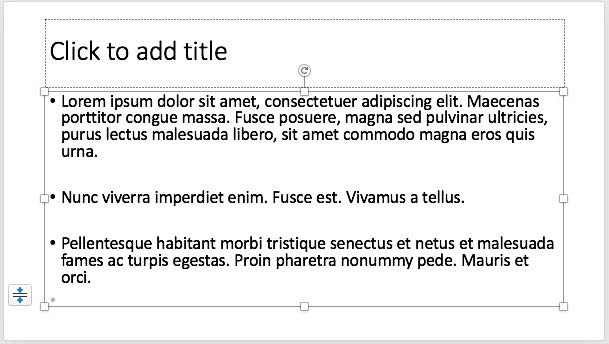
Learn how to insert dummy text on a slide in PowerPoint 2016 for Mac.
Filed Under:
PowerPoint 2016
Tagged as: Dummy Text, Mac, Office 2016, Office for Mac, PowerPoint 2016, PowerPoint 2019, PowerPoint 365, PowerPoint for Mac, Text, Tutorials
Comments Off on Insert Dummy Text in PowerPoint 2016 for Mac
By Kurt Dupont
When you are in train stations, airports, or shopping malls, you will see video advertising for clothing, electronic devices, bags, perfumes, etc. everywhere. They are using very attractive and colorful television screens to broadcast their ads. These screens scream for attention because the more they are seen, the better the marketing campaigns are, the better the sales. Let me give you a very good tip on how you can save time and money and make video advertising much easier using PowerPoint.
Videos are a bit more complex to create. First of all, you have to record your environment. Imagine a woman walking in a sunny and romantic city with a new travel suitcase. You have to clear the pathway, arrange that model, dress her, walk around with the suitcase, and then video-record it, possibly from different angles and with multiple shots. That takes time and preparation. Maybe your video recording work is much easier when you don’t need recording and maybe can rotate your product on a turntable and record it that way. Much easier and cheaper!
Filed Under:
Guest Posts
Tagged as: Add-in, Guest Post, iPoint, Kurt Dupont, PresentationPoint
Comments Off on Video Advertising with PowerPoint
There may be circumstances when you want to compare two or more presentations side-by-side. In this tutorial, you will learn how you can place presentations side-by-side and compare individual slides. Yes, this is not a comprehensive compare option within PowerPoint, but this does allow you to compare slides by just looking at them manually, the old-fashioned way.

Learn how to compare presentation slides manually in PowerPoint 2016 for Mac.
Filed Under:
PowerPoint 2016
Tagged as: Mac, Office 2016, Office for Mac, PowerPoint 2016, PowerPoint 2019, PowerPoint 365, PowerPoint for Mac, Tutorials
Comments Off on Compare Presentations Manually in PowerPoint 2016 for Mac

Guy Katabi is passionate about finding ways to use technology in order to make a positive impact on people’s lives. With over twelve years of experience in software engineering ranging from user experience to machine learning, Guy founded Lightkey with his partner Eran Brauer. Together, they developed a computer software that offers inline text predictions and spelling corrections supporting more than 80 languages. Lightkey saves millions of keystrokes to its users in more than 110 countries.
In this conversation, Guy discusses Lightkey.
Filed Under:
Interviews
Tagged as: Add-in, Eran Brauer, Guy Katabi, Interviews, Lightkey, Microsoft Office, PowerPoint
Comments Off on Lightkey: Conversation with Guy Katabi
We look at picture clichés in PowerPoint again. This time we explore Teamwork pictures, and what visual ideas you can use to get non-clichés picture alternatives . We also look at 5 Ideas to Help You Remember Your Speech. Whatever your presenting style may be, or whoever may be part of your audience, the most important part is for you to not forget what you intend to speak. We also feature Robert Befus of SlideSource, who discusses ways of coping with the challenges of managing many slides. We also look at Learning Color, in relation to PowerPoint.
PowerPoint 2016 for Windows users can learn about Hierarchical Guide Options and Working with Guides. PowerPoint 2016 for Mac users will explore options to Format Slide Backgrounds and to Reuse Slides. And if that wasn’t enough for this week, make sure you do not miss the quotes, press releases, and templates released in the last week.

Stay informed about updated tutorials and happenings related to PowerPoint and presenting.
Filed Under:
Ezine
Tagged as: Ezine, Indezine, News, PowerPoint
Comments Off on PowerPoint and Presenting News: April 9, 2019
Microsoft and the Office logo are trademarks or registered trademarks of Microsoft Corporation in the United States and/or other countries.