
This is the print version of this page. All content is copyright Indezine.com 2000-2026.
Thoughts and impressions of happenings in the world of PowerPoint and presentations, continuously updated since 2003.
See Also:
PowerPoint and Presenting Notes
PowerPoint and Presenting Glossary
PowerPoint provides twelve default Slide Background Styles. Apart from these default Styles, you can continue changing the default Slide Background to something else such as a solid color or gradient, a pattern or a texture, or, even a picture. In this tutorial, we’ll explore these options that can be accessed within the Format Background Task Pane.

Explore different options to format the slide background in PowerPoint 2016 for Mac.
Filed Under:
PowerPoint 2016
Tagged as: Mac, Office 2016, Office for Mac, PowerPoint 2016, PowerPoint 2019, PowerPoint 365, PowerPoint for Mac, Tutorials
Comments Off on Format Slide Background in PowerPoint 2016 for Mac
Do you have a secret slide with useful information that you would rather not delete? But what if you show this slide to your audience inadvertently? How do you cope with this problem? The solution is easy: you just hide the slide. Hidden slides don’t show up in Slide Show View, but they are still available to edit and to possibly unhide when you are ready to show that slide to the world.
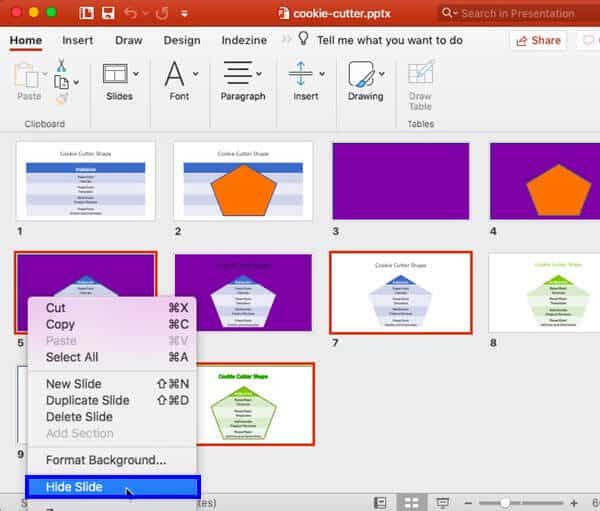
Learn how to hide and unhide slides in PowerPoint 2016 for Mac.
Filed Under:
PowerPoint 2016
Tagged as: Hide, Mac, Office 2016, Office for Mac, PowerPoint 2016, PowerPoint for Mac, Tutorials, Unhide
Comments Off on Hide/Unhide Slides in PowerPoint 2016 for Mac

Doug Neff is a writer, facilitator, trainer, and speaker coach with over fifteen years of experience moving people and audiences. As Duarte’s Content Director, Doug has crafted award-winning presentations that influence mindsets, sell revolutionary products, and some are literally changing the world. As an Executive Speaker Coach, he has awakened natural talents, built confidence, and inspired passion in communicators of all experience levels. He’s been fortunate to work with some of the world’s most well-known brands and thought leaders, including: Microsoft, Qualcomm, VMware, Cisco, Apple, Ford, HP, Citrix, numerous TED speakers, author Michael Pollan, productivity guru David Allen, and former Treasury Secretary Timothy Geithner. In his spare time, Doug enjoys urban sketching, photography, and writing.
In this conversation, Doug talks about Duarte’s speaker coaching services.
Filed Under:
Interviews
Tagged as: Coaching, Doug Neff, Duarte Design, Interviews, Speakers
Comments Off on Duarte’s Speaker Coaching Services: Conversation with Doug Neff
We look at two typical clichés for pictures in PowerPoint: Globe and Phone operator pictures, and what you can do to use visual content that is more fresh and inspiring.
PowerPoint 2016 for Windows will learn about Working with Snap to Grid options, and Guides. PowerPoint 2016 for Mac will explore the Recent Tab in Backstage View, and also the Open and Close Tabs in Backstage View. And if that wasn’t enough for this week, make sure you do not miss the quotes, press releases, and templates released in the last week.

Stay informed about updated tutorials and happenings related to PowerPoint and presenting.
Filed Under:
Ezine
Tagged as: Ezine, Indezine, News, PowerPoint
Comments Off on PowerPoint and Presenting News: March 26, 2019
Sometimes we come across slides that can be hazardous to our vision! One look at a terrible slide, and it really doesn’t matter if the content is great or not. The reason why it no longer matters is because such slides have nothing understated about them, and they seem to ensure that audiences get distracted. You might end up with a similar slide for no fault of yours, because someone else prepared them for you!

Learn how to reset your slide formatting with one click in PowerPoint 2016 for Mac.
Filed Under:
PowerPoint 2016
Tagged as: Mac, Office 2016, Office for Mac, PowerPoint 2016, PowerPoint for Mac, Reset, Tutorials
Comments Off on Reset Slides in PowerPoint 2016 for Mac
Microsoft and the Office logo are trademarks or registered trademarks of Microsoft Corporation in the United States and/or other countries.