
This is the print version of this page. All content is copyright Indezine.com 2000-2026.
Thoughts and impressions of happenings in the world of PowerPoint and presentations, continuously updated since 2003.
See Also:
PowerPoint and Presenting Notes
PowerPoint and Presenting Glossary
By James Ontra
Storytelling is the most important facet of effective presentations. Unfortunately, in the age of PowerPoint, many presenters rely too much on technology and forget how important stories are. To get the results you’re looking for, build your presentations on a foundation of great stories—not the other way around.

Image: Pixabay
Filed Under:
Guest Posts
Tagged as: Guest Post, James Ontra, Opinion, Presentations, Shufflrr, Storytelling
Comments Off on The Art of Storytelling: Presentations Are Corporate Storytelling
We feature Damjan Taylor, who talks about using PowerPoint’s Morph transition to create interactive slide navigation. We also bring you a download for Animated Headshots in PowerPoint and also show you how you can create it on your own.
PowerPoint 2016 for Windows users can learn about changing one animation to another. You can also learn about the New tab options in Backstage view. PowerPoint 2016 for Mac users can explore adding new slide layouts. PowerPoint Online users can find out ways to insert new slides. And if that wasn’t enough for this week, make sure you do not miss the quotes, press releases, and templates released in the last seven days.

Stay informed about updated tutorials and happenings related to PowerPoint and presenting.
Filed Under:
Ezine
Tagged as: Ezine, Indezine, News, PowerPoint
Comments Off on PowerPoint and Presenting News: May 8, 2018
Applying a Theme in PowerPoint applies Theme Colors, Theme Fonts, Theme Effects, Theme Backdrops, and much more. However there are scenarios in which you really don’t require such a complete makeover or metamorphosis. In that case, you can still apply Theme Colors and Theme Fonts and leave all other Theme attributes unchanged.
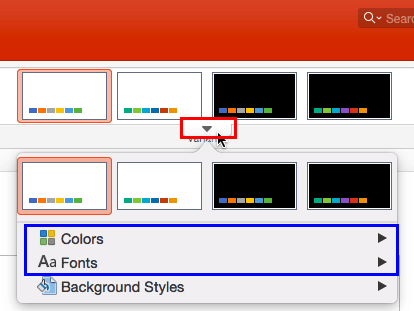
Learn how to apply Theme Colors and Theme Fonts in PowerPoint 2016 for Mac.
Filed Under:
PowerPoint 2016
Tagged as: Mac, Office 2016, Office for Mac, PowerPoint 2016, PowerPoint for Mac, Theme Colors, Theme Fonts, Themes
Comments Off on Applying Theme Colors and Theme Fonts in PowerPoint 2016 for Mac
Like many other tasks you do in PowerPoint, inserting a new slide can be done in multiple ways. You just need to find a way that works best for you. The following steps show you how you can do this simple task in PowerPoint Online.
Learn how you can insert a new slide in PowerPoint for the Web.
Filed Under:
PowerPoint for the Web
Tagged as: Insert, Interface, PowerPoint for the Web, Slides, Tutorials
Comments Off on Inserting a New Slide in PowerPoint for the Web
Do you want an animated slide with headshots that self-animate in sequence, one after the other? We have a sample presentation that may just be what you need. The presentation you download has two layers of headshots, with 12 headshots in each layer.

Download and use this Animated Headshots sample presentation.
Filed Under:
Presentation Bank
Tagged as: Animation, PowerPoint, Presentation Samples, Store
Comments Off on Animated PowerPoint Slides: Animated Headshots
Microsoft and the Office logo are trademarks or registered trademarks of Microsoft Corporation in the United States and/or other countries.