
This is the print version of this page. All content is copyright Indezine.com 2000-2026.
Thoughts and impressions of happenings in the world of PowerPoint and presentations, continuously updated since 2003.
See Also:
PowerPoint and Presenting Notes
PowerPoint and Presenting Glossary
When you are working with multiple pictures on a slide, their position, formatting, and size may be required to be the same across successive slides. This can be achieved manually using resizing and aligning options, although you will use an inordinate amount of time making sure that the pictures look consistent slide after slide. Even then, there are chances you may not be too happy with the results or the time it takes to make these changes. You can get over this problem by using a new Slide Layout with a picture placeholder. As we learned in previous tutorials, a placeholder is a container that you can use to fill in with all sorts of content types such as text, pictures, charts, SmartArt graphics, etc.

Learn how to format Picture placeholders in PowerPoint 2016 for Mac.
Filed Under:
PowerPoint 2016
Tagged as: Mac, Office 2016, Office for Mac, Pictures, Placeholders, PowerPoint 2016, PowerPoint for Mac, Tutorials
Comments Off on Formatting Picture Placeholders in PowerPoint 2016 for Mac
While you can open and save files from any file location you access on your computer or network, you can also add more places from where you can open and save files. You see options to add a place in both the Open and Save As tabs of Backstage view. By default, your OneDrive location is already available as a place, only if you have signed in. But you can add more places too, as we shall explore in this tutorial.

Learn to add places to open and save files in PowerPoint 2016 for Windows.
Filed Under:
PowerPoint 2016
Tagged as: Interface, Microsoft Windows, Office 2016, Places, PowerPoint 2016, Tutorials
Comments Off on Add Places in PowerPoint 2016 for Windows
Do you need to create video clips from your PowerPoint slides? Then you must look at our Before You Create a Video Clip From PowerPoint feature. James Ontra of Shufflrr talks about the Art of Storytelling.
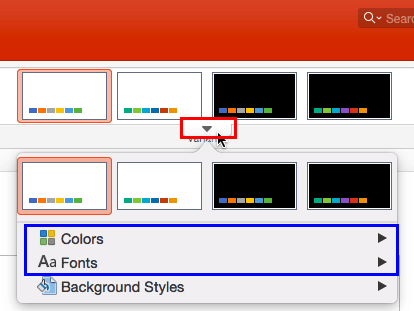
PowerPoint 2016 for Windows users can learn about the Options tab in Backstage view. We also look at the Open and Close tabs. PowerPoint 2016 for Mac users can explore applying Theme colors and Theme fonts, and inserting new placeholders in Slide Layouts. PowerPoint 2013 users can learn about New tab in Backstage view. And if that wasn’t enough for this week, make sure you do not miss the quotes, press releases, and templates released in the last seven days.
Stay informed about updated tutorials and happenings related to PowerPoint and presenting.
Filed Under:
Ezine
Tagged as: Ezine, Indezine, News, PowerPoint
Comments Off on PowerPoint and Presenting News: May 15, 2018
Text boxes in PowerPoint may need to be moved and resized within different areas of the slide. While you may think that selecting and resizing is all that is to be done, that’s not the entire truth because there’s so much more you can do even with mere resizing, if you know that these options exist!

Learn how to resize text boxes on a slide in PowerPoint 2016 for Mac.
Filed Under:
PowerPoint 2016
Tagged as: Mac, Office 2016, Office for Mac, PowerPoint 2016, PowerPoint for Mac, Resize, Text Boxes, Tutorials
Comments Off on Resize Text Boxes on a Slide in PowerPoint 2016 for Mac
In PowerPoint, a placeholder is a container that you can use to fill in with some content. When you launch PowerPoint, you will see distinctive boxes that invite you to add some content. Haven’t you noticed the “Click to add title,” “Click to add text,” or “Click to add picture” suggestions? All these boxes are placeholders. Each of the default layouts comprises a collection of various placeholders. If none of the available layouts work for you, you can create your own layout with custom placeholders in PowerPoint 2016 for Mac.

Learn how to add new placeholders within slide layouts in PowerPoint 2016 for Mac.
Filed Under:
PowerPoint 2016
Tagged as: Mac, Office 2016, Office for Mac, Placeholders, PowerPoint 2016, PowerPoint for Mac, Slide Layouts, Tutorials
Comments Off on Inserting New Placeholders in Slide Layouts in PowerPoint 2016 for Mac
Microsoft and the Office logo are trademarks or registered trademarks of Microsoft Corporation in the United States and/or other countries.