
This is the print version of this page. All content is copyright Indezine.com 2000-2026.
Thoughts and impressions of happenings in the world of PowerPoint and presentations, continuously updated since 2003.
See Also:
PowerPoint and Presenting Notes
PowerPoint and Presenting Glossary
First, we feature AlexAnndra Ontra who discusses how Shufflrr and good presentation management strategy makes jobs easier and helps users become more effective in their roles. We bring back a feature we first posted 14 years ago, and find it so amazing that Richard E Mayer’s interview about the Cognitive Load of PowerPoint is as relevant today as it was at the time it was first released. Emma Bannister talks about her new book, Visual Thinking. We look at Five Ways to Improve PowerPoint Presentations. And then, we feature Gil Segal who talks about the new ToolsToo v7.1, an add-in for PowerPoint. We also explore how you can edit captions, and align, hide, show, or remove them using the STAMP add-in for PowerPoint.
PowerPoint 2016 for Windows users can learn about the Present Online feature and options within the Share tab of Backstage view. PowerPoint 2016 for Mac users can learn about Notes Master view. And if that wasn’t enough for this week, make sure you do not miss the quotes, press releases, and templates released in the last seven days.

Stay informed about updated tutorials and happenings related to PowerPoint and presenting.
Filed Under:
Ezine
Tagged as: Ezine, Indezine, News, PowerPoint
Comments Off on PowerPoint and Presenting News: February 27, 2018
 An established media exec and serial entrepreneur, Guillaume Otrage has brought a number of 3D graphic technologies to market, that are now standard 3d visualization and interactive communication in numerous Fortune 500 companies including Sony, Electronic Arts, and P&G. Through his career, Guillaume built major partnerships with top brands in 3D visualization, such as Nvidia, HP, and Barco. After being VP of Global Sales for one of the brands at Dassault Systemes (the developer of leading CAD software such as Solidworks and CATIA) Guillaume co-founded with Krzysztof Kobus Wow3D to bring the 3D “Wow” of Pixar to PowerPoint.
In this conversation, Guillaume talks about Wow3D.
Filed Under:
Interviews
Tagged as: 3D, Add-in, Interviews, PowerPoint, Wow3D
Comments Off on Wow3D: Conversation with Guillaume Otrage
CEO Paul Balogh and CTO Cristian Dinu have known each other and worked together for over 15 years. They are both born and raised in Romania. Brian Daly is Commercial Director and joined in October 2016. He is American and an ex-investment banker. In this conversation, the three of them talk about Hypersay, a product that improves PowerPoint by making it a conversation.

Brian, Paul, Cristian and… Hypersay’s Roadmap for 2018
Filed Under:
Interviews
Tagged as: Brian Daly, Cristian Dinu, Hypersay, Interactivity, Interviews, Paul Balogh
Comments Off on Hypersay: Conversation with Paul Balogh, Cristian Dinu, and Brian Daly

Gil Segal is the creator of ToolsToo and a senior software consultant. Gil is always on the lookout for ways to automate manual tasks in any software he uses and has been a PowerPoint power-user since the mid-90s.
In this interview, Gil talks about the new ToolsToo v7.1 add-in for PowerPoint.
Filed Under:
Interviews
Tagged as: Add-in, Gil Segal, Interviews, PowerPoint, ToolsToo
Comments Off on ToolsToo v7.1 Add-in for PowerPoint: Conversation with Gil Segal
Each slide in your PowerPoint deck can have some notes associated with it, and these are placed in the Notes Pane area. Do you want to print all these slide notes? Yes, you can. However, very few people realize that you can print these notes in the form of a properly structured Notes Page. This might be among the least used PowerPoint options, but this certainly is among the most useful ones!
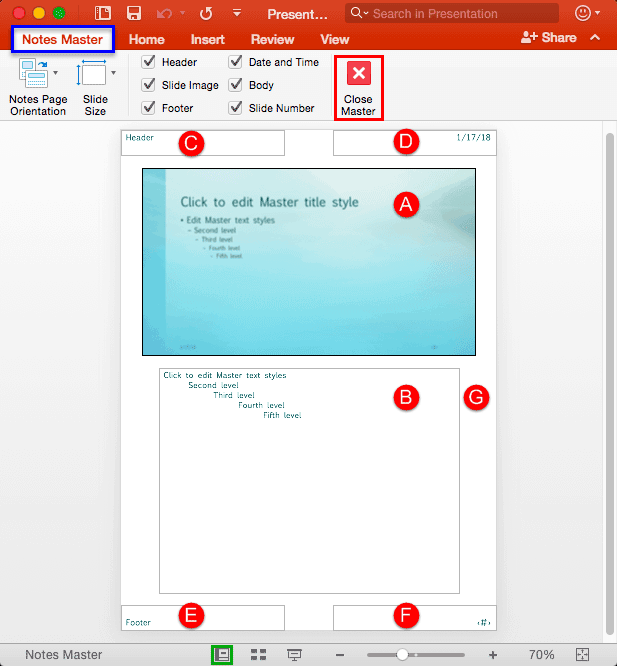
Learn about Notes Master view in PowerPoint 2016 for Mac.
You May Also Like:
Filed Under:
PowerPoint 2016
Tagged as: Mac, Notes Master, Office 2016, Office for Mac, PowerPoint 2016, PowerPoint for Mac, Tutorials, View
Comments Off on Notes Master View in PowerPoint 2016 for Mac
Microsoft and the Office logo are trademarks or registered trademarks of Microsoft Corporation in the United States and/or other countries.