
This is the print version of this page. All content is copyright Indezine.com 2000-2026.
Thoughts and impressions of happenings in the world of PowerPoint and presentations, continuously updated since 2003.
See Also:
PowerPoint and Presenting Notes
PowerPoint and Presenting Glossary
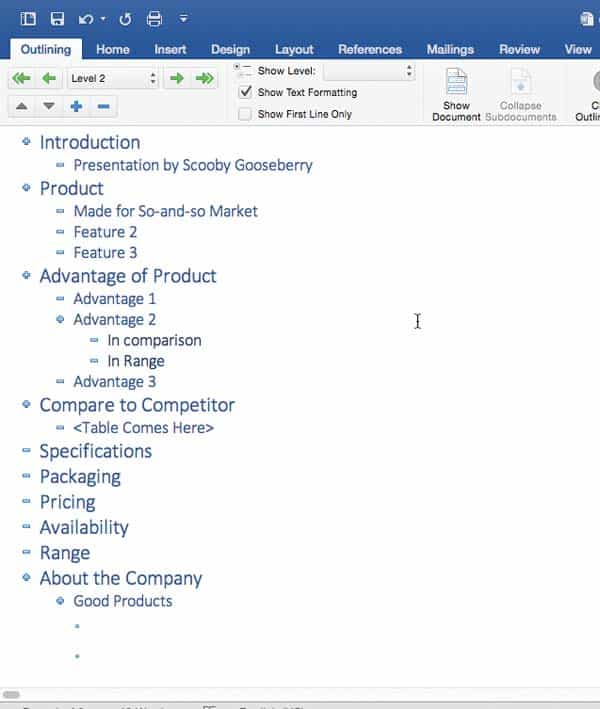
Typically, there are three common ways in which you can create slides in PowerPoint. The first of these three ways is to create an outline, but all these three ways can be combined with each other. Having said so, it is best to start by creating an outline for your presentation in another program. Mac users can create outlines in TextEdit. You can also use Microsoft Word. In this tutorial, we’ll show how you can use Word 2016 for Mac to create an outline for a PowerPoint presentation.
Filed Under:
PowerPoint All Versions
Tagged as: Mac, Office 2016, Office for Mac, Outline, PowerPoint, PowerPoint 2016, Word
Comments Off on Creating PowerPoint Outlines in Microsoft Word 2016 for Mac
The Backstage view in PowerPoint for the Web provides access to the File menu and some other options. However, don’t expect the Backstage view within PowerPoint for the Web to be as full featured, compared to the Backstage view in PowerPoint’s desktop versions—in fact, there’s almost no feature to control interface elements. The options here mainly accomplish basic tasks such as sharing, saving, downloading, etc.

Explore Backstage view in PowerPoint for the Web.
Filed Under:
PowerPoint for the Web
Tagged as: Backstage, Interface, PowerPoint for the Web, Tutorials
Comments Off on File Menu and Backstage View in PowerPoint for the Web
 Lia Barnakova is a strategy and leadership consultant with a passion for teaching others how to make presentations more “spicy” and engaging. Also known online as “P-Spice,” she regularly shares innovative presentation tricks and emerging technologies on her popular YouTube channel and Spicy Presentations blog. In her full-time job, she works with Fortune 500 clients to envision the future and develop the capabilities needed to stay ahead of changing customer needs, emerging competitors, and disruptive technologies.
In this conversation, Lia talks about her sessions at the upcoming Presentation Summit 2017 in Clearwater Beach, FL.
Filed Under:
Events
Tagged as: Events, Interviews, Lia Barnakova, PowerPoint Spice, Presentation Summit
Comments Off on Presentation Summit 2017: Conversation with Lia Barnakova
 Sam Horn, CEO of the Intrigue Agency is on a mission to help people create quality brands, businesses, books and presentations that add value for all involved. Her TEDx talk and books – POP!, Tongue Fu!, IDEApreneur, Washington Post bestseller Got Your Attention? – have been featured in New York Times, Forbes, INC and on NPR, and presented to NASA, Boeing, Capital One, ASAE, National Geographic. Accenture, Intel and YPO.
In this conversation, Sam talks about her keynote at the upcoming Presentation Summit 2017 in Clearwater Beach, FL.
Filed Under:
Events
Tagged as: Events, Interviews, Presentation Summit, Sam Horn
Comments Off on Presentation Summit 2017: Conversation with Sam Horn
We bring you an amazing post by Kurt Dupont who explains in detail how PowerPoint can be used for digital signage. Ellen Finkelstein talks about the 2017 edition of her awaited Outstanding Presentations Workshop series of webinars. Dave Paradi discusses his new Annoying PowerPoint Survey. And Steve Campion of Toastmasters talks about 7 Steps to Deliver a Powerful Presentation. We also bring you Jigsaw Shapes for PowerPoint. As part of our series on the upcoming Presentation Summit, we feature Carmen Simon and Sheila McGurin.
We look at using Data Labels in PowerPoint charts, Outlines in PowerPoint, and creating outlines in Notepad. For PowerPoint Online users, we explore the Presentation Gallery, and PowerPoint 2016 for Windows users can learn about adding Headers and Footers to slides, and to Notes or Handout pages. Finally, do not miss the quotes, press releases, and templates of this week.

Stay informed about updated tutorials and happenings on Indezine.
Filed Under:
Ezine
Tagged as: Ezine, Indezine, News, PowerPoint
Comments Off on PowerPoint and Presenting News: September 19, 2017
Microsoft and the Office logo are trademarks or registered trademarks of Microsoft Corporation in the United States and/or other countries.