
This is the print version of this page. All content is copyright Indezine.com 2000-2026.
Thoughts and impressions of happenings in the world of PowerPoint and presentations, continuously updated since 2003.
See Also:
PowerPoint and Presenting Notes
PowerPoint and Presenting Glossary
Do you need to share your presentations with others? If yes, it’s a good idea to make sure that your presentations are set to be read-only before you share them. To make your file read-only, you should look at the Mark as Final option in PowerPoint. Note that this option is not as restrictive as password protecting a PowerPoint presentation. The Mark as Final option tries to prevent users from typing, editing commands, and proofing. All editing options are disabled or turned off. However, do remember that Mark as Final is not a security feature and it can be easily reversed by the recipient of your file.

Learn how to apply the Mark as Final option to a presentation in PowerPoint 2016 for Windows.
Filed Under:
PowerPoint 2016
Tagged as: Microsoft Windows, Office 2016, PowerPoint 2016, Share, Tutorials
Comments Off on Mark as Final Option in PowerPoint 2016 for Windows
PowerPoint celebrates 30 years. Who could be better than Robert Gaskins, the founder of PowerPoint to reflect on what users think about PowerPoint today! We bring you an exclusive feature with him. We then get one of best Toastmasters, Christopher Hirsch to tell us more about using fairy stories to boost your business. We then look back two and a half centuries ago to explore Baskerville, a celebrated typeface.
In the Tutorials section, PowerPoint 2016 users will learn about viewing add-ins installed, and also how they can manage and load add-ins. PowerPoint 2013 users can explore the Thesaurus and viewing add-ins. PowerPoint 2010 users can learn about Research Options. Finally, do not miss the press releases and templates of this week.

Stay informed about updated tutorials and happenings on Indezine.
Filed Under:
Ezine
Tagged as: Ezine, Indezine, News, PowerPoint
Comments Off on PowerPoint and Presenting News: May 9, 2017
In PowerPoint 2016, all information that you need about your currently active presentation is available in a single easily accessible location. This location is the Info pane of Backstage View. Using the options available within this pane, you can access information about permissions set for the active presentation, prepare your content for sharing, and also possibly recover older versions of unsaved files. In addition, the Info pane also provides access to many more properties.

Filed Under:
PowerPoint 2016
Tagged as: Backstage, Microsoft Windows, Office 2016, Options, PowerPoint 2016, Tutorials
Comments Off on Info Tab Options in Backstage View of PowerPoint 2016 for Windows
PowerPoint add-ins are awesome, small mini-programs that reside in PowerPoint to extend abilities. While most add-ins automatically show up inside PowerPoint, some of them need to be loaded manually. And there may be times when you want to disable an add-in rather than completely uninstalling it. It’s possible to view, load and manage add-ins manually within PowerPoint, as we will show you in this tutorial.
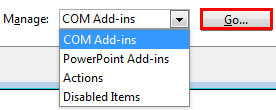
Learn to manage and load add-ins in PowerPoint 2013 for Windows.
Filed Under:
PowerPoint 2013
Tagged as: Add-in, Microsoft Windows, Office 2013, Options, PowerPoint 2013, Tutorials
Comments Off on Manage and Load Add-ins in PowerPoint 2013 for Windows
Reflections from Robert Gaskins
In early 2017, in view of the upcoming 30th anniversary of PowerPoint, Microsoft wanted to know how the application was viewed by millennials, people aged 18‒34. To find out, they commissioned a poll among users of social media (Snapchat and Instagram). To Microsoft’s surprise, they found that 80% of millennial respondents considered PowerPoint to be a great tool, an opinion comparable to people old enough to be their parents (gen X) or grandparents (baby boomers).
Filed Under:
Guest Posts
Tagged as: Death by PowerPoint, Guest Post, Memorabilia, PowerPoint, Robert Gaskins
Comments Off on PowerPoint at Age 30 Has Many Fans Among Millennials
Microsoft and the Office logo are trademarks or registered trademarks of Microsoft Corporation in the United States and/or other countries.