
This is the print version of this page. All content is copyright Indezine.com 2000-2026.
Thoughts and impressions of happenings in the world of PowerPoint and presentations, continuously updated since 2003.
See Also:
PowerPoint and Presenting Notes
PowerPoint and Presenting Glossary
We begin with a feature about Carmen Taran’s keynote at the upcoming Presentation Summit. Make sure you read what she says, even if you won’t attend the conference! We also feature Nova Fisher this week who talks about the new Xara Designer Pro X product.
In the Tutorials section, we explore Adding New Shapes to SmartArt graphics in PowerPoint 2013 for Windows–we also explore Changing Colors and Changing and Deleting Shapes in SmartArt. Finally, do not miss the new press releases and templates of this week.
Read Indezine’s PowerPoint and Presenting News.
Filed Under:
Ezine
Tagged as: Ezine, Indezine, News, PowerPoint
Comments Off on PowerPoint and Presenting News: September 20, 2016

Rick Altman has been hired by hundreds of companies, listened to by tens of thousands of professionals, and read by millions of people, all of whom seek better results with their presentation content and delivery. He covers the whole of the industry, from message crafting, through presentation design, slide creation, software technique, and delivery. Rick claims to have invented desktop publishing back in 1982 and can show a galley sheet of type that was produced by connecting his Osborne 1 computer to a typesetter across town with a 300-baud modem (that cost $800). An avid sportsman, he was not a good enough tennis player to make it onto the professional tour. All the rest of this has been his Plan B…
In this conversation, Rick discusses his sessions at the upcoming Presentation Summit 2016 series.
Filed Under:
Events
Tagged as: Events, Interviews, PowerPoint, Presentation Summit, Rick Altman
Comments Off on Presentation Summit 2016: Conversation with Rick Altman
When change colors of a SmartArt graphic, fill colors of individual shapes within the SmartArt change. Other attributes such as outlines or effects are not altered. Rather than individually add these attributes to your SmartArt, you can use the all-inclusive SmartArt Styles option to overcome this limitation. In this tutorial, you will learn how to apply SmartArt Styles to the selected SmartArt graphics in PowerPoint 2013.

Learn how to apply SmartArt Styles in PowerPoint 2013 for Windows.
Filed Under:
PowerPoint 2013
Tagged as: Diagrams, Graphics, Microsoft Windows, Office 2013, PowerPoint 2013, SmartArt, Tutorials
Comments Off on Apply SmartArt Styles in PowerPoint 2013 for Windows
After inserting a SmartArt graphic in your slide, you can change the color for the entire SmartArt graphic — this applies new colors to the entire SmartArt graphic including the various shapes it contains. However there may be times when you want one of the shapes to be colored differently — in this tutorial we’ll explore the fill, line, and effect options which can be applied to individual shapes within a SmartArt graphic in PowerPoint 2013.

Filed Under:
PowerPoint 2013
Tagged as: Diagrams, Graphics, Microsoft Windows, Office 2013, PowerPoint 2013, SmartArt, Tutorials
Comments Off on Shape Fills, Lines, and Effects for SmartArt in PowerPoint 2013 for Windows
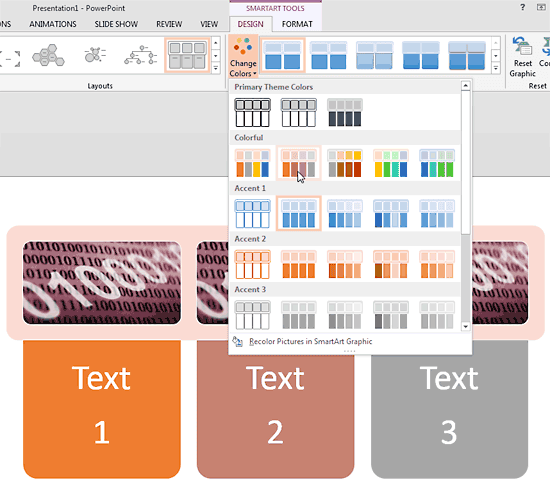
Although the default colors of an inserted SmartArt graphic may work the best, you may also want to change the colors of the shapes comprising the SmartArt graphic. You change the colors of everything within the SmartArt graphic at one go or change colors of individual shapes within the SmartArt graphic. Follow these steps to learn how you can change colors of your SmartArt graphic in PowerPoint 2013 for Windows.
Learn how to change colors for a SmartArt graphic in PowerPoint 2013 for Windows.
Filed Under:
PowerPoint 2013
Tagged as: Diagrams, Graphics, Microsoft Windows, Office 2013, PowerPoint 2013, SmartArt, Tutorials
Comments Off on Change Colors for a SmartArt Graphic in PowerPoint 2013 for Windows
Microsoft and the Office logo are trademarks or registered trademarks of Microsoft Corporation in the United States and/or other countries.