
This is the print version of this page. All content is copyright Indezine.com 2000-2026.
Thoughts and impressions of happenings in the world of PowerPoint and presentations, continuously updated since 2003.
See Also:
PowerPoint and Presenting Notes
PowerPoint and Presenting Glossary

Paul Stannard is the founder and CEO of SmartDraw Software. A self-taught software developer, Stannard began his career in the PC industry in 1980, founding a software company that developed software for Apple computers. Since that time, he has written more than a dozen published software applications, primarily software designed to help people visualize information. Stannard wrote the first version of SmartDraw and continues to play a key role in developing the company’s software products.
In this conversation, Paul discusses SmartDraw Cloud.
Filed Under:
Interviews
Tagged as: Graphics, Interviews, Paul Stannard, SmartDraw
Comments Off on SmartDraw Cloud: Conversation with Paul Stannard

Chantal Bossé got hooked on PowerPoint while doing instructional design in the mid-90s. Convinced there was a better way to present, she started CHABOS in 2004 and became a presentations and visual communications expert. She helps entrepreneurs, speakers, and trainers improve their presentations’ impact by having a clear message, great visuals, and a memorable delivery, whether in French or English. Chantal has been a speaker at various business events and a few international webinars, she is a presentation coach for the TEDxQuebec event.
In this conversation, Chantal talks about the benefits of creating large decks that have subsets suitable for specific audiences.
Filed Under:
Interviews
Tagged as: Case Studies, Chantal Bossé, Interviews, PowerPoint
Comments Off on Creating Gigantic PowerPoint Decks: Conversation with Chantal Bossé
Picture fills may appear convincing or confusing depending upon the type of picture you use for the fill. Do remember that using a detailed or crowded picture as a fill for a small shape will get you no awards for slide design! It is best to use pictures that have one focused object or are subtle in nature for this purpose. Any shape on your slide in PowerPoint 2016 can be provided with a picture fill in the same way as you add or change solid fills or gradient fills.
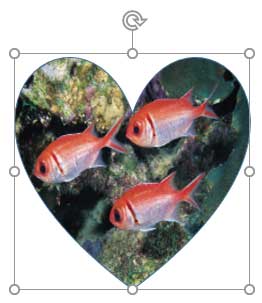
Learn how you can use a Picture to fill selected shapes in PowerPoint 2016 for Windows.
Filed Under:
PowerPoint 2016
Tagged as: Fills, Office 2016, Pictures, PowerPoint 2016, Shapes, Tutorials
Comments Off on Add Picture Fills to Shapes in PowerPoint 2016 for Windows
We start with 12 engaging presenter behaviors to keep your audience awake — this is explained by Claudyne Wilder. We then look at a timeline that looks like a road map. We feature Richard Michaels, who talks about Zapps Pro, his fantastic add-in that connects Word and PowerPoint. Ellen Finkelstein explains how you can help your audience remember your points by three techniques for highlighting important words. And Sandra Johnson talks about the new Presentation Guild, and also a survey in which you can take part.
PowerPoint 2016 for Windows users can learn more about fills for Slide Backgrounds, and also about shapes that have no outline. Finally, do not miss the new templates of this week!

Read Indezine’s PowerPoint and Presenting News.
Filed Under:
Ezine
Tagged as: Ezine, Indezine, News, PowerPoint
Comments Off on PowerPoint and Presenting News: May 10, 2016
Whenever a new shape is inserted on a slide in PowerPoint 2016, it is filled by default with a solid color (or something else depending on the Theme your presentation is based on). Other than a solid fill type, PowerPoint 2016 provides several more options that let you fill a shape with a picture, a gradient, a pattern, or a texture — and we have explored these other fill options in our Fills for Shapes in PowerPoint 2016 tutorial. In this tutorial, we’ll show you how you can work with solid color fills.

Learn how to add solid fill to selected shapes in PowerPoint 2016.
Filed Under:
PowerPoint 2016
Tagged as: Fills, Office 2016, PowerPoint 2016, Shapes, Tutorials
Comments Off on Add Solid Fills to Shapes in PowerPoint 2016 for Windows
Microsoft and the Office logo are trademarks or registered trademarks of Microsoft Corporation in the United States and/or other countries.