
This is the print version of this page. All content is copyright Indezine.com 2000-2026.
Thoughts and impressions of happenings in the world of PowerPoint and presentations, continuously updated since 2003.
See Also:
PowerPoint and Presenting Notes
PowerPoint and Presenting Glossary

Claudyne Wilder coaches executives, managers, and salespeople on how to deliver presentations that get to the message. Her clients give compelling, passionate presentations. Her company has an ongoing contract to give her Get to the Message: Present with a Purpose workshop at a Fortune 100 Global Pharmaceutical Company. Claudyne brings a unique and invigorating perspective to her work from her years of studying the Argentine Tango.
In this conversation, Claudyne discusses her new product, TorchMetrics, that lets you find out more about your audience’s perceptions of your presentations.
Filed Under:
Interviews
Tagged as: Claudyne Wilder, Interviews, Survey, Torchmetrics
Comments Off on TorchMetrics: Conversation with Claudyne Wilder
Gradient fills are typically blended fills between two or more colors that graduate from one color to another. Although shapes filled with gradients look so incredible, make sure you choose the colors that form the gradient very carefully. PowePoint’s basic gradients are all very useable since they just blend a basic color with white or black making the result lighter or darker.
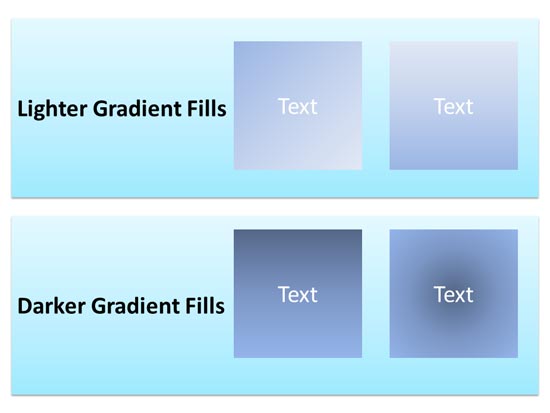
Learn to use Gradient fills for selected shapes in PowerPoint 2016 for Windows.
Filed Under:
PowerPoint 2016
Tagged as: Fills, Gradients, Office 2016, PowerPoint 2016, Shapes, Tutorials
Comments Off on Add Gradient Fills to Shapes in PowerPoint 2016 for Windows

Carmen Simon‘s presentations and workshops help business professionals to use communication and presentation skills to increase revenue, train or motivate others, and overall to stand out from too much sameness in the industry. A published author, Dr. Simon is frequently invited as a keynote speaker at various conferences. She is the founder of Memzy, a company that helps business professionals from all fields improve their presentation skills, whether they deliver content face-to-face, online, or create on-demand presentations.
In this interview, Carmen talks about her new book, Impossible to Ignore.
Geetesh: Carmen, your new book Impossible to Ignore was just released. What motivated and inspired you to create this book?
 Carmen: There were several things that converged and pushed me into action. A few years ago, I completed a study to answer a simple question: how much would people remember from a 20-slide presentation after 2 days? Each slide had only one message. On average, participants remembered 4 slides. However, out of 1,500 people who were part of the study, 500 remembered zero. I was humbled by those results, particularly since I noticed that many people did not admit to remembering nothing. Many made things up.
As a result of that study, I started asking another question: can we control what people remember? Or is memory a random process, typically left to chance? So I created a few variations of the study, and discovered that, on average, people did not necessarily remember more than 4 for slides but it was possible to control what they remembered. For example, when I applied techniques such as distinctiveness, highly emotional visuals, or broke a pattern the audience learned to expect, I could impact recall with precision. I concluded after the study that it’s not important to convince people to remember more things, but rather to convince them to remember the right things. Sometimes, the mistake we make when we share content with others is that we aim for sharing a lot, instead of focusing on the precision of what people will take away.

Break a pattern people learn to expect in order to influence recall
Geetesh: What is easy to remember and what is easy to forget?
Carmen: Things that are already part of people’s habits are easy to remember. Habits are automatic, they require very little cognitive energy and therefore are more likely to put into action. This is why it is important to link a new message to existing habits. For example, if I wanted you to remember to take vitamins and I know you’re an avid TV watcher, I would place the vitamin bottle next to the remote control. Each time you indulge your existing habit, you’re also seeing a reminder of a new one. With enough repetition, even if the vitamin bottle is not there (let’s say you’re on vacation), when you pick a TV remote, your brain will prompt you to think of vitamins. The mistake many content creators make is to speak of content outside of their audiences’ existing habits.
What is easy to forget? To answer this, we must consider how memory works: when we are exposed to information, we encode it, store it, consolidate it, and later retrieve it. Things can go wrong at each of these four stages, and the result is a forgettable message. For example, when people multitask and their attention is split, it is difficult to encode something well and retrieve it later. Or, if we encode it, we don’t practice it long enough to store it (sometimes people rush through messages, or bombard an audience with so many messages that it is hard for any of them to stick long-term). Memories are not created instantly, they need consolidation time and sleep is known to mediate this consolidation process. So if you’re presenting to an audience who is sleep-deprived or will be exposed to even more information after listening to you, it will be difficult for memories to solidify. And finally, even if the first three stages go perfectly – we encode, store, and consolidate – it is still possible for a message not to come to mind when we want to retrieve it. This may be because a memory does not have a “hook” strong enough to pull it from an inventory of memories. Typically, this happens due to interference. Sometimes there are so many similar messages, that it is hard to tell what is what. Think of slides that use the same layout (text on the left, picture on the right) – how many of these slides would you be able to retrieve from memory a few days later? Forgetting happens when nothing stands out.
For more information on how the brain processes information, remembers and decides to act, read Impossible to Ignore, available at Amazon or anywhere else that books are sold.
The views and opinions expressed in this blog post or content are those of the authors or the interviewees and do not necessarily reflect the official policy or position of any other agency, organization, employer, or company.
Filed Under:
Interviews
Tagged as: Books, Carmen Simon, Interviews, Memory
Comments Off on Impossible to Ignore: Conversation with Carmen Simon

Bob Befus is passionate about helping scientists and clinicians present the results of their research. In the 1980s, he co-founded Spectrum Multi Media Inc. as a full-service presentation graphics company servicing medical and pharmaceutical organizations. In later years, the company name was changed to Research Presentation Strategies (RPS) to reflect its focus on helping customers with high profile regulatory and scientific presentations. RPS developed and manages SlideSource, a presentation management tool that lets you organize and share your presentations from one secure online library anytime, anywhere.
In this conversation, Bob discusses ways of coping with the challenges of managing many slides.
Geetesh: Bob, your research shows that 76% of PowerPoint users have trouble locating the slides they need. Moreover, even if they find what they need, 80% of users have a tough time combining slides from different presentations. Can you share why people face these difficulties for such seemingly simple tasks?
Bob: In a recent RPS survey of 1,300 individuals, 47% of respondents indicated that they used PowerPoint to some extent in their work. According to the Kaiser Family Foundation, there are more than 56 million white collar workers in the United States which means that there may be as many as 26 million workers in the US who use PowerPoint to some extent in their jobs.
That is a lot of people making an awful lot of slides. And when building presentations, we found that 60% start from an existing set of slides to create a new presentation, so managing versions of presentations is an important part of their work. This is especially true for the 30% of users who work in PowerPoint frequently.
The problem is that 76% of all the PowerPoint users who responded said they have trouble locating the slides and presentations they need when they need them. This is very consistent with research in the area of knowledge management where it’s been well documented that employees spend a great deal of their time searching for… not finding… and recreating information1.
57% of PowerPoint users said they had experienced version control problems, and in general, the more frequent the user, the more frequent the problems.

While managing files and versions seems like it should be a simple task, when it comes to PowerPoint, it turns out it really isn’t simple at all. That’s because PowerPoint presentations are mutable mobiles, meaning that, unlike a PDF file for example, PowerPoint files change as they travel through an organization.
This creates some major challenges for those who have the responsibility for managing presentation content.

Geetesh: Your research also shows that 90% of users have never used a slide or presentation library. Would using such a library help? Do you have any recommendations?
Bob: Slide libraries have been around for a while, but we were surprised to find that the vast majority of PowerPoint users have never tried one. I think there are a number of reasons for this. First there is just a general lack of awareness about slide library tools and their benefits. For those who have looked into them, many are complex and restrictive. They may not have been designed for how people and organizations actually use PowerPoint. While in theory it might seem effective to provide controls on how people create slides, what templates, fonts and colors they can use, in real life I don’t think this is practical or even desirable. Secondly, most require significant modification of user workflows and processes. I believe a tool should be able to easily conform to your process, not the other way around.

When we developed SlideSource.com, we knew how people actually used PowerPoint in organizations because we had been helping them do exactly that for many years. So we tried to design a simple and intuitive online library that took into account PowerPoint’s strengths and weaknesses as well as how people actually used it day to day. SlideSource.com enables slide library managers to easily organize the slides they want to make available, but at the same time, make it easy for users to download and edit their presentations as needed.
1 Coveo Research: The Knowledge Report, 2015
The views and opinions expressed in this blog post or content are those of the authors or the interviewees and do not necessarily reflect the official policy or position of any other agency, organization, employer, or company.
Filed Under:
Interviews
Tagged as: Add-in, Death by PowerPoint, Interviews, PowerPoint, Presentation Management, Robert Befus, Slide Management, SlideSource
Comments Off on So Many Slides: Conversation with Robert Befus
There is much more you can do to your picture fill for a shape — you can play around with the parameters for transparency, tiling, etc. This tutorial covers these advanced options for picture fills in PowerPoint 2016. These extra options can help you if you want your picture fill to stand apart and look out of the ordinary.

Learn to use advanced options for Picture fills in PowerPoint 2016 for Windows.
Filed Under:
PowerPoint 2016
Tagged as: Fills, Office 2016, Pictures, PowerPoint 2016, Shapes, Tutorials
Comments Off on Advanced Picture Fill Options in PowerPoint 2016 for Windows
Microsoft and the Office logo are trademarks or registered trademarks of Microsoft Corporation in the United States and/or other countries.