
This is the print version of this page. All content is copyright Indezine.com 2000-2026.
Thoughts and impressions of happenings in the world of PowerPoint and presentations, continuously updated since 2003.
See Also:
PowerPoint and Presenting Notes
PowerPoint and Presenting Glossary
In PowerPoint 2016 for Windows, the Slide Master influences the layout and look of all slides in your presentation. Make changes to the Slide Master and those changes reflect on your presentation slides. For example, you can apply another Background Style so that all Slide Layouts and slides in your presentation use this changed slide background. In this tutorial, we will explore how you can choose from any of the 12 available Background Styles to apply to the Slide Master.

Learn how to change Background Styles within the Slide Master in PowerPoint 2016 for Windows.
Filed Under:
PowerPoint 2016
Tagged as: Background, Microsoft Windows, Office 2016, PowerPoint 2016, Slide Master View, Slide Masters, Templates, Themes, Tutorials
Comments Off on Change Background Styles in the Slide Master in PowerPoint 2016 for Windows

Nancy Duarte is CEO of Duarte, Inc. and the author of Resonate, Slide:ology, and the HBR Guide to Persuasive Presentations.
Her latest book, Illuminate: Ignite Change Through Speeches, Stories, Ceremonies, and Symbols, co-authored with Patti Sanchez, shows how the world’s greatest leaders use powerful communication to move people and ideas forward. She has a passion for teaching others about the power of persuasive presentations to drive change in the world.
In this conversation, Nancy talks about Illuminate.
Geetesh: Nancy, what does Illuminate as a book mean to you as an author? What is its raison d’etre? And how was it to co-author this book with Patti?
Nancy: My firm has been in the Silicon Valley for 28 years now, and my medium-sized organization has been through 5 reinventions, which has led to changes in our industry over the decades. It’s been a challenge to constantly innovate and reinvent the organization while at the same time keeping the employees excited about their unknown future.
 For years, clients would call to have us help with their next great presentation. Then, they started to say that it wasn’t about just spreading the idea. For them, it was about a movement. This meant that we would once again have to shift our firm into understanding what it means to communicate in a way that moves people en masse.
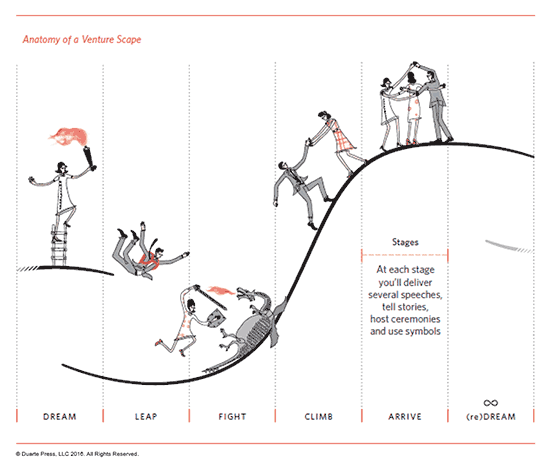
So my co-author Patti and I studied what made great movements work. After three years of intense research and writing, we found that the most successful movements are a lot like the structure of epic tales, and at moments along the way, people need speeches, stories, ceremonies, and symbols to stay motivated.
Geetesh: For a reader, what would the biggest takeaway from Illuminate be?
Nancy: Great leaders are torchbearers. They illuminate just enough of the path into the dark and scary unknown to dissipate fear and motivate their travelers to make the journey with them. When the principles in Illuminate are put into practice, you will empathetically understand the people you’re leading and keenly understand what change feels like to them. This book helps leaders orient themselves in how to communicate change during five different stages of transformation, and design the right moments along the way to keep their travelers motivated.
You May Also Like: Illuminate: Conversation with Patti Sanchez
The views and opinions expressed in this blog are those of the authors and do not necessarily reflect the official policy or position of any other agency, organization, employer, or company.
Filed Under:
Interviews
Tagged as: Books, Duarte Design, Illuminate, Interviews, Nancy Duarte, Patti Sanchez, PowerPoint, Presentation Skills
Comments Off on Illuminate: Conversation with Nancy Duarte
We’ve learnt about how hyperlinks let you do excellent stuff such as linking between slides or even linking to files outside PowerPoint. However, did you know that you can create a hyperlink that links to a file that does not even exist! Click that hyperlink, and a new file gets instantly created. If you are intrigued by how something so strange can happen, read further.

Learn how you can create a new file using a hyperlink in PowerPoint 2013 for Windows.
Filed Under:
PowerPoint 2013
Tagged as: Hyperlinking, Linking, Microsoft Windows, Office 2013, PowerPoint 2013, Tutorials
Comments Off on Create a New File with a Hyperlink in PowerPoint 2013 for Windows
Evolution is an interesting concept because it’s the change that’s natural, logical, and involved. And although Themes (Office Themes) did not exist in their present form before Office 2007 for Windows, they did evolve from the humble PowerPoint template, which continues to co-exist and thrive.
As we explore deeper into how Themes work, you’ll find that PowerPoint uses these Themes in amazing ways, and shares them with Word and Excel. That’s the reason they are called Office Themes rather than PowerPoint Themes.

Learn about Office Themes, and how they work, specifically in PowerPoint.
Filed Under:
PowerPoint All Versions
Tagged as: PowerPoint, Templates, Themes, Tutorials
Comments Off on The Evolution of Office Themes
Icons are the new “in” thing for visuals. In a world where you need to be neutral all the time, icons are a Godsend since they are neutral by nature. Another reason to use icons is because they look great in small sizes, and they also use fewer resources to display. The fact that they go well with contemporary flat and minimal design trends: that just gets you extra brownie points!

Explore sites that provide free icons.
Filed Under:
Clip Media
Tagged as: Downloads, Free, Graphics, Icons, PowerPoint, Resources, Visuals
Comments Off on Free Icon Sites
Microsoft and the Office logo are trademarks or registered trademarks of Microsoft Corporation in the United States and/or other countries.