
This is the print version of this page. All content is copyright Indezine.com 2000-2026.
Thoughts and impressions of happenings in the world of PowerPoint and presentations, continuously updated since 2003.
See Also:
PowerPoint and Presenting Notes
PowerPoint and Presenting Glossary
In a previous tutorial, we looked at how you can create new Sway. Other than creating new Sways from scratch, you can also use your existing content by importing them into Sway. As of now, Sway allows you to import PowerPoint, PDF, and Word files. Once you import these files into Sway, the content in those files no longer works like how it did within the original format. However, that’s precisely what you want to happen because you can hereafter add and edit the imported content within Sway. In this tutorial, we’ll explore how you can import an existing PowerPoint file into Sway.

Learn how to import content into Sway.
Filed Under:
Sway
Tagged as: Docs.com, PowerPoint for the Web, Sway, Tutorials
Comments Off on Import Content into Sway

PowerPoint MVP, Sandra Johnson helps presenters PowerPoint. Responsibly. Sandra has owned her presentation design business, Presentation Wiz, Inc., since 2001. As a certified Woman-owned Business Enterprise, she works with individuals and corporations across the globe to ensure that they PowerPoint. Responsibly. Sandy strives each day to challenge her clients’ preconceived notions about what they think PowerPoint can and cannot do for them. Doing so, elevates their materials and presentations, essentially transforming their personal or corporate brand to a level never before achieved.
In this conversation, Sandra discusses her session at the upcoming Presentation Summit 2015 series.
Geetesh: Sandy, you are doing a session this year at the Presentation Summit called Click Here, Go There: Navigate your slides like a website. Can you tell us more about this session, and what takeaways can the audience expect?
Sandra: This session is about creating interactive presentations. What does that mean?
Well, a well-designed website allows users to easily find the most relevant information when needed, creating a customized experience for each visitor. The same goes for a PowerPoint presentation that leverages Custom Shows and Action Settings, allowing presenters to deliver content on demand, depending on their varying audiences’ needs.
My session will cover the following steps to creating an interactive presentation:
I started using this technique to encourage my clients to put less content on their slides. I found that they felt more comfortable knowing they could access additional content – with a click of a button – if they needed it.


Geetesh: You’ve been part of the Presentation Summit before — can you share your thoughts about how new attendees and repeat visitors can benefit even more from this event?
Sandra: I originally participated in the Presentation Summit as an attendee. I tell the story of how the information I received in the first 10 minutes of a presentation given by Kathy Jacobs, a PowerPoint MVP at the time, paid for my entire investment in the conference. Because you’re among the best and brightest in the presentation industry, you’ll have access to key insights into presentation design, building, and delivering – whether you’re a first-time or repeat attendee.
For many years now, Rick Altman has been hosting the Presentation Summit, a highly popular event that is geared towards users of PowerPoint and other presentation platforms.
Date: September 27 to 30, 2015
Location: Astor Crowne Plaza, New Orleans, USA
The views and opinions expressed in this blog post or content are those of the authors or the interviewees and do not necessarily reflect the official policy or position of any other agency, organization, employer, or company.
Filed Under:
Events
Tagged as: Interviews, PowerPoint, Presentation Summit, Sandra Johnson
Comments Off on Presentation Summit 2015: Conversation with Sandra Johnson
Once you sign into your Sway account, you can create Sways! Yes, the program and the files it creates are both called Sway. So what do you need to create Sways? You can either use the content from your local device, or any content from internet sources such as Bing, OneDrive, YouTube, and Facebook. These created Sways can be shared later as interactive reports, presentations, personal stories, and more.

Explore how to create a new Sway presentation or document in Microsoft Sway.
Filed Under:
Sway
Tagged as: Online Presentations, PowerPoint for the Web, Sway, Tutorials
Comments Off on Create a New Sway
We start with an exclusive conversation with Ben Decker and Kelly Decker. Their new book, Communicate to Influence: How to Inspire Your Audience to Action, shares real-world stories and tips from the C-Suite that apply to us all. In this conversation, they discuss their book.
We continue our tutorial series on Docs.com, Microsoft’s file sharing, curating, and document-viewing website. Finally, don’t miss the new discussions and templates of this week!

Read Indezine’s PowerPoint and Presenting News.
Filed Under:
Ezine
Tagged as: Ezine, Indezine, News, PowerPoint
Comments Off on PowerPoint and Presenting News: September 1, 2015
Before you start working with Sway to create your own digital presentations, reports, or documents, you must first sign in using your Microsoft account. A Microsoft account contains credentials you use to sign into any of Microsoft’s services such as Hotmail, Outlook, XBox, Live, Zune, etc. In this tutorial, we explain how you can sign into Sway.
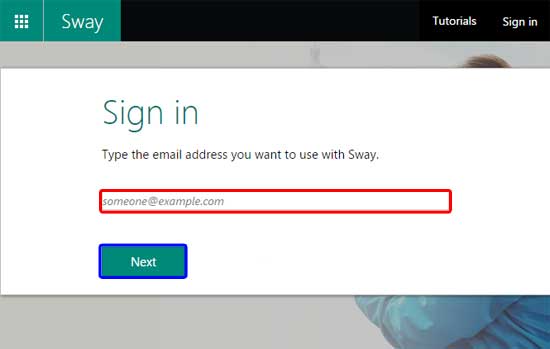
Learn how to sign into Microsoft Sway.
Filed Under:
Sway
Tagged as: Docs.com, PowerPoint for the Web, Sway, Tutorials
Comments Off on Sign into Microsoft Sway
Microsoft and the Office logo are trademarks or registered trademarks of Microsoft Corporation in the United States and/or other countries.