
This is the print version of this page. All content is copyright Indezine.com 2000-2026.
Thoughts and impressions of happenings in the world of PowerPoint and presentations, continuously updated since 2003.
See Also:
PowerPoint and Presenting Notes
PowerPoint and Presenting Glossary
Whichever slide objects you place on your PowerPoint slide, their position and alignment matters a lot — be it shapes or even the many inserted pictures. In some cases, a haphazard arrangement of pictures may work — but most of the time you will have to align objects in a proper way on your slide. Even before you align pictures, you should explore whether all pictures are the same size or not.
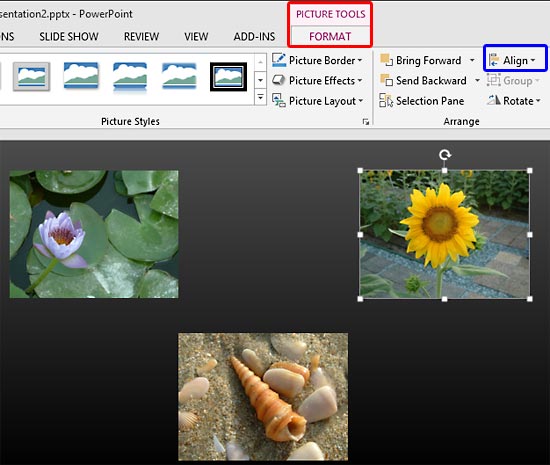
Learn to align and distribute pictures in PowerPoint 2013 for Windows.
Filed Under:
PowerPoint 2013
Tagged as: Pictures, PowerPoint 2013, Tutorials
Comments Off on Learn PowerPoint 2013 for Windows: Align and Distribute Pictures
PowerPoint provides various picture enhancement options such as: Picture Adjustments, Picture Styles, Picture Effects, and Picture Borders. Beyond these options, there are some very significant yet basic picture editing options that you should consider — these include learning how you can Resize, Rotate, and Flip pictures. All of these options help you to enhance the look of your inserted pictures.

Learn how to Resize, Rotate, and Flip pictures in PowerPoint 2013 for Windows.
Filed Under:
PowerPoint 2013
Tagged as: Pictures, PowerPoint 2013, Tutorials
Comments Off on Learn PowerPoint 2013 for Windows: Resize, Rotate, and Flip Pictures
After inserting pictures within your PowerPoint slide, you may want to change the appearance of the picture. Picture Styles are based on PowerPoint’s Picture Effects capabilities and add some effects with a click. Most of the time, this means that a single Picture Style adds a reflection, a glow, and a border to your picture. However, you can also apply any of these effects individually to your pictures. In all, PowerPoint provides 6 effects: shadow, reflection, glow, soft edges, bevel, and 3-D rotation.

Learn about Picture Effect options in PowerPoint 2013 for Windows.
Filed Under:
PowerPoint 2013
Tagged as: Pictures, PowerPoint 2013, Tutorials
Comments Off on Learn PowerPoint 2013 for Windows: Picture Effects
The Picture Border option in PowerPoint adds a simple outline or even a beautiful frame to your pictures. Once you insert a picture on your slide, you may want to apply various adjust picture options. Additionally, you can also apply the preset Picture Styles available. In this tutorial we’ll explore how to add Borders to the inserted pictures in PowerPoint 2013.

Learn how to add and edit Picture Borders in PowerPoint 2013 for Windows.
Filed Under:
PowerPoint 2013
Tagged as: Pictures, PowerPoint 2013, Tutorials
Comments Off on Learn PowerPoint 2013 from Windows: Picture Borders
We bring you Map Pins this time that can be used over maps or anything else that you want to highlight on your slides. Also you can take part in the very interesting Business Presentations Survey, held once every 10 years, and win a gift. PowerPoint 2013 users can learn more from a bunch of Audio (Sound) and Visuals (Graphics) tutorials.

Read Indezine’s PowerPoint and Presenting News.
Filed Under:
Ezine
Tagged as: Ezine, PowerPoint
Comments Off on PowerPoint and Presenting News: October 28, 2014
Microsoft and the Office logo are trademarks or registered trademarks of Microsoft Corporation in the United States and/or other countries.