
This is the print version of this page. All content is copyright Indezine.com 2000-2026.
Thoughts and impressions of happenings in the world of PowerPoint and presentations, continuously updated since 2003.
See Also:
PowerPoint and Presenting Notes
PowerPoint and Presenting Glossary
Unlike rehearsing slides, recording a slide show is not something that’s a practice session. Rather, recording slides is almost like delivering a presentation that you cannot deliver in person! Does that sound confusing? Let’s imagine that you cannot deliver your slides in person. You then want to do the next best option, that is to deliver your presentation in front of your computer, almost as if you had a live audience present. All this while, all your narrations are being recorded. Even the time you spend on each slide is recorded along with the time taken for each animation to play. You can also record your laser pointer activity if you use PowerPoint’s built in laser pointer. All of this can be saved as part of your presentation that you can send to others – and they can see this at their convenience, with your voice accompanying the slide show!

Learn how you can record a slide show in PowerPoint 2013 for Windows.
Filed Under:
PowerPoint 2013
Tagged as: PowerPoint 2013, Tutorials
Comments Off on Learn PowerPoint 2013 for Windows: Record Slide Show
You might have noticed that by default, PowerPoint 2013 only shows Horizontal Major Gridlines on a chart. Yes, you can enable Vertical Gridlines too as we explored in our Chart Gridlines in PowerPoint 2013 for Windows tutorial, and more importantly you can format these Gridlines to appear exactly as you want them to show.

Learn how to format Chart Gridlines in PowerPoint 2013 for Windows.
Filed Under:
PowerPoint 2013
Tagged as: Charting, PowerPoint 2013, Tutorials
Comments Off on Learn PowerPoint 2013 for Windows: More Gridline Options for Charts
In this issue, we bring you some awesome stuff that you download: storyboard templates, animated boxes, and stars.
PowerPoint 2013 users can learn about several fills you can add to plot areas of charts: solid, gradient, picture, and texture fills. PowerPoint 2010 (Windows) and 2011 (Mac) users can explore working with RGB colors. And if you are using PowerPoint Online (earlier called the Web App), we show how you can sign into your OneDrive account.
And finally, do not miss the new discussions and templates of this week!

Read Indezine’s PowerPoint and Presenting News.
Filed Under:
Ezine
Tagged as: Ezine, Indezine, News, PowerPoint
Comments Off on PowerPoint and Presenting News: July 1, 2014
Patterns in PowerPoint are two-color designs comprising lines, dots, dashes and checks. PowerPoint includes 48 patterns such patterns with names like Plaid, Weaves, Shingle, and Zig Zag. When used with some caution, Patterns can make a great fill for your Plot Area, same like any other fill. In this tutorial, let us learn how to apply a Pattern fill to the chart’s Plot Area in PowerPoint 2013.

Learn how to apply pattern fills to the Plot Area of a chart in PowerPoint 2013 for Windows.
Filed Under:
PowerPoint 2013
Tagged as: Charting, Fills, PowerPoint 2013, Tutorials
Comments Off on Learn PowerPoint 2013 for Windows: Apply Pattern Fills to Plot Area
Gridlines are the lines that span wide and tall within the chart’s Plot Area. These Horizontal and Vertical gridlines originate from the axes, which makes the data easier to comprehend for the viewer. Gridlines may emerge from both the horizontal and vertical axes, although by default you can see only Horizontal gridlines on the chart.
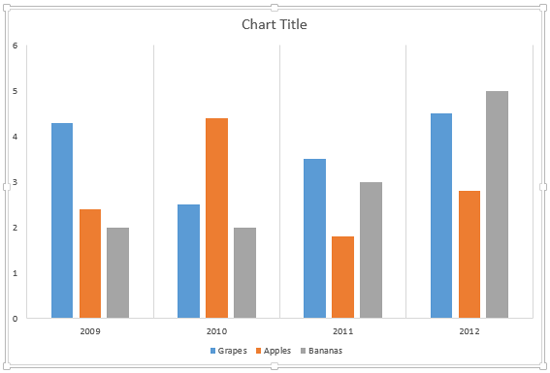
Learn about Chart Gridlines in PowerPoint 2013 for Windows.
Filed Under:
PowerPoint 2013
Tagged as: Charting, PowerPoint 2013, Tutorials
Comments Off on Learn PowerPoint 2013 for Windows: Chart Gridlines
Microsoft and the Office logo are trademarks or registered trademarks of Microsoft Corporation in the United States and/or other countries.