
This is the print version of this page. All content is copyright Indezine.com 2000-2026.
Thoughts and impressions of happenings in the world of PowerPoint and presentations, continuously updated since 2003.
See Also:
PowerPoint and Presenting Notes
PowerPoint and Presenting Glossary
We are happy to announce a second bunch of Countdown Timer slides. After the success of our first Countdown Timer series, here’s another set that contains longer countdowns (10 minutes each). This entire kit contains 5 different styles of Countdown Timers. Each slide has animated objects that already contrast with the slide background. Just copy and paste the slides in your presentation – and the slide objects will inherit the color schemes of the presentation you paste into!

Get these countdown timers now!
Filed Under:
Presentation Bank
Tagged as: Animation, Design, Graphics, PowerPoint, Presentation Samples
Comments Off on Countdown Timers for PowerPoint (Set 2: Longer)
In this issue, we first look at Public Domain pictures, and how they are different that pictures you can use as part of the Creative Commons license.
PowerPoint 2013 users can learn this about tables: erasing table borders and toggling their visibility. You will also learn about a few exotic shapes, such as drawing with cookie cutters, and creating CD/DVDs and shopping bags!
And finally, do not miss the new discussions and templates of this week!

Read Indezine’s PowerPoint and Presenting News.
Filed Under:
Ezine
Tagged as: Ezine, PowerPoint
Comments Off on PowerPoint and Presenting News: June 10, 2014
Look closely at the interface within PowerPoint 2013, particularly the Customize Quick Access Toolbar drop-down menu, and you’ll find the Touch/Mouse Mode command. This essentially is a toggle button that alternates between touch and mouse modes. Touch mode is the default mode when using PowerPoint on a touch device such as the Microsoft Surface or other tablets, and lets you use the program even without a mouse. And Mouse mode is the default mode for PowerPoint 2013 when working on a non-touch enabled desktop or laptop. The larger question though is why you can toggle to the Touch mode in a non-touch device. If you are using PowerPoint on a desktop, why you need the Touch mode?
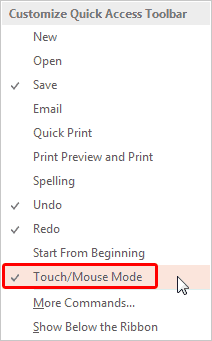
Explore the Touch/Mouse modes in PowerPoint 2013.
You May Also Like: Slides for Color Blind Audiences | Grayscale to Color Cutout Animation in PowerPoint | People Animation in PowerPoint
Filed Under:
PowerPoint 2013
Tagged as: PowerPoint 2013, PowerPoint Touch, Tutorials
Comments Off on Touch/Mouse Mode in PowerPoint 2013 for Windows
Table borders in PowerPoint sport the default color from the Theme applied to the presentation. However, you can override and change this color as required. Not only you can set the table border color for the new tables before they are drawn, but also you can change the color of existing table borders. Follow these steps to learn more.

Learn how to set color for table borders in PowerPoint 2013 for Windows.
Filed Under:
PowerPoint 2013
Tagged as: PowerPoint 2013, Tables, Tutorials
Comments Off on Learn PowerPoint 2013 for Windows: Set Color for Table Borders

Dr. Carmen Simon‘s presentations and workshops help business professionals to use communication and presentation skills to increase revenue, train or motivate others and overall, stand out from too much sameness in the industry. A published author, Dr. Simon is frequently invited as a keynote speaker at various conferences.
In this conversation, Carmen discusses how you can create more memorable slides.
Filed Under:
Interviews
Tagged as: Carmen Simon, Death by PowerPoint, Design, Interviews, Opinion, PowerPoint
Comments Off on Remembering Your Slides: Conversation with Carmen Simon
Microsoft and the Office logo are trademarks or registered trademarks of Microsoft Corporation in the United States and/or other countries.