
This is the print version of this page. All content is copyright Indezine.com 2000-2026.
Thoughts and impressions of happenings in the world of PowerPoint and presentations, continuously updated since 2003.
See Also:
PowerPoint and Presenting Notes
PowerPoint and Presenting Glossary
Here’s the most comprehensive list of PowerPoint Web App keyboard shortcuts that we know about — many users are not aware that the in-browser PowerPoint web app supports an amazing number of keyboard shortcuts! However, these shortcuts may differ depending upon whether you are using a Windows or a Mac computer — all the keyboard shortcuts listed on this page have been tested using the PowerPoint web app on the Safari web browser on Mac OS X.

Explore keyboard shortcuts for the PowerPoint Web App using Safari on Mac.
Filed Under:
Apple Mac OS
Tagged as: Mac, PowerPoint for Mac, PowerPoint for the Web, Tutorials
Comments Off on Keyboard Shortcuts: PowerPoint Web App for Mac
 Aaron Khoo is a software industry veteran with a strong background in building and leading software teams and managing the delivery of projects, from conception to completion, for a variety of companies, including Microsoft. Prior to joining 9Slides, Aaron served in the executive capacity as President and Chief Technology Officer for several technology startups. He spent nearly 10 years with Microsoft as principal development lead on a variety of projects, including Xbox, Interactive Entertainment Business Analytics team, and Windows Gaming Experience. He holds several patents for software and gaming and a PhD in computer science from Northwestern University.
In this conversation, Aaron discusses his new position at 9Slides.
Geetesh: Tell us more about yourself, and also what your thoughts are about 9Slides.
Aaron: I’m presently the Director of Engineering for 9Slides. I might be subject to some bias, but what can I say about 9Slides other than the fact that it’s awesome? Our product offers the ability for people to truly connect with their audience. There are existing services that enable users to share slides or videos, but just a handful that enable users to easily bring both together in synchronized harmony. PowerPoint slides are a powerful communication tool that provide a way to convey information succinctly. However, they are fundamentally designed to reinforce a speaker’s message, not to stand alone for someone to read as a mere online flipbook. At 9Slides, we strongly believe that the speaker must be present (even if just virtually) to elevate the slides and drive home the point.
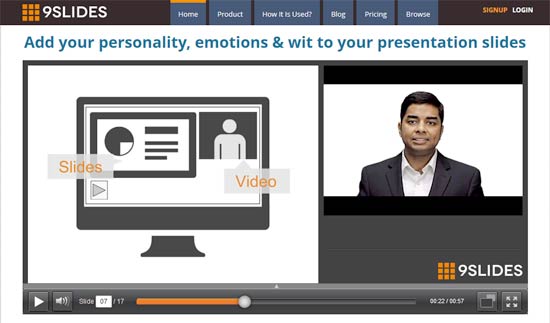
To this point, more and more professionals have put videos online in an attempt to reach a wider audience, but these videos are often jarring, as a single camera struggles to capture the dynamism of the speaker and the information-richness of the presentation simultaneously. Often, the video switches between the two aspects (speaker and slides) in a non-intuitive fashion, making for a confusing viewing experience.
Our goal at 9Slides is to make the process of creating and viewing synchronized video and presentations simple and intuitive. Sales/marketing, corporate training and education professionals should be able to craft interactive videos supported strongly by rich presentations. Their target audience should be able to view these video presentations at anywhere, at any time and on any device.
That’s what we live for. Come upload some great content, and see what we can do for you.
Geetesh: What motivated you to join 9Slides — can you share your beliefs about the online presenting market?
Aaron: I look for two things when I join a company: People, and then Vision. I have known Ruchit Garg (the CEO of 9Slides) for about 5 years. We worked together for a couple years at Microsoft, and I know him to be a smart, tenacious person. Moreover, we got along very well when we worked together previously. This was critical to me, since ultimately you spend 8 hours a day with your co-workers (even more in a smaller company!). As I learned more about 9Slides, I realized that they had a concrete, clear vision: Making presentations shine online as easily as possible. Ruchit was able to quickly articulate this vision and convince me that it filled a very specific and real need for many people.
It is obvious that the Internet has enabled an individual to reach many others in profound yet affordable ways. Available hosting solutions have allowed enterprise professionals to share their message far and wide, and many have taken advantage of this reach. Sites that host presentations and videos abound, and provide good ways of sharing. However, we feel that, in many ways, the communication mechanisms and processes are still in their nascent stages. To put it simply, there’s more to it than simply putting a presentation, or a video, on a website. The magic, we believe, is marrying the speaker to the presentation in an interactive way that truly engages the consuming party. It is more than just about hosting a presentation or a video. It is about allowing your consumer to view a dynamic speaker, reinforced by a strong presentation, on any device at any time. It is about the ability to create these experiences as simply as possible, so that anyone can do it, and share their vision with literally the rest of the planet.
See Also: 9Slides: Conversation with Ruchit Garg
The views and opinions expressed in this blog post or content are those of the authors or the interviewees and do not necessarily reflect the official policy or position of any other agency, organization, employer, or company.
Filed Under:
Interviews
Tagged as: 9slides, Interviews, Online Presentations, PowerPoint
Comments Off on 9Slides: Conversation with Aaron Khoo
These “pushpin” graphics are already placed in PowerPoint slides – just copy them and paste within your slides to create a look that makes a picture, shape, or anything else appear as if it has been pushed onto a surface, board, or wall with a pin! These ready-made pushpins are already within PowerPoint slides — and have been provided in five colors. Just copy them and paste them on your slides.

Download and use these push pins in your slides.
Filed Under:
Presentation Bank
Tagged as: Graphics, PowerPoint, Presentation Samples
Comments Off on Handmade Slides: Pushpins for PowerPoint
Creating outlines for PowerPoint in various external applications lets you stay away from distractions in PowerPoint-land and concentrate on the structure of your slides rather than their appearance. Once you have the outline created, it’s very easy to import it in the form of slides into PowerPoint. While this import process works the same way in all versions of PowerPoint, there are small interface changes.

Learn how to import outlines in PowerPoint 2013 for Windows.
Filed Under:
PowerPoint 2013
Tagged as: PowerPoint 2013, Tutorials
Comments Off on Learn PowerPoint 2013 for Windows: Import Outlines
Similar to how you can add Headers and Footers to your slides, you can also add Headers and Footers to your Notes and Handout pages. Different from the slides which are primarily presented through a display device such as a monitor or a TV screen or a projector, Notes and Handouts are essentially intended for printing. Let us explore how to add Headers and Footers to make your printed Notes and Handout pages look more professional and useful.

Learn how to add Headers and Footers in Notes and Handout Pages in PowerPoint 2011 for Mac.
Filed Under:
PowerPoint 2011
Tagged as: Office for Mac, PowerPoint 2011, Tutorials
Comments Off on Learn PowerPoint 2011 for Mac: Add Headers and Footers in Notes and Handout Pages
Microsoft and the Office logo are trademarks or registered trademarks of Microsoft Corporation in the United States and/or other countries.