
This is the print version of this page. All content is copyright Indezine.com 2000-2026.
Thoughts and impressions of happenings in the world of PowerPoint and presentations, continuously updated since 2003.
See Also:
PowerPoint and Presenting Notes
PowerPoint and Presenting Glossary
Although PowerPoint lets you choose almost any color you want, it is often difficult to choose the same color as a picture on the slide! You may want to match the colors of shapes or text on your slides to a picture, or even some other object (maybe a logo or even the slide background) of your PowerPoint presentation to give your slides a cohesive look. PowerPoint 2013’s new Eyedropper option enables you to pick an exact color from anywhere, sometimes even from somewhere outside PowerPoint! Even better, when you are picking up the color from a source, you get to see the color preview as well as the RGB value of the color you are picking.

Learn how the new Eyedropper option works in PowerPoint 2013 for Windows.
Filed Under:
PowerPoint 2013
Tagged as: Color, Fills, Outline, PowerPoint 2013, Tutorials
Comments Off on Learn PowerPoint 2013 for Windows: Eyedropper Option
In PowerPoint, the Slide Master influences the layout and look of all slides in your presentation. One of the changes you can make to your Slide Master is applying the Background Style used so that all slide layouts and actual slides in your presentation use a different slide background. In this tutorial, we will explore how you can choose from any of the 12 available Background Styles to apply to the Slide Master.
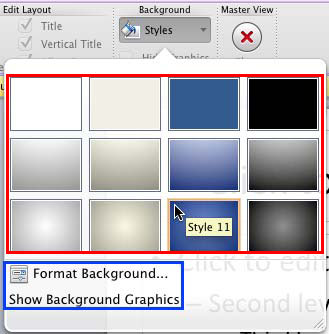
Learn how to change Background Styles within the Slide Master in PowerPoint 2011 for Mac.
Filed Under:
PowerPoint 2011
Tagged as: Office for Mac, PowerPoint 2011, Templates, Tutorials
Comments Off on Learn PowerPoint 2011 for Mac: Change Background Styles in the Slide Master

Rick Altman is a presentation consultant based out of Pleasanton, CA. Rick has been hosting end-user conferences since 1989, and is well known as the host of the annual Presentation Summit conference. He has a strong sense of the needs of the presentation community. Rick has authored 15 books on presentations and graphics, including Why Most PowerPoint Presentations Suck.
In this conversation, Rick discusses the upcoming eleventh edition of his Presentation Summit conference, to be held in September 2013 in Fort Lauderdale.
Geetesh: The 2013 Presentation Summit is slated to be held soon at Fort Lauderdale, Florida. It’s the first time we are going to be on the East Coast next to the ocean — what else will happen for the first time?
Rick: I suspect that it will be the first time for many to get significant exposure to the new version of PowerPoint. While out for several months, we know how slow corporate wheels turn. And yet our patrons are a curious lot, so we’ll make sure to have version 2013 installed on all of our Help Center computers so patrons can spend quality time with it and decide for themselves if a migration to it would be the right move.

This year will also mark two debuts at the conference: Sam Horn of the IntrigueAgency and Sunni Brown of the Doodle Revolution. Both are outstanding presenters with compelling stories to tell about how presentation professionals can better engage their audiences with critical messages. We can’t wait for our gang to meet them.
Geetesh: What can attendees expect from the Summit? Can they bring their problem slides with them? Can they learn a lot? Can they also have fun?
Rick: Summit patrons can expect a completely immersive experience. For four days, they will get to live and breathe presentation. From message crafting, presentation design, PowerPoint technique, introductions to other software, right through to delivery, our seminars are broad and deep. Meanwhile, the networking opportunities are what attract many, as we make it virtually impossible to not meet peers, make friends, and cultivate meaningful relationships.
Patrons can indeed bring files with them; we encourage them to load up their flash drives and come to our Help Center fully armed. Little is more helpful than working through issues with slides that are relevant and meaningful. So yes, bring us your pain – we thrive on it.
As for the fun, well, we’re famous for that, too. We’ll be 1/4 mile from the most charming and happening nightlife spot in town, and we will be literally across Atlantic Blvd. from the beach. The weather should be phenomenal there in mid-September. So all in all, we’re looking forward to a wonderful time.
Geetesh: And you have early pricing to offer?
Rick: Yes, but your readers will want to hurry. Throughout the month of May, registrants can take $100 off of the registration price.
See Also: Presentation Summit 2012 and 2013: Conversation with Rick Altman
The views and opinions expressed in this blog post or content are those of the authors or the interviewees and do not necessarily reflect the official policy or position of any other agency, organization, employer, or company.
Filed Under:
Events
Tagged as: Interviews, PowerPoint, Presentation Summit
Comments Off on Presentation Summit 2013: Conversation with Rick Altman
Continuing our series of tutorials on PowerPoint 2013, we look at the not so obvious differences between text placeholders and text boxes. We teach you how you can create outlines in Word 2013, and then import the outline content as new slides within PowerPoint. PowerPoint 2011 for Mac users can learn about adding Headers and Footers on their slides, and also on their Notes and Handout pages. Finally, we combined all our Pushpin graphics to make a single large collection — including all colors and variations, you have 35 pushpin graphics that you can use on your slides.

Read Indezine’s PowerPoint and Presenting News.
Filed Under:
Ezine
Tagged as: Ezine, Indezine, News, PowerPoint
Comments Off on PowerPoint and Presenting News: May 21, 2013
Here’s the most comprehensive list of PowerPoint Web App keyboard shortcuts that we know about — many users are not aware that the in-browser PowerPoint web app supports an amazing number of keyboard shortcuts! However, these shortcuts may differ depending upon whether you are using a Windows or a Mac computer — all the keyboard shortcuts listed on this page have been tested using the PowerPoint web app on the Internet Explorer web browser on Windows.

Explore keyboard shortcuts for the PowerPoint Web App using Internet Explorer on Windows.
Filed Under:
PowerPoint for the Web
Tagged as: Microsoft Windows, PowerPoint for the Web, Tutorials
Comments Off on Keyboard Shortcuts: PowerPoint Web App for Windows
Microsoft and the Office logo are trademarks or registered trademarks of Microsoft Corporation in the United States and/or other countries.