
This is the print version of this page. All content is copyright Indezine.com 2000-2026.
Thoughts and impressions of happenings in the world of PowerPoint and presentations, continuously updated since 2003.
See Also:
PowerPoint and Presenting Notes
PowerPoint and Presenting Glossary
These Eight Petals Circle graphics are part of our Petal Circles series that add stylized tips to your circle shapes. These two tip styles: Rounded and Pointed make your circles look different from conventional segmented circle graphics. They also break the monotony of text heavy slides, and help you explain concepts better to your audiences. Using these circle shapes also convinces your audiences that you care enough about them to make the slides look appealing and comprehensible. What’s more, these shapes are also so much fun to use!
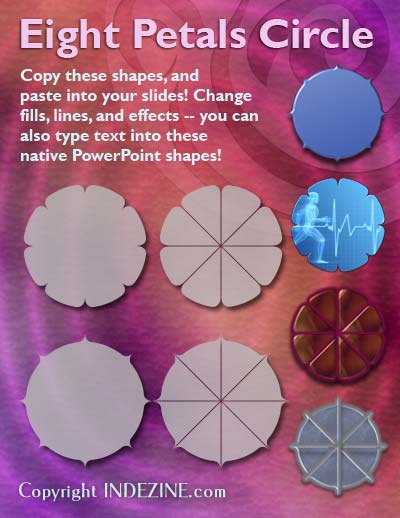
Buy and download these slides now.
Filed Under:
Presentation Bank
Tagged as: Design, Graphics, PowerPoint, Presentation Samples
Comments Off on PowerPoint Concept Slides: Eight Petals Circle
Although text in PowerPoint can be with a texture, the appearance of the text depends upon the texture chosen, and how well it contrasts with the slide background. Make sure that the texture used is not too crowded or even multicolored — and as already stated, choose a texture that contrasts with your slide background for the reason of readability.

Learn how to add a texture fill to the selected text in PowerPoint 2011 for Mac.
Filed Under:
PowerPoint 2011
Tagged as: Office for Mac, PowerPoint 2011, Text, Tutorials
Comments Off on Learn PowerPoint 2011 for Mac: Texture Fill for Text
There is no doubt that a presentation with relevant pictures is more effective than just a plain text presentation. Although pictures enhance the look of your presentation, they can also phenomenally increase the size of your presentation file. PowerPoint 2010 is better in that respect compared to previous versions because it does some compression even if you may not be aware — yet there is an option to make the compression even more effective.

Learn how to compress pictures in PowerPoint 2010 for Windows.
Filed Under:
PowerPoint 2010
Tagged as: Pictures, PowerPoint 2010, Tutorials
Comments Off on Learn PowerPoint 2010 for Windows: Compress Pictures
Let’s talk about a fascinating picture of an iceberg by photographer Ralph A. Clevenger. This is a fully copyrighted picture, yet a quick search on Google Images will show that this picture has been used hundreds of times on the web (see Figure 1, below).

Figure 1: Search and you get hundreds of the same results
Filed Under:
Pictures and Visuals
Tagged as: Copyrights, Opinion, Pictures, PowerPoint
In this issue, we have two sets of Concept Slides — Organic Diamonds and Seven Petals Circles — both these sets contain ready-made PowerPoint slides with all the graphics you need. Just copy the graphics from these slides and paste into your own slides. Full customization instructions and samples are included to make the entire process easy for you. We have exclusive interviews: Sunil Chandna of Stellar Phoenix PowerPoint Repair discusses how you can avoid corrupting your PowerPoint files, and what you can do to recover them. Peter Watts of Speak2all discusses sync issues between slides and presenters. We also have tutorials for PowerPoint 2010 users — learn about Advanced Audio Options and also the options available on the Format tab when you have an audio file selected. PowerPoint 2011 for Mac users can learn about WordArt Styles, Text Fills, and Gradient Fills for Text.

Read all this and more in Indezine News.
Filed Under:
Ezine
Tagged as: Ezine, Indezine, News, PowerPoint
Comments Off on Indezine News: March 19, 2013
Microsoft and the Office logo are trademarks or registered trademarks of Microsoft Corporation in the United States and/or other countries.