
This is the print version of this page. All content is copyright Indezine.com 2000-2026.
Thoughts and impressions of happenings in the world of PowerPoint and presentations, continuously updated since 2003.
See Also:
PowerPoint and Presenting Notes
PowerPoint and Presenting Glossary
 Rick Altman, a presentation consultant based out of Pleasanton, CA, USA is well known as the host of the annual Presentation Summit and has a strong sense of the needs of the presentation community. He has also authored books on PowerPoint.
In this conversation, Rick discusses the upcoming Presentation Summit being held in San Diego this October.
Filed Under:
Events
Tagged as: Interviews, PowerPoint, PowerPoint Live, Presentation Summit
Comments Off on Presentation Summit 2010: Conversation with Rick Altman
 Sang-Eun Lee graduated with Master of Arts from the School of Arts in Korea, and works in the areas of medical illustration and photography for the Samsung Medical Center in Seoul, Korea. She is a PowerPoint power user who uses a variety of advanced features for creation of Samsung Medical Center Template Designs, Q&A slides, and other stuff. Her projects are used by doctors for oral presentations or posters at symposiums, scientific lectures, learning books, and theses. Her activities in the hospital have been considered very valuable and important to over 7000 staff personnel, including doctors. She has been awarded as a Microsoft PowerPoint MVP (Most Valuable Professional) since 2009.
Geetesh: Tell us a little about your work using PowerPoint in the medicine sector.
Sang-Eun Lee: I create engaging and attractive slide decks with my medical knowledge from experiences in the hospital. The results are considered good enough to be used at external seminars and internal staff meetings. Many colleagues and faculty members (doctors) show strong interests in my lectures during the community seminars and have requested me frequently to help out with their work.
I use combination of PowerPoint and other applications to create digital illustration projects. I do use professional illustration software as well but have found that by using PowerPoint, I can quickly and easily help communicate accurate information during doctor’s visits.
Let me share this project which shows my workflow of creating medical illustration using PowerPoint.

Figure 1: Saved pictures collected from a video clip
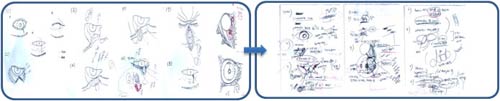
Figure 2: Preliminary sketches

Figure 3: Sequenced visual content
Geetesh: What’s different in the way that the folks in the medicine industry use PowerPoint, compared to how the business people use it?
Sang-Eun Lee: Both business people, and the medical industry share the commonality that they both use PowerPoint as a visual tool for creating presentations such as visual-heavy report materials, effective multimedia enabled materials, various drafts for internal and external use, etc.
However, using PowerPoint graphic tools to create mimetic diagrams and drawings of up-to-date medical information that the medical staff includes in their journals and presentations has been appraised as a new application of PowerPoint by audiences from around the world. This was obvious during this year’s Microsoft MVP Global Summit’s MVP presentations.
The views and opinions expressed in this blog post or content are those of the authors or the interviewees and do not necessarily reflect the official policy or position of any other agency, organization, employer, or company.
Filed Under:
Interviews
Tagged as: Design, Interviews, Medicine, PowerPoint
Comments Off on PowerPoint and Medicine, Design in Samsung Medical Center, Korea: Conversation with Sang-Eun Lee
 Visual content often scores higher than pure textual content — and this has been proved by several scientific studies and surveys. Yet it is not always easy to create and use visual content in slides, documents, or even web pages because the tools required in creating such content typically involve a long learning curve, and familiarity with some new terminology. Our review product, SmartDraw 2010 overcomes these limitations and allows normal office people to create good looking and effective business graphics. How does it fare?
Filed Under:
Reviews
Tagged as: Graphics, PowerPoint, Review, SmartDraw
Comments Off on SmartDraw 2010: The Indezine Review
 Dave Paradi is the author of The Visual Slide Revolution and 102 Tips to Communicate More Effectively Using PowerPoint. He helps presenters communicate more effectively by using persuasive PowerPoint presentations. He has published over 200 issues of his bi-weekly newsletter, produced more than 45 slide makeover video podcasts and appears in media regularly. His web site is ThinkOutsideTheSlide. In this conversation, Dave discusses his new book.
Geetesh: Tell us more about your new book, 102 Tips to Communicate More Effectively Using PowerPoint.
 Dave: The idea for the book came to me last summer when I was speaking at a conference in New Orleans. I noticed that many presenters were looking for quick tips that they could use to improve their presentations. They don’t have the time to attend a multi-day course and don’t want a thick technical manual. Participants in my workshops would tell me afterward that it was the tips that I shared that would make the biggest impact. So I decided to look at what I shared in my workshops and through my writing, and collect the tips that people found the most helpful. I focused on those tips that would help presenters communicate more effectively since that is what the goal of any presentation should really be – effective communication of our ideas. I’ve organized the tips into categories: Structure, Slide Design, Slide Content, Delivery, and Handouts. Each tip is practical and easy to apply so presenters can make immediate improvements to their presentations. I’ve set up a special web page for readers to download sample PowerPoint files that illustrate some of the tips. That web page also has links to all of the web sites I refer to in the book. There is virtually no overlap with my previous book “The Visual Slide Revolution”, which focuses on my five-step KWICK method for creating persuasive visuals. Presenters can benefit from both books to create more effective PowerPoint presentations.
Geetesh: If there’s just one thing I ask you to explain what PowerPoint designers can do to make their slides communicate better, what would that be?
Dave: My perspective has always been what works for audiences, and my advice would be to remember to focus on what the audience needs for this presentation. Too often I see elements added to slides for a pure design purpose. The element does not add to the audience’s understanding of the message. Prof. Mayer’s research tells us that anything we add to a visual that is not directly connected to our topic will cause confusion and reduce the understanding of the audience. I would remind designers to ask whether that gradient fill, the reflection of the photo, or the complex diagram created in a graphics program is being added to make the message clearer, or is it really being added because it is “cool.” As I say in my workshops, “clear” comes before “cool” in the dictionary and it should be the same when considering our slides. Seek to be clear first, instead of trying to be cool.
Filed Under:
Interviews
Tagged as: Books, Dave Paradi, Interviews, PowerPoint
Comments Off on 102 Tips to Communicate More Effectively Using PowerPoint: Conversation with Dave Paradi
 As Vice President and General Manager of ToolBook at SumTotal Systems, Brad Crain is responsible for ToolBook products, including strategy, research and development, and product management. Brad previously held various positions at Click2learn/Asymetrix including Director of Learning Management Systems Engineering and Directorof Enterprise Products. In this conversation, Brad discusses how the new ToolBook 10 from SumTotal makes conversion of PowerPoint content into interactive learning even easier and faster than before.
Geetesh: How does ToolBook help PowerPoint users effectively use their existing PowerPoint content?
Brad: With the ability to import Microsoft PowerPoint files into ToolBook, you have even more choices when developing content. For example, you can quickly re-use existing PowerPoint content to cut development time—simply import the PowerPoint file into ToolBook as described in the picture below. Then, add assessments, interactivity, media, and rich effects using ToolBook. For deployment, publish the content to the SCORM format using ToolBook Web publishing feature.

You can also increase the involvement of your Subject Matter Experts (SMEs) in content authoring. After instructional designers create a PowerPoint-based storyboard, SMEs can populate the storyboard using the familiar PowerPoint interface. Next, these PowerPoint files are imported into ToolBook. For deployment, just publish the content out to SCORM format using ToolBook Web publishing feature.
Geetesh: Tell us more about the new PowerPoint import enhancements in ToolBook 10.
Brad: With the new features of SumTotal ToolBook 10, superior content creation has never been so fast and easy. Now you can create new learning materials with more speed and expertise, and then enhance those materials easily with assessments, interactivity, media, and rich effects.
Import more from your Microsoft PowerPoint presentations. With the ability to import Microsoft PowerPoint presentations, the previous ToolBook release helped you get your Subject Matter Experts more involved in content authoring projects, and you gained the ability to quickly reuse legacy content. Now with ToolBook 10, PowerPoint speaker notes and audio files can also be imported, giving you even more options when reusing PowerPoint content.
To learn more visit us here.
See Also: An Interview with Brad Crain
Filed Under:
Interviews
Tagged as: Add-in, eLearning, Interviews, Online Presentations, PowerPoint
Comments Off on PowerPoint Features in SumTotal ToolBook 10: Conversation with Brad Crain
Microsoft and the Office logo are trademarks or registered trademarks of Microsoft Corporation in the United States and/or other countries.