
Did you want to move the location of the legend in your chart? Or do you always need to add a Data Table? Does PowerPoint’s default layout options for all chart elements work for you? Or perhaps it doesn’t? If you identify with any of these scenarios, you will love the way you can play with different layouts for your charts using the pre-defined Chart Quick Layouts feature. This essentially is a collection of some pre-arranged layouts containing chart elements. With just a couple of clicks you can change the entire look of your chart, as explained in this tutorial.
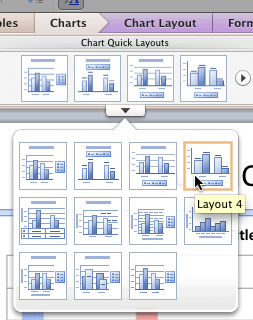
Learn how to apply preset Quick Layouts to your charts in PowerPoint 2011 for Mac.
Related Posts
 Charts that include elements spaced apart look better. You can increase the Gap width so that there is enough space between the categories. Also, you ...
 The Gap width within a chart is the space between two series points -- this by default is set to 150% of the width of individual Data Series (columns)...
 Patterns in PowerPoint are two-color designs that include lines, dots, dashes and checks. PowerPoint includes 48 such patterns with names such as 5%, ...
 There are various fills that you can apply to the Plot Area of a chart -- and a texture can often work surprisingly well. For those who want to know w...