
This is the print version of this page. All content is copyright Indezine.com 2000-2026.
Thoughts and impressions of happenings in the world of PowerPoint and presentations, continuously updated since 2003.
See Also:
PowerPoint and Presenting Notes
PowerPoint and Presenting Glossary

A Microsoft PowerPoint MVP since 2000, Echo Swinford began her PowerPoint career in 1997. She holds a master’s degree in new media from the Indiana University School of Informatics and is the owner of Echosvoice, a PowerPoint consulting firm specializing in custom template development, presentation creation, makeovers and cleanup, and training for large and small corporate clients. Echo has written and co-written five PowerPoint books, developed a number of video publications, and has a string of tech editing credits to her name. She is President Emerita of the Presentation Guild, a not-for-profit trade association for the presentation industry which she founded in 2015. She just completed her latest book, Building PowerPoint Templates, version 2, with co-author Julie Terberg.
In this conversation, Echo talks about her updated book, Building PowerPoint Templates v2.
 Geetesh: Echo, the new version of your book, Building PowerPoint Templates, co-authored with Julie Terberg is a great resource for PowerPoint users. What are the main pain points that you help resolve for them in this book?
Echo: Honestly, I think the guidance around which fonts to use in your PowerPoint templates is the most complete information I’ve seen anywhere. I have to give a ton of props to Julie for doing that research and compiling all of the current information in a few easy-to-understand pages. PowerPoint is horrible about font substitution and it’s not intuitive at all for folks who use the software, whether they are building a template or simply using one that’s been provided. So we tried really really hard to help template builders consider the ramifications of using various fonts – and we included about a page worth of cautions to go along!
Also, because there are so many different uses and designs for templates, there’s often not one specific exact right way to do something – but there are plenty of wrong ones. So we tried to give better insight into how we think through some of those decisions: dealing with footers, when to add a custom layout vs using one of the defaults, when to set a dark background style, how to get the logo to appear on top of a picture, things like that.
You may also want to check our similar feature with Julie Terberg , who is the co-author of this book.
Geetesh: You have a comprehensive section within the book that looks at editing template nuances using an XML editing environment. How doable is this part for everyday PowerPoint users, and does the book hand-hold them?
Echo: Well, I guess that depends on how much hand-holding you expect! Seriously, though, the chapter on editing XML gives plenty of guidance for getting started with editing PowerPoint’s XML as well as pointers to additional resources. We cover the things that Julie and I do most often, like stripping “most recent” colors, adding custom colors, and changing the default font size for tables. We also explain how to remove userdrawn settings to help prevent getting weird overlapping graphics when applying a theme. None of these are absolutely critical to do, but they do take your template to the next level. Anyone who’s interested in these things should be able to get started with a minimum of fuss after reading the chapter on XML.
You May Also Like: Building PowerPoint Templates: Conversation with Echo Swinford
The views and opinions expressed in this blog post or content are those of the authors or the interviewees and do not necessarily reflect the official policy or position of any other agency, organization, employer, or company.
Filed Under:
Interviews
Tagged as: Books, Echo Swinford, Interviews, Templates
Comments Off on Building PowerPoint Templates v2: Conversation with Echo Swinford
We already explored how you can add connected services in PowerPoint 365. Although it may seem that you are adding these services to PowerPoint, you are essentially connecting them to all programs and platforms connected with your Microsoft account, including OneDrive, all of Microsoft 365, and even your Windows operating system. Wherever used, these connected services help you access your settings and recent files or templates across all your devices, including laptops, tablets, and smartphones.

Learn how to manage and remove connected services in PowerPoint 365 for Windows.
Filed Under:
PowerPoint 365
Tagged as: Interface, Microsoft Windows, Office 365, PowerPoint 365, Services, Tutorials
Comments Off on Manage and Remove Connected Services in PowerPoint 365 for Windows
We first look at the AutoCorrect options in PowerPoint 365 for Windows. This is an important feature that works similarly in other Microsoft Office programs as well. We then look at setting options for AutoCorrect in PowerPoint 365 for Windows.
We bring you a short review of AKVIS Magnifier AI 11, a standalone tool that also includes a Photoshop-compatible plug-in that intelligently enlarges images. We also bring you quotes, press releases, and templates from the last few days.

Stay informed about updated tutorials and happenings related to PowerPoint and presenting.
Filed Under:
Ezine
Tagged as: Ezine, Indezine, News, PowerPoint
Comments Off on PowerPoint and Presenting News: October 19, 2021
Microsoft 365 applications work well with cloud platforms such as OneDrive. Roaming capabilities enable when you log into your Microsoft account within Office applications such as PowerPoint. Once logged in, all your settings, including your recent files or templates, will be synced across all your devices, including laptops, tablets, and even smartphones. The process explained in this tutorial works the same way in Word, Excel, and other Office programs. Also, once you follow the process within any one Office program, the services are linked for all programs, and even for your Microsoft account.
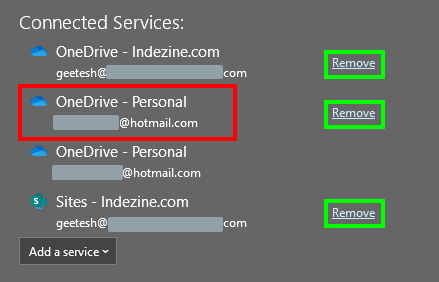
Learn how to add various services in PowerPoint 365 for Windows.
Filed Under:
PowerPoint 365
Tagged as: Interface, Microsoft Account, Microsoft Windows, Office 365, PowerPoint 365, Services, Tutorials
Comments Off on Add Services in PowerPoint 365 for Windows
As you type, PowerPoint’s AutoCorrect feature automatically corrects common typos and spelling errors. How does PowerPoint know that a particular word is spelled wrong? Does it refer to some resource as a reference? Also, do you find some AutoCorrect options such as the capitalization of some words unnecessary? Several researchers working in different scientific fields actually have to use some words that cannot start with a capital letter, and the first thing they want to do is turn off the automatic capitalization.
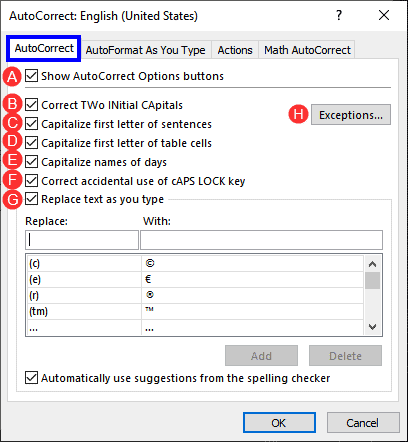
Explore AutoCorrect options in PowerPoint 365 for Windows.
Filed Under:
PowerPoint 365
Tagged as: AutoCorrect, Interface, Microsoft Windows, Office 365, PowerPoint 365, Tutorials
Comments Off on AutoCorrect Options in PowerPoint 365 for Windows
Microsoft and the Office logo are trademarks or registered trademarks of Microsoft Corporation in the United States and/or other countries.