
This is the print version of this page. All content is copyright Indezine.com 2000-2026.
Thoughts and impressions of happenings in the world of PowerPoint and presentations, continuously updated since 2003.
See Also:
PowerPoint and Presenting Notes
PowerPoint and Presenting Glossary
Google Presentations, a component of Google Docs, now provides a much-requested feature that allows you to save your presentations as PowerPoint files. This will allow users to create presentations using Google’s online office suite and then share them in the omnipresent PowerPoint file format.
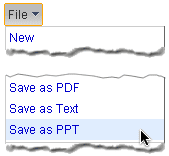
This is a great move on Google’s part and will help users exchange information in various file formats easily. I like this option because I can now create the skeleton of the presentation using Google’s great collaboration tools, and then save the outline to a PowerPoint file. Once this is saved as a PowerPoint file, I can then use PowerPoint’s powerful features to create a great presentation.
Here’s a link on Google’s blog that explains more.
Filed Under:
Microsoft Office
Tagged as: Google, Google Slides, Microsoft Office, PowerPoint
Comments Off on Google Presentations Now Saves As PowerPoint
This exclusive book extract from Advanced PowerPoint 2007 is presented here with permission from Pearson Education.
The book, authored by Wayne Kao and Jeff Huang will help an intermediate PowerPoint user improve their skills to an advanced level. The book goes into deep technical detail about the Office 2007 theme engine. It shows how color schemes, effect schemes, and font schemes work. You also learn about the new PowerPoint XML file format and get to edit PowerPoint files without using PowerPoint at all.

Read an exclusive book excerpt from Advanced PowerPoint 2007.
Filed Under:
Books
Tagged as: Books, PowerPoint 2007
Comments Off on Book Excerpts: Advanced PowerPoint 2007
 Christina Deatherage serves as Vice President of Sales and Marketing for ShowLogicTM for Catevo.
Prior to joining The Catevo Group, she worked for IBM/Lenovo where she held various marketing, sales and strategy positions.
In this interview, she discusses Catevo’s new ShowLogic presentation platform.
Filed Under:
Interviews
Tagged as: Interviews, PowerPoint
Comments Off on The Christina Deatherage Interview
Google Docs is now providing offline access to editing files on an experimental basis. As of now, this only works with Docs, rather than Spreadsheets and Presentations, but it is definitely a start in a direction that may have far-reaching results in the way we all use computing.
ChannelWeb provides opinions from many users about this new feature that works on Google Gears, an open source browser extension that enables web applications to provide offline functionality.
Even with Docs, this option has not been made available to all Google accounts, so if you don’t see this functionality yet, you might have to wait a little while longer. I’m waiting to see how Google implements this technology into the Presentations component of Google Docs. And while many sites and bloggers seem to indicate that this might be a big blow to Microsoft Office, I think there’s so much more to wait and watch before making a blanket statement of that magnitude.
Filed Under:
Microsoft Office
Tagged as: Google, Google Slides, Microsoft Office
Comments Off on Google Docs Plays with Offline Access
Users in the field of medicine are among the largest users of PowerPoint as a medium of information, instruction, and distribution. These users however tend to use PowerPoint in a very different manner than conventional PowerPoint users. They also need a different set of resources that is geared towards their profession. After years of running Indezine, one of the largest PowerPoint sites, we realized that there really isn’t a PowerPoint resource available that has been created exclusively for end users in the medicine sector. And thus, MedicinePPT was born.

If you work with PowerPoint in the medicine sector, please do share this resource with your colleagues, and do send us your feedback so that we can make this site better.
Filed Under:
Templates
Tagged as: Medicine, PowerPoint, Templates
Comments Off on Announcing Medicine PowerPoint
Microsoft and the Office logo are trademarks or registered trademarks of Microsoft Corporation in the United States and/or other countries.