
This is the print version of this page. All content is copyright Indezine.com 2000-2026.
Thoughts and impressions of happenings in the world of PowerPoint and presentations, continuously updated since 2003.
See Also:
PowerPoint and Presenting Notes
PowerPoint and Presenting Glossary

Tom Mucciolo is president of MediaNet, and a recognized industry expert in visual communications, business presentations, and leadership skills. He has served as a skills consultant for major corporations since 1985, concentrating on the script, visuals, and delivery associated with presentations, especially electronic events. High-profile communicators, including corporate leaders, politicians, educators, physicians, lawyers, sales teams, and media personalities, as well as those at any organizational level, demand his coaching expertise to enhance executive presence, improve leadership effectiveness, and develop high-quality communication skills.
In this interview, Tom discusses his work, his training, and PowerPoint specific visual skills.
Filed Under:
Interviews
Tagged as: Interviews, Personalities, PowerPoint, Tom Mucciolo
Comments Off on The Tom Mucciolo Interview

Mark Sicignano has been developing software for over 20 years. In addition to creating ScreenShot Direct, he is also a co-founder of SoftwareTime, which creates software tools that encourage children to use the computer wisely.
In this conversation, Mark discusses ScreenShot Direct, a screen capture product that directly inserts screen captures as new PowerPoint slides.
Geetesh: Tell us more about yourself and ScreenShot Direct.
Mark: ScreenShot Direct resulted from a conversation I had with a friend. He was looking for a utility to capture screenshots into PowerPoint, and he complained that everything he found either required too many steps, such as having to manually save and import screenshots into PowerPoint or was focused on creating special effects. He was unable to find an application that streamlined his workflow.
I’ve created numerous PowerPoint presentations in my career, but they never consisted of many screenshots. My friend’s challenge sounded like a fun project and I like to help people! I’m a software developer and I enjoy solving usability problems. I’ve worked in Clinical Information Systems, Document Management, and Retail, but lately, I’ve enjoyed solving smaller problems for people I can relate to directly.
My friend needed an easy way to snap lots of screenshots into PowerPoint. Every day he was creating presentations for demos and training. We talked over breakfast and while he described the features he wanted, I focused on hearing his actual problem. During the screen capture phase of creating demos or training materials, he wanted to focus on the application or process he was documenting in PowerPoint. He didn’t want to have to “multitask” by constantly Alt-tabbing between a screenshot tool, PowerPoint, and the application or process.
So I asked, “What if I could give you a tool that gets your screenshots into PowerPoint with a single keystroke, and during that process, PowerPoint and the tool would both stay in the background, out of sight allowing you to focus on your applications or processes.” He was ecstatic and said, “That would be a beautiful thing!”
So off I went to create it…
Geetesh: Tell us about some case studies where the use of ScreenShot Direct has resulted in quicker and more efficient workflows.
Mark: Case #1 is my friend who uses ScreenShot Direct every day for his demos and training material. As soon as I gave him a proof of concept with the basic functionality, he called me to rave about how efficient the tool made him. He suggested some basic improvements but said the basic design was what he needed.
I never doubted that the tool would save time because it eliminates so many unnecessary steps. After picking which presentation to insert screenshots, you simply hit the PrintScreen key (or Alt-PrintScreen)… No switching to PowerPoint, no need to create new slides, no need to manually paste or scale the image. Simply focus on the primary task you want to document, and stay in the “flow” (or “the zone”) while you snap away.
Once I refined ScreenShot Direct a bit more, I passed it along to others who, in Case #2, use it to collect customer requirements. The benefit in this case is that as customers demonstrate their systems to explain their business process, users can capture screenshots into PowerPoint without any distractions. This makes discovery sessions much more efficient and productive for all involved.
After seeing these niches for ScreenShot Direct and the excitement people had for it, I decided to release it as shareware. To be clear, it isn’t a general-purpose screenshot utility. ScreenShot Direct addresses a specific need: lots of screenshots… directly into PowerPoint… fast. I have a few more enhancements for future updates, but I want to keep the tool simple and it should always be about snapping screens into PowerPoint as fast as possible.
The views and opinions expressed in this blog post or content are those of the authors or the interviewees and do not necessarily reflect the official policy or position of any other agency, organization, employer, or company.
Filed Under:
Interviews
Tagged as: Add-in, Interviews, PowerPoint
Comments Off on ScreenShot Direct: Conversation with Mark Sicignano
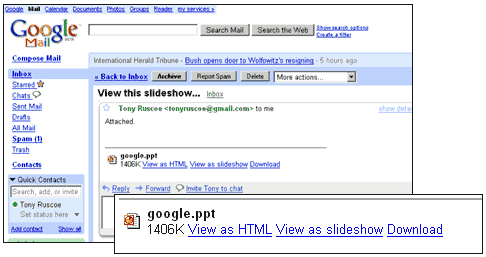
Google’s Gmail email service now allows you to preview the PowerPoint slides you receive as an attachment without downloading them at all. This option, which was available to a few Gmail users is now rolled out for all users.
When you receive a PowerPoint presentation as an attachment, you can click the new View as SlideShow option to preview the presentation from slide to slide. This option only works with PPT files, not the new PPTX files created by PowerPoint 2007.
Filed Under:
Companion Programs
Tagged as: Google, Google Slides, PowerPoint
Comments Off on Google Gmail Now Previews PowerPoint

Carmine Gallo is a communications coach for the world’s most admired brands. His client list includes Intel, Chase, Barclays, IBM, Nokia, and many others. He is an Emmy award-winning journalist and former anchor, host, and business correspondent for CNN, Fox, CNET, and CBS. Gallo writes a bi-weekly column on the subject of business communications for Businessweek and he is the author of two books aimed at business professionals who want to become better speakers and presenters.
In this interview, Carmine discusses his work, his books, and PowerPoint-specific communication skills.
Filed Under:
Interviews
Tagged as: Books, Carmine Gallo, Interviews, PowerPoint
Comments Off on The Carmine Gallo Interview
This exclusive book extract from Microsoft Office PowerPoint 2007 on Demand is presented here with permission from Pearson Education.
The book, authored by Steve Johnson is in full color, and explains common PowerPoint procedures using a series of numbered steps with tons of screenshots that are captioned.

Read an exclusive book excerpt from Microsoft Office PowerPoint 2007 for Windows on Demand.
Filed Under:
Books
Tagged as: Books, PowerPoint 2007
Comments Off on Book Excerpts: Expanding PowerPoint Functionality
Microsoft and the Office logo are trademarks or registered trademarks of Microsoft Corporation in the United States and/or other countries.