
This is the print version of this page. All content is copyright Indezine.com 2000-2026.
Thoughts and impressions of happenings in the world of PowerPoint and presentations, continuously updated since 2003.
See Also:
PowerPoint and Presenting Notes
PowerPoint and Presenting Glossary

Scott Schwertly is the Founder/CEO of Ethos3. He has loved giving and hearing presentations since he gave his first big speech in the 7th grade. Scott has spent the last eight years working for television network affiliates helping them create story-telling visuals and doing marketing for both the private and public sectors. He has a B.A. in Communications and an M.B.A. from Harding University. Helping others design and deliver captivating presentations is his passion.
In this conversation, Scott speaks about his design company, Ethos3 Communications.
Filed Under:
Interviews
Tagged as: Interviews, PowerPoint, Presentation Samples, Scott Schwertly, SlideShare
Mind mapping is a great way to brainstorm, store ideas, and create visual relations between concepts. I found a great application to do mind mapping — and it lets me save those mind maps as PowerPoint presentation outlines — a great way to create great outlines.
With ConceptDraw MINDMAP 5, you can present processes, ideas, complicated relationships, and other concepts graphically. The program helps you present your learning material in a logical and structured way — it also includes a comprehensive library of graphics, colors, figures, and connections which helps in creating and sustaining the outline structure.
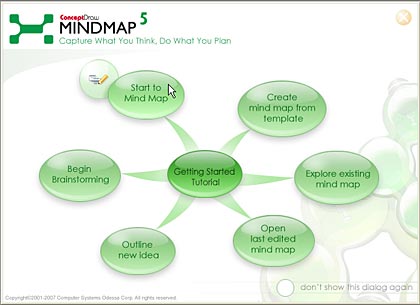
Read our review of ConceptDraw MINDMAP 5.
Filed Under:
Companion Programs
Tagged as: Companion, Graphics, PowerPoint
Comments Off on Mind Map your PowerPoint Outlines with ConceptDraw MINDMAP
 Voice-over artist Rodney Saulsberry has put up some great voice-over warmup exercises on YouTube.
These vocal warm-up videos are designed to help you strengthen, refine, and enhance your voice before delivering a critical presentation or attending an important meeting. Whether you need to improve clarity, boost projection, or reduce vocal strain, these exercises will prepare your voice for confident and impactful communication. Taking just a few minutes to warm up can make a significant difference in how you sound, engage, and connect with your audience.
There are also excerpts from Rodney’s books available: You Can Bank on Your Voice | Step Up To The Mic
Filed Under:
Audio and Video
Tagged as: Audio, Books, Multimedia, Rodney Saulsberry, Sounds, Voice, Voice-overs

Sonja Van Halder from Tjool has years of experience in sales and marketing for shareware and software. She’s been part of several European and US shareware conferences. In her present role at Tjool, Sonja interacts with PowerPoint users.
Geetesh: Tell us more about yourself and Tjool.
Sonja: Tjool is a company based in the south of Germany near Stuttgart. We work with clients worldwide and offer tools in both English and German. We provide add-ins and tools to PowerPoint users. In the past, we developed customized solutions and add-ins for customers and enterprise businesses. We realized during our consultancy services to our partners and customers that tens of thousands of PowerPoint presentations are saved on customer’s sites — and employees were still using different slides with different styles or old masters in their presentation — or their slides contained wrong information, such as out-of-date revenue figures, numbers, etc.
We first developed a web-based presentation management tool (Tjool) for enterprise customers, which is being used to organize and manage their slides and presentations in an indexed server database. This allows their employees to access the presentations anytime, and from anywhere — or to pick the desired presentation and generate a new one based on a template using the corporate design of the company. Over a couple of years, several small and enterprise companies found this solution very practical and useful to manage their slides, maintain a unified look, and provide up-to-date information in their presentations.
We felt the need to provide Tjool as a single-user license compared to a web-based solution. Users needed an add-in tool to PowerPoint, to be used by the sales or marketing departments — and therefore a small number of users between 2 to 30 will use the Tjool — PowerPoint Manager. Therefore, we developed Tjool as a single-user license with a local database or network repository.
The user interface of Tjool comprises 4 parts:
Geetesh: How is Tjool different from other presentation optimizer programs, and do you plan to make Tjool compatible with PowerPoint 2007?
Sonja: Tjool indexes all words in the scanned presentations and categories, in the slides, diagrams, and within the objects to make it easy for the users to find the desired slide. The search function of Tjool goes further than the Microsoft search function in PowerPoint. In comparison to other tools, Tjool is available in 3 editions:
The customer can decide which edition fulfills his requirements. In addition, Tjool offers the creation of virtual presentations. Virtual presentations mean that the user will be able to build up their own presentations based on slides from other presentations and Tjool will keep these virtual presentations automatically up-to-date. This means if slide 7 in a presentation XYZ was changed and this slide is linked to a virtual presentation, then this will be automatically changed for the user who generated this virtual presentation.
The number of users of PowerPoint 2007 is increasing from day to day. We are expecting the new release of Tjool to be released either at the end of third quarter or at the beginning of the fourth quarter of this year. We are glad that Microsoft released PowerPoint 2007’s file format based on XML — as this will allow the scanning function of presentations in Tjool to perform faster.
The views and opinions expressed in this blog post or content are those of the authors or the interviewees and do not necessarily reflect the official policy or position of any other agency, organization, employer, or company.
Filed Under:
Interviews
Tagged as: Add-in, Interviews, PowerPoint
Comments Off on Tjool: Conversation with Sonja Van Halder
Instant Effects announced the release of version 2.6 of both OfficeFX and OfficeFX Professional, their PowerPoint add-in that metamorphoses the look and play of your presentations using themes included inside the product.
This new release includes Windows Vista support, and partial compatibility with PowerPoint 2007. This release is a free upgrade for anyone running OfficeFX V2 or higher.
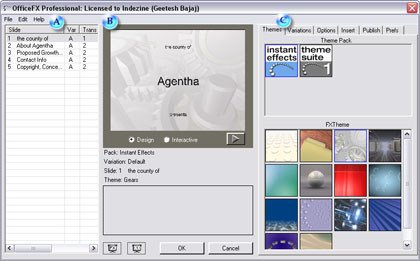
Read more info on the OfficeFX site.
You May Also Like: OfficeFX v2.5 Indezine Review
Filed Under:
Add-ins
Tagged as: Add-in, OfficeFX, PowerPoint
Comments Off on OfficeFX V2.6 Released
Microsoft and the Office logo are trademarks or registered trademarks of Microsoft Corporation in the United States and/or other countries.