
This is the print version of this page. All content is copyright Indezine.com 2000-2026.
Thoughts and impressions of happenings in the world of PowerPoint and presentations, continuously updated since 2003.
See Also:
PowerPoint and Presenting Notes
PowerPoint and Presenting Glossary
We begin by looking at ideas and resources to help you prevent your online audiences from getting distracted. This, of course, is so important these days. Learn what you can do to counter these distractions with Haritosh Srivastav of Toastmasters International. PowerPoint 365 for Windows users can explore options found within the Account tab of Backstage view, that allows you to sign in to your Microsoft Account, automatically connect to your OneDrive account, and do so much more.
We feature two more speakers from the upcoming Presentation Summit conference being held this September. They are Jamie Garroch and Lori Chollar. We also bring you quotes, press releases, and templates from the last few days.

Stay informed about updated tutorials and happenings related to PowerPoint and presenting.
Filed Under:
Ezine
Tagged as: Ezine, Indezine, News, PowerPoint
Comments Off on PowerPoint and Presenting News: August 31, 2021

Ilene Bergelson is an award-winning actress-turned-presentation-coach and international trainer. She has supported speakers from six out of the seven continents to fully embrace their audience and their adventurous side. She is happy to be on the Summit presenting team again this year, being amazed by the PowerPoint prowess of her fellow Guild members. Through her consulting practice, EmpowerSpeak, Ilene coaches subject matter experts in health, finance, pharmaceutical, technology, public relations, entertainment, and academia, where clients have sought guidance for optimizing presentation content, interpersonal communication, sensitive conversations, and high-profile events such as interviewing Hillary Clinton before a live audience.
In this conversation, Ilene talks about her participation at the upcoming Presentation Summit 2021, being held on location in Clearwater Beach, FL, and virtually this year from September 26 to 29, 2021.
Filed Under:
Events
Tagged as: Events, Ilene Bergelson, Interviews, Presentation Summit
Comments Off on Presentation Summit 2021: Conversation with Ilene Bergelson

Lori Chollar is co-founder and CEO of TLC Creative Services Inc., a design studio focusing on presentations, and live and virtual events. Her multi-faceted design background includes traditional graphic and print design, apparel and tattoo design (the temporary kind!), and a full range of presentation, template, and multimedia design. Building from a formal degree in graphic design to a thriving freelance business, her company with husband Troy, has grown into a successful corporate design studio. Lori is passionate about good design and good business. Some of her favorite pastimes include critiquing letter spacing and punctuation on public signage, walking her dog Scout, and growing a veggie garden (anybody need some tomatoes?).
In this conversation, Lori talks about her participation at the upcoming Presentation Summit 2021, being held on location in Clearwater Beach, FL, and virtually this year from September 26 to 29, 2021.
Filed Under:
Events
Tagged as: Events, Interviews, Lori Chollar, Presentation Summit
Comments Off on Presentation Summit 2021: Conversation with Lori Chollar
By Haritosh Srivastav, Toastmasters International
Whilst we’ve all had to get used to online meetings the biggest issue remains the same. How do we engage our audience members and retain their attention?
According to a survey by Prezi and Harris Poll, while attending an online presentation 28% of the audience sends text messages, 27% check their emails, and 17% fall asleep. So, the question becomes how you keep your audience involved and prevent them from being distracted.

Image: Yay Images
Here are 7 quick tips to help you reinvent your online presentation, and keep your audience focused on the content, not their smartphone:
Filed Under:
Guest Posts
Tagged as: Guest Post, Presentation Skills, Toastmasters
Comments Off on How to Prevent Your Online Audience from Getting Distracted
In PowerPoint, and in other Microsoft 365 programs you typically need to sign in to a Microsoft Account so that you can access saved settings, customizations, and even some files off the cloud. You typically do this by managing your Account, right inside PowerPoint or another Microsoft 365 program such as Word and Excel. The Account tab in Backstage view allows you to sign in to your Microsoft Account, and automatically connect to your OneDrive account, and do so much more.
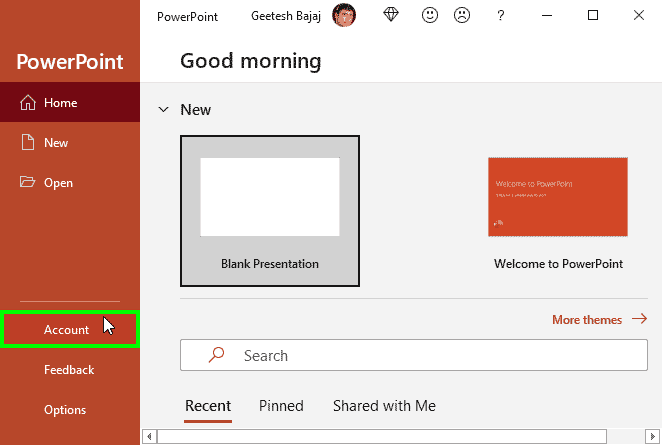
Learn about options within the Account tab of Backstage view in PowerPoint 365 for Windows.
Filed Under:
PowerPoint 365
Tagged as: Backstage, Interface, Microsoft Windows, Office 365, PowerPoint 365, Tutorials
Comments Off on Account Tab of Backstage View in PowerPoint 365 for Windows
Microsoft and the Office logo are trademarks or registered trademarks of Microsoft Corporation in the United States and/or other countries.