
This is the print version of this page. All content is copyright Indezine.com 2000-2026.
Thoughts and impressions of happenings in the world of PowerPoint and presentations, continuously updated since 2003.
See Also:
PowerPoint and Presenting Notes
PowerPoint and Presenting Glossary
CS Odessa announced the release of ConceptDraw 6.1, a free update for existing v.6 users of both the Macintosh and Windows platforms. The new version update adds some new features including customizable soft shadows. Also shapes can be locked from the shape context menu. Six new shape libraries are also included.

Filed Under:
Add-ins
Tagged as: Add-in, ConceptDraw, PowerPoint
LecShare has released LecShare Pro, which allows users to add audio to Microsoft PowerPoint presentations to create QuickTime movies, MPEG-4 Video files (video podcasts), accessible HTML, and Microsoft Word documents. Users can either record audio through a microphone or import an audio file.

Filed Under:
Companion Programs
Tagged as: Companion, Media, Office for Mac, PowerPoint, Video
Many programs allow you to create charts that you can insert in PowerPoint — but what if your charting expert, boss, or publicist wants you to make very important changes at the last minute? That’s certainly not easy — especially if you don’t have access to the program that you used to create it. Luckily, Rich Chart Live — the product we are reviewing today can help.

Learn more about Rich Chart Live here.
Filed Under:
Add-ins
Tagged as: Add-in, Animation, Charting, PowerPoint, PowerPoint Flash
Your hands are shaking, your palms are sweaty, your mouth is dry, and your knees are knocking. You haven’t felt this nervous since you were summoned to the principal’s office in primary school. What’s going on? You have to do a presentation!

Read more on the MarketingWeb site.
Filed Under:
Case Studies
Tagged as: Case Studies, Death by PowerPoint, PowerPoint
While Slide view allows you to focus on the slide’s visual appeal, Outline view lets you focus on the structure of your presentation’s message. You can use Outline view to concentrate on your presentation’s text, such as the main points and subpoints you want to convey. The Outline feature is simply another way in which you can view your presentation in PowerPoint.
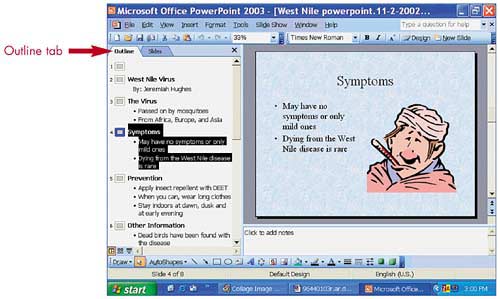
You can learn more about the Outline view in an excerpt from the book, Easy Microsoft Office PowerPoint 2003.
Read the excerpt on the Informit site.
Filed Under:
Books
Tagged as: Books, Education, Outline View, PowerPoint, Training
Microsoft and the Office logo are trademarks or registered trademarks of Microsoft Corporation in the United States and/or other countries.