
This is the print version of this page. All content is copyright Indezine.com 2000-2026.
Thoughts and impressions of happenings in the world of PowerPoint and presentations, continuously updated since 2003.
See Also:
PowerPoint and Presenting Notes
PowerPoint and Presenting Glossary
A vote to make Microsoft Office document formats an international standard was approved on Thursday, according to a Microsoft representative.
At the general assembly of Ecma International in Zurich, Switzerland, Microsoft’s Office Open XML–a set of specifications detailing the document formats in Microsoft’s office–was certified as a standard.

Read more on the ZDNet Asia site.
Filed Under:
Microsoft Office
Tagged as: Microsoft Office, ODF, OpenXML
Comments Off on Microsoft Sails Through Document Standard Vote
Microsoft’s Mac Business Unit announced Tuesday that their timetable has them releasing file converters to read Office 2007 file formats in older Mac versions of Office sometime this Spring, probably late March/early April.
While this is a little later than most users would like, given that Office will be on store shelves the end of January, the announcement was in response to some alarmist articles suggesting that Mac Office users were being screwed, when these file converters had been promised months ago.

Read more on the WebProNews site.
Filed Under:
Thoughts
Tagged as: Office 2007, Office for Mac, PowerPoint 2007
Comments Off on Office 2007 Mac Converters Coming Soon
It’s true that the biggest new feature in Office 2007 is the interface and thus usability improvements. The new ribbon tabs change dynamically depending upon what task you are doing — yet unlike the old toolbars of pre-Office 2007 applications, there’s no way you can create a new ribbon tab in PowerPoint 2007.
That’s not entirely true though since you can actually create and edit the ribbon tabs in PowerPoint and other Office 2007 applications using a third-party add-in called RibbonCustomizer.

Read the Indezine review of RibbonCustomizer.
Filed Under:
Add-ins
Tagged as: Add-in, Microsoft Office, Office 2007, Patrick Schmid, PowerPoint 2007, Review
Comments Off on Focus on RibbonCustomizer
 Joel Harband heads Tuval Software Industries, based in Israel. Notes-Over, their new PowerPoint add-in creates and manages formatted speaker notes coordinated with the slide contents. Not only can notes now be related to individual slides, but you can also link them to individual slide elements like shapes. In this conversation, Joel explains more.
Geetesh: Tell us more about Notes-Over.
Joel: Notes-Over is based on the thesis that good speaker notes are the key to a good presentation. Unfortunately, we all work under deadlines and there isn’t much time to write good speaker notes. Notes-Over answers the need for specialized productivity software for speaker notes.
Notes-Over is a PowerPoint add-in that creates and manages formatted speaker notes that can be linked with slide elements. The note sticks to the slide element, so that when you rearrange or add bullet text items on the slide, the notes are automatically reordered. Notes attached to slide graphics or unattached notes are reordered by up/down arrow controls. A full-featured notes editor lets you dictate notes and cut and paste them between elements. The notes appear on the PowerPoint notes pane and can be distributed as handouts and saved with the presentation.
Geetesh: How did Notes-Over evolve, and how does it integrate with your other products?
Joel: I’m glad you asked that question. The original idea for Notes-Over came from Scott Burmester of Microsoft. When we told him about our Speech-Over product, he right away said: Oh, it reads the PowerPoint notes aloud. The product didn’t exactly work like that at the time, but the idea was so great and simple that now all three products in the Speech-Over Studio suite are based on speaker notes text.
The three products, Notes-Over, Record-Over, and Speech-Over, are organized like a fugue: Notes-Over is standalone, Record-Over includes Notes-Over, and Speech-Over includes Record-Over and Notes-Over.
Altogether, the products broaden the verbal/textual capability of PowerPoint and, at the same time, integrate the verbal with the visual. They support the entire life cycle of a presentation: Notes-Over supports preparation and delivery and Record-Over and Speech-Over support stand-alone slide shows and post-presentation leave-behinds for colleagues that didn’t attend.
The views and opinions expressed in this blog post or content are those of the authors or the interviewees and do not necessarily reflect the official policy or position of any other agency, organization, employer, or company.
Filed Under:
Interviews
Tagged as: Add-in, Interviews, Joel Harband, PowerPoint
Comments Off on Notes-Over: Conversation with Joel Harband
Sharing pictures is a great way to show visual content like digicam pictures. These pictures can be sent as e-mail attachments, photo albums, slide shows, etc. Or you could use Flash Slide Show Maker, a free software that creates Flash-based photo slide shows with ease.
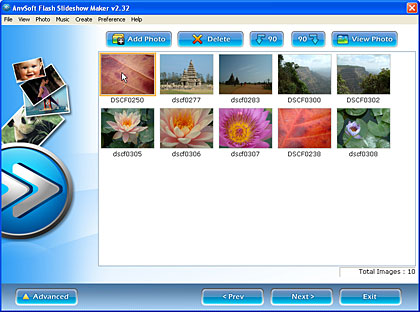
Read our review of Flash Slide Show Maker.
Filed Under:
Companion Programs
Tagged as: Companion, Digital Cameras, Flash, Review, Tutorials
Comments Off on Flash Slide Show Maker
Microsoft and the Office logo are trademarks or registered trademarks of Microsoft Corporation in the United States and/or other countries.