
This is the print version of this page. All content is copyright Indezine.com 2000-2026.
Thoughts and impressions of happenings in the world of PowerPoint and presentations, continuously updated since 2003.
See Also:
PowerPoint and Presenting Notes
PowerPoint and Presenting Glossary
When launched, PowerPoint 2019 for Windows typically opens with Backstage View. If you want to create a new presentation, you can do so using the New tab. If you want to work on any of the already created presentations, you can open them by using the various options in the Open tab.

Explore saving options in Backstage view of PowerPoint 2019 for Windows.
Filed Under:
PowerPoint 2019
Tagged as: Backstage, Interface, Microsoft Windows, Office 2019, PowerPoint 2019, Tutorials
Comments Off on Save and Save As Tabs of Backstage View in PowerPoint 2019 for Windows
By Kurt Dupont
We were recently working on a project for a customer, and they sent in a Photoshop design of what they wanted to see on the information screens. That’s typical, most users send in a PowerPoint presentation already, while designers send in a Photoshop file and you have to start all over in PowerPoint.
We were displaying the newly created PowerPoint on a television screen here, as a test. And with this presentation, we saw completely different results between our design computer and the test television.

Filed Under:
Guest Posts
Tagged as: Calibration, Digital Signage, Guest Post, Kurt Dupont, PresentationPoint
Comments Off on The Importance of Screen Calibration
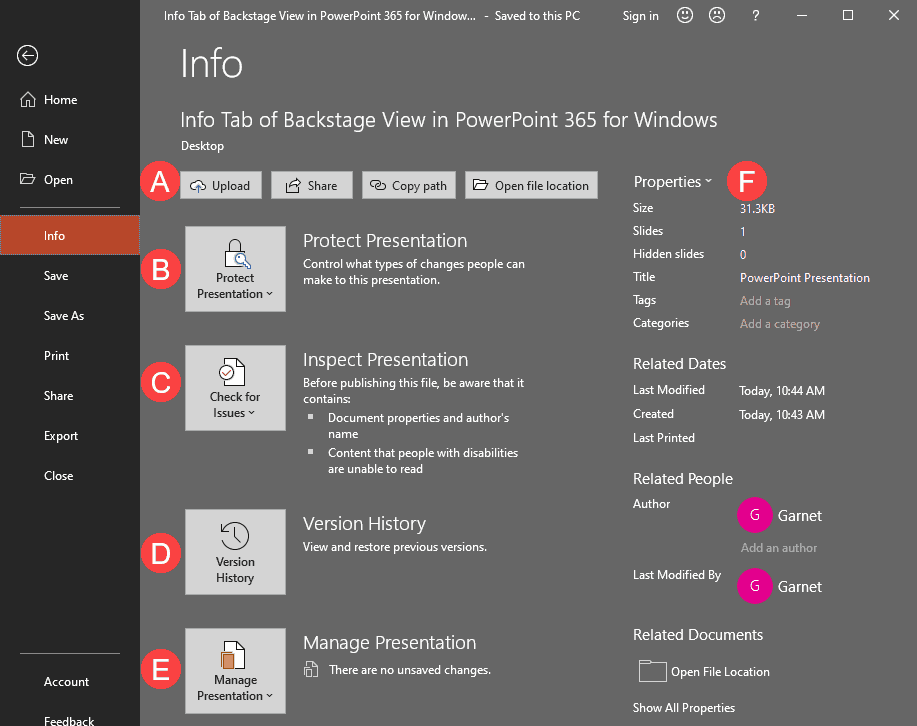
In PowerPoint 365 for Windows, all information that you need about your currently active presentation is available in a single easily accessible location. This location is the Info tab of Backstage View. Using the options available within this tab, you can access information about permissions set for the active presentation, prepare your content for sharing, and also possibly recover older versions of unsaved files. In addition, the Info tab also provides access to many more properties that we will discuss on this page.
Filed Under:
PowerPoint 365
Tagged as: Backstage, Interface, Microsoft Windows, Office 365, PowerPoint 365, Tutorials
Comments Off on Info Tab of Backstage View in PowerPoint 365 for Windows
In PowerPoint 2019 for Windows, all information that you need about your currently active presentation is available in a single easily accessible location. This location is the Info tab of Backstage View. Using the options available within this tab, you can access information about permissions set for the active presentation, prepare your content for sharing, and also possibly recover older versions of unsaved files. In addition, the Info tab also provides access to many more properties that we will discuss on this page.

Filed Under:
PowerPoint 2019
Tagged as: Backstage, Interface, Microsoft Windows, Office 2019, PowerPoint 2019, Tutorials
Comments Off on Info Tab of Backstage View in PowerPoint 2019 for Windows
By David Henson, Toastmasters International
Slides can be a great way to make a business presentation come alive – if they are designed well and then used properly. But, as many of us have experienced, presenters will often throw their slides together without much thought for the audience and then deliver their presentation in a way that is likely to put an audience to sleep!
Making Your Slides Effective
Getting Comfortable with Slides

Image: Pixabay
Filed Under:
Guest Posts
Tagged as: Business, David Henson, Guest Post, Presentations, Toastmasters
Comments Off on Tips for Making the Most of Your Slides in a Business Presentation
Microsoft and the Office logo are trademarks or registered trademarks of Microsoft Corporation in the United States and/or other countries.