
This is the print version of this page. All content is copyright Indezine.com 2000-2026.
Thoughts and impressions of happenings in the world of PowerPoint and presentations, continuously updated since 2003.
See Also:
PowerPoint and Presenting Notes
PowerPoint and Presenting Glossary
The Status Bar is a thin strip located at the bottom of the PowerPoint 2019 interface. This area provides information about the active slide and also provides several View options. To work with options in the Status Bar, you must have a presentation open in PowerPoint 2019 for Windows; otherwise the options within the Status Bar will be grayed out.

Learn about options available in the Status Bar within PowerPoint 2019 for Windows.
Filed Under:
PowerPoint 2019
Tagged as: Interface, Microsoft Windows, Office 2019, PowerPoint 2019, Status Bar, Tutorials
Comments Off on Status Bar in PowerPoint 2019 for Windows
Your slides are the same, yet various views in PowerPoint do allow you to see those same slides with a different viewpoint. This approach makes sense because viewing slides in Slide Show view gives an entirely different perspective than editing them in Normal view. Further, it’s easier to reorder and work with multiple slides in Slide Sorter view, and make changes to individual slides in Normal view.

Learn about various views that allow you to edit and show slides in PowerPoint 2019 for Windows.
Filed Under:
PowerPoint 2019
Tagged as: Microsoft Windows, Office 2019, PowerPoint 2019, Tutorials, View
Comments Off on Views in PowerPoint 2019 for Windows
We look at presentation industry events held throughout the year. Jim Harvey asks in his post, why do you need a corporate PowerPoint template?
PowerPoint 2019 and 365 for Windows users can learn how to Reset, Export, and Import QAT Customizations. Plus, PowerPoint 365 for Mac and Windows users can learn how to Reset, Export, and Import Ribbon Customizations. Also, make sure you do not miss the quotes, press releases, and templates featured in the last week.

Stay informed about updated tutorials and happenings related to PowerPoint and presenting.
Filed Under:
Ezine
Tagged as: Ezine, Indezine, News, PowerPoint
Comments Off on PowerPoint and Presenting News: December 3, 2019
If you have a bunch of commands that you use frequently, you may want to keep them more accessible within PowerPoint 365 for Mac by customizing your Quick Access Toolbar. You populate the QAT with commands you use often. Over a period, these customizations may become a valuable asset you want to save or share. However, PowerPoint 365 on the Mac does not let you import or export customizations.
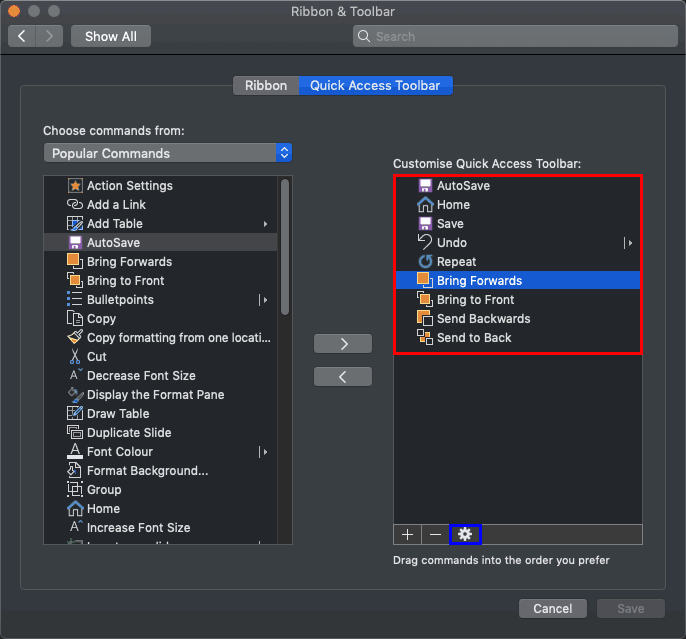
Learn how to reset, export, and import QAT customization in PowerPoint 365 for Mac.
Filed Under:
PowerPoint 365
Tagged as: Customizations, Microsoft Windows, Office 365, PowerPoint 365, QAT, Tutorials
Comments Off on Reset, Export, and Import QAT Customizations in PowerPoint 365 for Mac
PowerPoint design is a field of design that’s different than the design of brochures, web sites, and even Word documents. It affords opportunities that these other media do not, and it also does not provide some options you may be used to, especially if you are a print designer. So, what if PowerPoint itself showcased these presentations-specific design opportunities or design possibilities for you? You could then choose to adopt a possibility with one click, or ignore—it’s your decision. Wouldn’t that be awesome? PowerPoint Designer is exactly this option.

Learn how you can use PowerPoint Designer in PowerPoint 365 for Windows.
Filed Under:
PowerPoint 365
Tagged as: Microsoft Windows, Office 365, PowerPoint 365, PowerPoint Designer, Tutorials
Comments Off on PowerPoint Designer in PowerPoint 365 for Windows
Microsoft and the Office logo are trademarks or registered trademarks of Microsoft Corporation in the United States and/or other countries.