
This is the print version of this page. All content is copyright Indezine.com 2000-2026.
Thoughts and impressions of happenings in the world of PowerPoint and presentations, continuously updated since 2003.
See Also:
PowerPoint and Presenting Notes
PowerPoint and Presenting Glossary
PowerPoint’s fill options for shapes are extensive. The texture fills incidentally are not too different from picture fills, other than the fact that they can be tiled. PowerPoint includes a built-in library of textures, and you can also import any picture, to be used as a texture.

Add texture fills to shapes in PowerPoint 2016 for Mac.
Filed Under:
PowerPoint 2016
Tagged as: Mac, Office 2016, Office for Mac, PowerPoint 2016, PowerPoint for Mac, Shapes, Texture Fills, Textures, Tutorials
Comments Off on Add Texture Fills to Shapes in PowerPoint 2016 for Mac
We first bring you a post by Kurt Dupont who wonders, “But, when you put your images into PowerPoint, do your images remain high resolution? Or does PowerPoint compress images?” We also feature Jeremey Donovan who speaks about his book, Speaker, Leader, Champion. We then look at a callout example that will help you be inspired for design ideas in your next PowerPoint slide. We then look at how you can change the unit of measurement in Windows 10.
PowerPoint 2016 for Windows users can learn about the Tell Me feature, and explore Outline Pane Options. PowerPoint 2016 for Mac can explore tutorials on Adding Gradient Fills to Shapes and More Gradients. And if that wasn’t enough for this week, make sure you do not miss the quotes, press releases, and templates released in the last week.

Stay informed about updated tutorials and happenings related to PowerPoint and presenting.
Filed Under:
Ezine
Tagged as: Ezine, Indezine, News, PowerPoint
Comments Off on PowerPoint and Presenting News: February 5, 2019
Once you add gradient fills to shapes in PowerPoint 2016 for Mac, you may want to make the gradient fill look a little or a whole lot different. Yes, you can use the More Gradients option to add different types of gradients as fills to the shapes, but that only provides more gradient fill types, and does not let you customize the colors within the gradient.

Work with gradient stops and create new gradients in PowerPoint 2016 for Mac.
Filed Under:
PowerPoint 2016
Tagged as: Fills, Gradient Fills, Gradients, Mac, Office 2016, Office for Mac, PowerPoint 2016, PowerPoint for Mac, Shapes, Tutorials
Comments Off on Gradient Stops in PowerPoint 2016 for Mac
Add a gradient fill to your shape, and you may run into limitations! PowerPoint’s default gradient options choose all the gradient colors for you, and all available gradients seem to be based on the same color family. While this sort of restraint does keep your slides looking consistent and aesthetic, they also prevent you from playing more with gradients. To explore more, you must choose the More Gradients option. This option leads you to a detailed gradient editor that’s capable of making changes to the gradient type, direction, angle, color, etc. In this tutorial, we explain these extra gradient options available within PowerPoint 2016 for Mac.

Explore the More Gradients option for shape fills in PowerPoint 2016 for Mac.
Filed Under:
PowerPoint 2016
Tagged as: Mac, Office 2016, Office for Mac, PowerPoint 2016, PowerPoint for Mac, Tutorials
Comments Off on More Gradients in PowerPoint 2016 for Mac
We first explore a checklist for digital signage presentations, created by Kurt Dupont of PresentationPoint. We then look at the new Embedded 3D Animations in Office 365 versions of PowerPoint. Old time PowerPoint users will love the Alternatives for Office Clip Art Gallery article and all users can learn from our Getting Started with Morph feature.
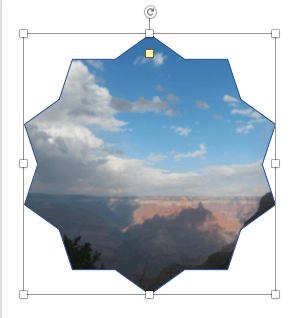
PowerPoint 2016 for Windows users can explore Getting Started with Sections and Setting Standard 4:3 Aspect Ratio as the Default. We also explore differences between Text Placeholders and Text Boxes. PowerPoint 2016 for Mac users can learn how to Add Picture Fills to Shapes and Advanced Picture Fill Options. And if that wasn’t enough for this week, make sure you do not miss the quotes, press releases, and templates released in the last week.
Stay informed about updated tutorials and happenings related to PowerPoint and presenting.
Filed Under:
Ezine
Tagged as: Ezine, Indezine, News, PowerPoint
Comments Off on PowerPoint and Presenting News: January 29, 2019
Microsoft and the Office logo are trademarks or registered trademarks of Microsoft Corporation in the United States and/or other countries.