
This is the print version of this page. All content is copyright Indezine.com 2000-2026.
Thoughts and impressions of happenings in the world of PowerPoint and presentations, continuously updated since 2003.
See Also:
PowerPoint and Presenting Notes
PowerPoint and Presenting Glossary
Have you ended up with a presentation that has linked files, embedded media clips, and so much more? And now you have been asked to copy the entire presentation and all linked files to a CD? Burn a CD in these times? How ancient is that? Let’s rephrase that question: have you ever been asked to copy all the content for a presentation to a folder, a network location, or a USB drive?

Learn how to package a presentation to a CD or a folder in PowerPoint 2013 for Windows.
Filed Under:
PowerPoint 2013
Tagged as: CD, DVD, Folder, Microsoft Windows, Office 2013, PowerPoint 2013, Share, Tutorials
Comments Off on Package a Presentation to a CD or Folder in PowerPoint 2013 for Windows

Doug Thomas once reviewed movies and rent you–or your parents–VHS tapes. After working a few months at Microsoft, he had an idea to get other people to create videos about Office. That idea turned into a new job of creating videos and training content for the Office Training Center, including the Office 15-Minute Webinars and Doug from Office video series. However, none of his videos are on VHS.
In this conversation, Doug explores the right approach to using PowerPoint more effectively.
Filed Under:
Interviews
Tagged as: Doug Thomas, Excel, Interviews, Microsoft, PowerPoint, Word
Comments Off on The Right Approach to PowerPoint: Conversation with Doug Thomas
When you change the Background Style of the Slide Master, the Background Style for all dependent Slide Layouts will also change. However, it is not necessary for all your Slide Layouts to possess the same Background Style as the Slide Master. Each Slide Layout can overrule the Slide Master and have its own independent Background Style, as you will learn in the rest of this tutorial.
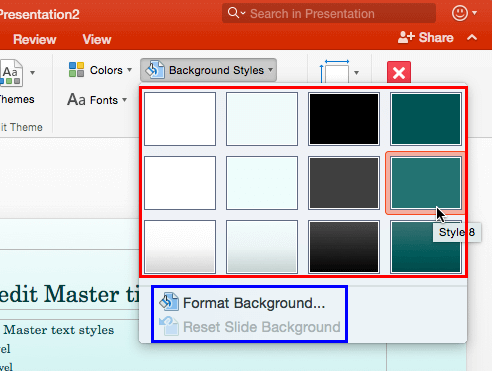
Learn how to apply Background Styles to individual Slide Layouts in PowerPoint 2016 for Mac.
Filed Under:
PowerPoint 2016
Tagged as: Background Styles, Mac, Office 2016, Office for Mac, PowerPoint 2016, PowerPoint for Mac, Slide Layouts, Tutorials
Comments Off on Change Background Styles for Slide Layouts in PowerPoint 2016 for Mac
Have you ended up with a presentation that has linked files, embedded media clips, and so much more? And now you have been asked to copy the entire presentation and all linked files to a CD? Burn a CD in these times? How ancient is that? Let’s rephrase that question: have you ever been asked to copy all the content for a presentation to a folder, a network location, or a USB drive? PowerPoint provides the Package Presentation for CD option that can do this task for you, with just a click or two. Don’t go by the CD mentioned in this feature name, because you can use this option to burn both data CDs and DVDs and also copy all content to a new folder.

Learn how to package a presentation to a CD or a folder in PowerPoint 2016 for Windows.
Filed Under:
PowerPoint 2016
Tagged as: CD, DVD, Folder, Microsoft Windows, Office 2016, Package, PowerPoint 2016, Share, Tutorials
Comments Off on Package a Presentation to a CD or Folder in PowerPoint 2016 for Windows
We feature Rick Altman, host of the upcoming Presentation Summit conference in San Diego. He talks about the sessions and the topics being covered this year, and also the new and returning speakers. We look at sites where you can get animated GIFs, and products that help you create them. We also have a special feature that looks at creating animated GIFs from PowerPoint slides.
PowerPoint 2016 for Windows users can learn about open and closed motion paths for animations, and how you can lock or unlock such paths. PowerPoint 2016 for Mac users can learn about adding more Guides, and working with them more effectively. Plus, we also have a tutorial on Slide Layouts within Slide Master view. And if that wasn’t enough for this week, make sure you do not miss the quotes, press releases, and templates released in the last seven days.

Stay informed about updated tutorials and happenings related to PowerPoint and presenting.
Filed Under:
Ezine
Tagged as: Ezine, Indezine, News, PowerPoint
Comments Off on PowerPoint and Presenting News: April 10, 2018
Microsoft and the Office logo are trademarks or registered trademarks of Microsoft Corporation in the United States and/or other countries.