
This is the print version of this page. All content is copyright Indezine.com 2000-2026.
Thoughts and impressions of happenings in the world of PowerPoint and presentations, continuously updated since 2003.
See Also:
PowerPoint and Presenting Notes
PowerPoint and Presenting Glossary
By Ally Yates
Successful leadership is built upon four practices:
But there is a fifth, often overlooked characteristic; the need for leaders to be able to flex their style, dependent on the situation. A business with its back against the wall requires a different style to one which is enjoying a profitable, steady state.

Image: Pixabay
Filed Under:
Guest Posts
Tagged as: Ally Yates, Behavior, Guest Post, Leadership, Opinion
Comments Off on The Importance of Behavioral Flexibility in Leadership
Your slides remain the same, yet the various views in PowerPoint make exploring those same slides a little different. This approach makes sense because viewing slides in Slide Show view gives an entirely different perspective than editing them in Editing view. Further, it’s easier to skim through your slides in Reading view, and then make changes to individual slides in Editing view. All put together, PowerPoint Online provides you with three different views.
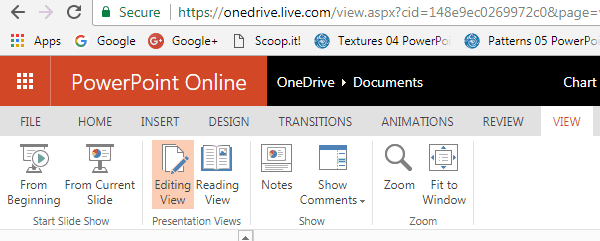
Learn about various views that allow you to edit and show slides in PowerPoint Online.
You May Also Like:
Slides Pane in PowerPoint for the Web
Notes Pane in PowerPoint for the Web
Slide Area in PowerPoint for the Web
Filed Under:
PowerPoint for the Web
Tagged as: Interface, PowerPoint for the Web, Tutorials, View
Comments Off on Views in PowerPoint for the Web
By Laura Bruce
Over your career, you develop expertise. But is your expertise recognized? You won’t gain the recognition you deserve until you demonstrate what you know in a compelling way. One of the best vehicles is an impressive presentation where you communicate your knowledge.

Image: Pixabay
Filed Under:
Guest Posts
Tagged as: Guest Post, Presentations, Toastmasters
Comments Off on Show Off Your Expertise in an Impressive Presentation
PowerPoint 2016 for Mac’s tri-paned interface has three regions: the Slides Pane, the Slide Area, and the Notes Pane. The Notes Pane is placed right below the Slide Area. The Notes Pane provides space to add speaker’s notes that can be so helpful to the presenter while presenting. You can also write any sort of information about the presentation or individual slide.
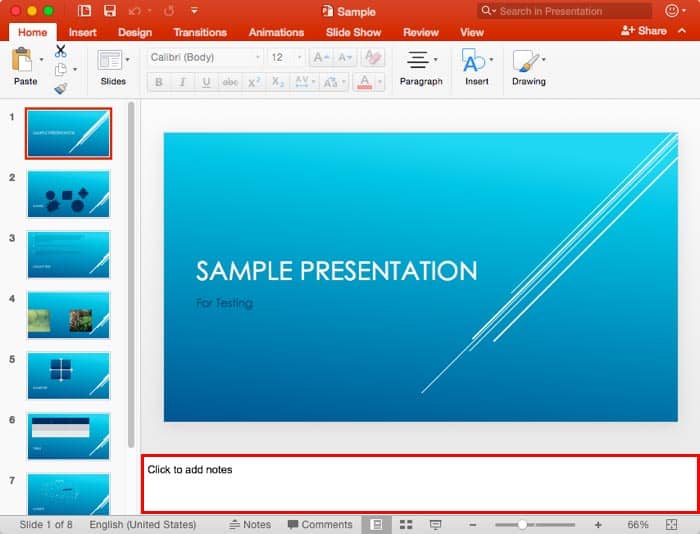
Learn about the Notes Pane in PowerPoint 2016 for Mac.
You May Also Like: Set PowerPoint 2016 for Mac as the Default Version | Slides Pane in PowerPoint 2016 for Mac | Status Bar in PowerPoint 2016 for Mac
Filed Under:
PowerPoint 2016
Tagged as: Mac, Notes Pane, Office for Mac, PowerPoint 2016, PowerPoint for Mac, Tutorials
Comments Off on Notes Pane in PowerPoint 2016 for Mac
Among the tabs within Backstage View, we have already explored some options such as Open, New, Save, etc. In this tutorial, we will explore the Print option used to print the current presentation in the form of selected slides, notes pages, handouts, etc. Follow these steps to learn more about Print options within Backstage view in PowerPoint 2016.

Learn about the Print option in PowerPoint 2016 for Windows.
You May Also Like:
Save and Save As Options in Backstage View in PowerPoint 2016 for Windows
Open and Close Options in Backstage View in PowerPoint 2016 for Windows
New Option in Backstage View in PowerPoint 2016 for Windows
Filed Under:
PowerPoint 2016
Tagged as: Backstage, Interface, Microsoft Windows, PowerPoint 2016, Printing, Tutorials
Comments Off on Print Option in Backstage View in PowerPoint 2016 for Windows
Microsoft and the Office logo are trademarks or registered trademarks of Microsoft Corporation in the United States and/or other countries.