
This is the print version of this page. All content is copyright Indezine.com 2000-2026.
Thoughts and impressions of happenings in the world of PowerPoint and presentations, continuously updated since 2003.
See Also:
PowerPoint and Presenting Notes
PowerPoint and Presenting Glossary
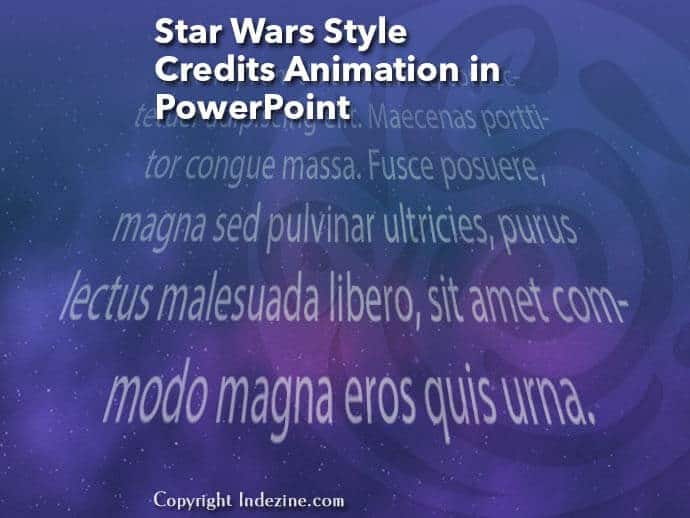
Having trouble finding a market for your PowerPoint work? Perhaps you’re struggling to find students for your training service or clients for your design work. PowerPoint MVP Tom Howell has some great thoughts for you. Bret Freeman of Toastmasters says that his first presentation was not successful. Weeks went into preparing content. And then he explains how you can present and connect with your audience every time. And to conclude our featured stories this week, we bring back our tutorial and sample slides on creating the Star Wars style credits animation in PowerPoint.
PowerPoint 2016 for Windows users can learn how different views in PowerPoint allow you to view and improve your slides with a differing perspective in each view. We also look at how you can reset, export, and import your Quick Access Toolbar (QAT) customizations, if you want to move to another computer, or just share your workflow with others. PowerPoint 2013 users can explore print options and PowerPoint 2010 users can identify whether they are running 32-bit or 64-bit versions of Microsoft Office; you just need to know where to look. PowerPoint 2016 for Mac users can read a walkthrough of the Slide Area. And if that wasn’t enough for this week, make sure you do not miss the quotes, press releases, and templates released in the last seven days.
Stay informed about updated tutorials and happenings related to PowerPoint and presenting.
Filed Under:
Ezine
Tagged as: Ezine, Indezine, News, PowerPoint
Comments Off on PowerPoint and Presenting News: December 26, 2017
Sometimes, you want to know whether you are running a 32 or 64-bit version of PowerPoint or Office. Yes, if you are running a 32-bit version of Windows, then there’s no ambiguity in the fact that you have to be running a 32-bit version of Office. But if you are running a 64-bit version of Microsoft Windows, you may be running a 32 or a 64-bit version of Office. Many sysadmins and even users run 32-bit Office within a 64-bit Windows environment because there are add-ins that may not work in a 64-bit version of Office. Or you may have another reason. Luckily, it’s easy to identify 32-bit or 64-bit if you know where to look.
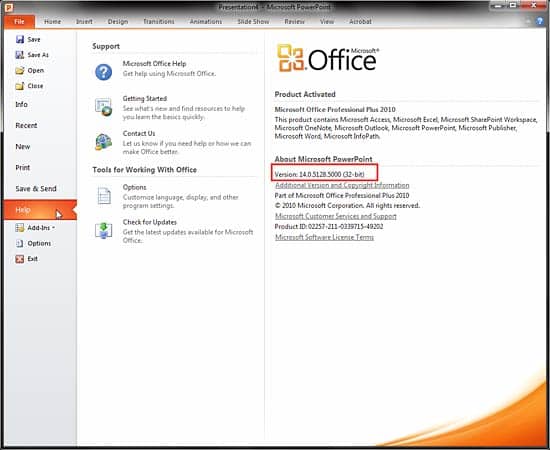
Find out whether your PowerPoint and Office 2010 version is 32 or 64-bit.
You May Also Like: Where is PowerPoint 2010? | PowerPoint 2010 for Windows Interface | Ribbon and Tabs in PowerPoint 2010 for Windows
Filed Under:
PowerPoint 2010
Tagged as: Office 2010, PowerPoint 2010, Tutorials
Comments Off on Identify 32-Bit or 64-Bit in PowerPoint and Office 2010 for Windows
In various versions of PowerPoint, including PowerPoint 2016 for Mac, what’s the one thing that has not changed? Yes, it’s PowerPoint’s tri-paned interface! So, why is the interface called tri-paned? Are there three distinct regions within the PowerPoint 2016 for Mac interface? Yes, the Slide Area is one of three principal regions in PowerPoint 2016; the other two being the Slides Pane and the Notes Pane.

Learn about the Slide Area in PowerPoint 2016 for Mac.
Filed Under:
PowerPoint 2016
Tagged as: Interface, Mac, Office for Mac, PowerPoint 2016, Slide Area, Tutorials
Comments Off on Slide Area in PowerPoint 2016 for Mac
By Bret Freeman
My first presentation was not successful. Weeks went into preparing content. I didn’t focus on “mindset” I needed for a great performance. Since then, I have developed Communicating with P.O.W.E.R. – my own methodology. Follow these steps and you’ll deliver successful speeches and presentations every time.

Image: Pixabay
Filed Under:
Guest Posts
Tagged as: Communication, Guest Post, Opinion, Presentation Skills, Toastmasters
Comments Off on Learn to Present and Connect With Your Audience Everytime
This week we feature Chris Larson of Techsmith who talks about Snagit 2018, the new release of their screen capturing program. He even shares videos of his favorite new Snagit features. BrightCarbon, a UK design agency shares some amazing PowerPoint animated cards for Christmas and the New Year. Scott Wakefield talks about these cards, and why they are giving them away. Sharyn Fitzpatrick, one of our favorites talks how you can be well-prepared for a webinar. She speaks about an awesome checklist. Did you know that there can be three types of uppercase characters you can type within PowerPoint? This is one of those thoughts you have to share. And then we show you how you can use a $5000 font in your PowerPoint even though it is not installed on your system, and you don’t see it. But PowerPoint will still insist that the font is used!
PowerPoint 2016 users who followed last week’s customization tutorials now can learn to add their own commands to custom groups on the Ribbon. When you are happy with your Ribbon customizations, you can Reset, Export, and Import them. We also explore the amazing Touch and Mouse mode toggle. PowerPoint 2016 for Mac users must explore the overlooked options within the Status Bar. For most Windows versions of PowerPoint, did you know that Microsoft provides STAMP, which means Sub-titling text add-in for Microsoft PowerPoint, and enables you to create captions for video and audio files within your PowerPoint presentations? And if that wasn’t enough for this week, make sure you do not miss the quotes, press releases, and templates released in the last seven days.

Stay informed about updated tutorials and happenings related to PowerPoint and presenting.
Filed Under:
Ezine
Tagged as: Ezine, Indezine, News, PowerPoint
Comments Off on PowerPoint and Presenting News: December 19, 2017
Microsoft and the Office logo are trademarks or registered trademarks of Microsoft Corporation in the United States and/or other countries.