
This is the print version of this page. All content is copyright Indezine.com 2000-2026.
Thoughts and impressions of happenings in the world of PowerPoint and presentations, continuously updated since 2003.
See Also:
PowerPoint and Presenting Notes
PowerPoint and Presenting Glossary
Line charts can display continuous data over time, set against a common scale, and are therefore ideal for showing trends in data at equal intervals. In a line chart, category data is distributed evenly along the horizontal axis, and all value data is distributed evenly along the vertical axis. Line charts are best used to represent evenly spaced values such as months, quarters, or fiscal years.

Learn about Line Charts, and how you can use them within PowerPoint.
Filed Under:
Charts and Diagrams
Tagged as: Charting, PowerPoint, Tutorials
Comments Off on Line Charts in PowerPoint
If you need to share a PowerPoint presentation with colleagues, or even publish it online, remember that your slides may include hidden data or information that you or your company may not want to share. The Inspect Document option enables you to check your presentation for such hidden properties and personal information, and clean whatever information or data you want to be removed.
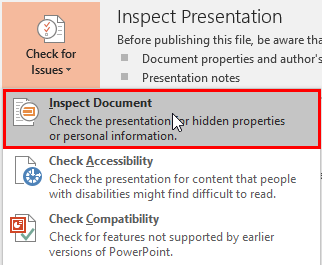
Use the Inspect Document feature in PowerPoint 2016 to remove confidential or personal information.
Filed Under:
PowerPoint 2016
Tagged as: Inspect, Microsoft Windows, Office 2016, PowerPoint 2016, Share, Tutorials
Comments Off on Inspect Document in PowerPoint 2016 for Windows
Who doesn’t like to use photos in their presentation slides? But did you know that using photos in presentations is a two-edged sword that can help you conquer the minds of others, but can also hurt you in the process? How can you be hurt?

Take a peek into secrets professionals use for photos in presentations.
You May Also Like: PowerPoint Online Tutorials
Filed Under:
Clip Media
Tagged as: Clip Media, Photos, Pictures
Comments Off on Photos in Presentations
Different PowerPoint versions support a plethora of video file formats. Not surprisingly, the new PowerPoint versions support a larger number of file formats for video. This table provides information about video file format compatibility.

Learn about the video file formats that are supported by various PowerPoint versions.
Filed Under:
PowerPoint All Versions
Tagged as: File Types, PowerPoint, Tutorials, Video
Comments Off on PowerPoint Friendly Video Formats
By Jan Metchel
In this guest post, I will introduce SlideProof. SlideProof is an all-in-one PowerPoint add-in to deliver presentations better and faster. With this software, you will have access to many tools such as:
Filed Under:
Guest Posts
Tagged as: Add-in, Guest Post, Jan Metchel, PowerPoint, SlideProof, Veodin
Comments Off on Introducing SlideProof for PowerPoint
Microsoft and the Office logo are trademarks or registered trademarks of Microsoft Corporation in the United States and/or other countries.