
This is the print version of this page. All content is copyright Indezine.com 2000-2026.
Thoughts and impressions of happenings in the world of PowerPoint and presentations, continuously updated since 2003.
See Also:
PowerPoint and Presenting Notes
PowerPoint and Presenting Glossary
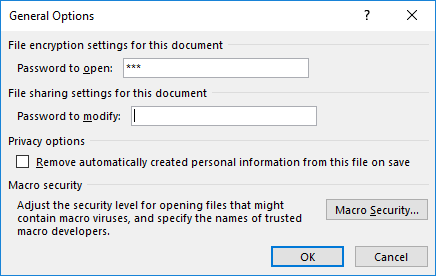
There are various reasons why you would want to encrypt your PowerPoint file with a password. There are two password levels you can implement within a PowerPoint file: a password to open and a password to edit. However, even if you add a password to your presentation, there may come a time when you want to remove it. Or, you may want to change the password.
Filed Under:
PowerPoint 2016
Tagged as: Microsoft Windows, Office 2016, Password, PowerPoint 2016, Share, Tutorials
Comments Off on Remove and Change Passwords in PowerPoint 2016 for Windows
When you share your PowerPoint presentations with other people, you may want to protect or lock your content so that the slides may be accessed by only the people whom you permit to open the presentation. Or perhaps you have no problems with the recipients viewing slides but do not want them to be able to edit the presentation. PowerPoint 2016 provides an Encrypt with Password option to protect your presentation. However, let us ponder about why anyone would need to password-protect their PowerPoint presentations.

Learn how to encrypt your presentation with a password in PowerPoint 2016 for Windows.
Filed Under:
PowerPoint 2016
Tagged as: Encryption, Microsoft Windows, Office 2016, Password, PowerPoint 2016, Tutorials
Comments Off on Encrypt with Password Option in PowerPoint 2016 for Windows
The last option within our tutorials of the Insert Online Video series is bringing in videos from Facebook. There is a prerequisite though. To insert video from your Facebook account, you must add Facebook as a connected Service within your Microsoft account.

Learn how to insert video from your Facebook account in PowerPoint 2016 for Windows.
Filed Under:
PowerPoint 2016
Tagged as: Facebook, Microsoft Windows, Office 2016, PowerPoint 2016, Tutorials, Video
Comments Off on Insert Video from Facebook in PowerPoint 2016 for Windows
The next option in our Insert Online Video series is inserting video from a Video Embed Code. Here you can use the embed code from any site and paste into Insert Video dialog box to insert the video clip into your slide. Technically, this option should work with YouTube, Vimeo, Dailymotion, and most other sites.

Learn how to insert embed code for online video in PowerPoint 2016 for Windows.
Filed Under:
PowerPoint 2016
Tagged as: Embed, Microsoft Windows, Office 2016, PowerPoint 2016, Tutorials, Video
Comments Off on Insert Video Using Video Embed Code in PowerPoint 2016 for Windows
By Kasper Langmann
One of the most commonly used features in Microsoft Excel is the Pivot Table. A Pivot Table simply allows you to make better sense of data by giving you different options of how to view that data. Furthermore, Pivot Tables allow you to do this without altering your source data.
Unsurprisingly, Pivot Tables are a powerful data visualization tool that can lead to the discovery of patterns in the underlying data and provide actionable insights. The use of Pivot Tables in Excel is a high leverage move in itself. Even more exciting than that, you can use a Pivot Table with all its interactive features within a Microsoft PowerPoint slide.
So, let’s take a dive into how we can begin adding an Excel Pivot Table to a PowerPoint presentation. Note that in this tutorial, we are using Microsoft Excel 2016 and PowerPoint 2016.
Filed Under:
Guest Posts
Tagged as: Data, Excel, Guest Post, Kasper Langmann, PowerPoint 2016
Comments Off on Pivot Tables in PowerPoint
Microsoft and the Office logo are trademarks or registered trademarks of Microsoft Corporation in the United States and/or other countries.